sandywp / plugins / mappress-google-maps-for-wordpress

MapPress
Google Maps, OpenStreetMap & Leaflet
Unlimited maps and markers. Free, no API key, no setup. Google Maps, Leaflet, OpenStreetMap & Mapbox. Map editor, blocks and store locators.
Ready in seconds.
v2.97.10 30,000+ installs WP 6.2+ PHP 7.0+
What you get inside
5 screens-
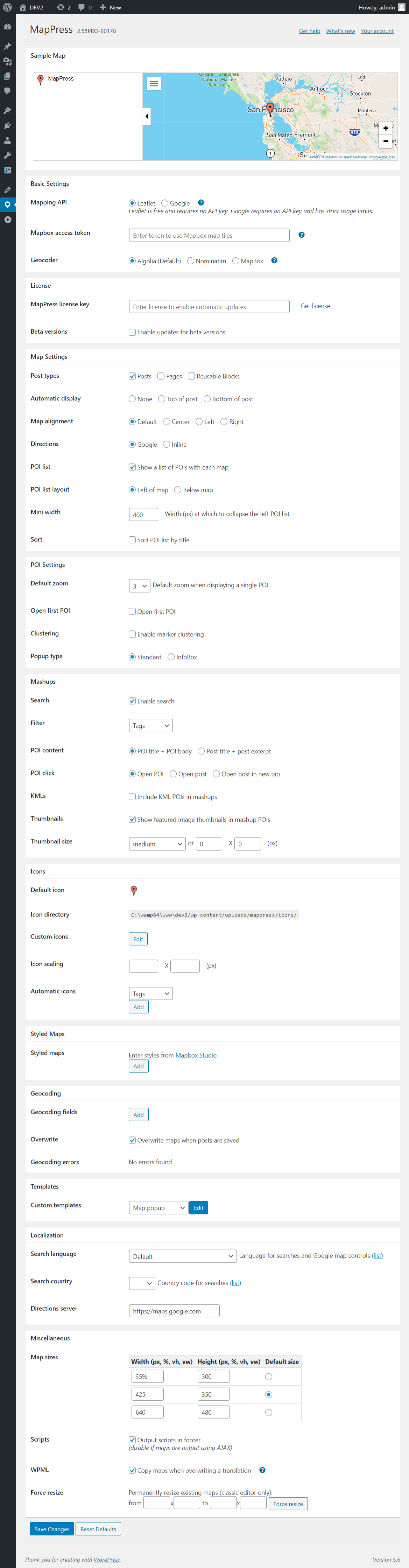
MapPress settings page
-
Map Library in Gutenberg
-
Creating a map
-
Creating a mashup
About this plugin
MapPress is the easiest way to add beautiful interactive maps to WordPress, with Gutenberg map blocks and classic editor support.
Create unlimited maps and markers in the free version, with no upgrade required. MapPress works the moment you activate it: no API key, no billing account, no configuration.
Pick the map service that fits you: Google Maps, or free keyless Leaflet maps using OpenFreeMap (OpenStreetMap data) — no API key required. Mapbox is also supported.
Perfect for contact pages, store and office locations, real estate listings, travel routes, delivery areas and directories.
Upgrade to MapPress Pro for even more features, including custom icons (with a built-in icon editor!), search and filter, mashups, and much more. See it in action on the MapPress Home Page or test it yourself with a Free Demo Site!
Home Page
What’s New
Documentation
FAQ
Support
Key Features
- Unlimited maps and markers in free version
- No API key, no setup and no fees
- Google Maps, Leaflet, Mapbox, and free OpenFreeMap maps (using OpenStreetMap data)
- Gutenberg editor map blocks
- Classic editor support
- Styled maps
- Marker clustering
- Add maps to any post, page or custom post type
- Responsive maps
- Size maps by pixels, percent or viewport
- Popups with custom text, photos, images, and links
- Google overlays for traffic, bicycling and transit
- Directions from Google Maps
- Geocoders from Google, Nominatim, and Mapbox
- KML map overlays
- GPX tracks
- Draw polygons, circles, and lines
- Generate maps using PHP
- WPML compatible
- MultiSite compatible
Pro Version Features
- Get MapPress Pro for additional functionality
- Build a searchable map or store locator with search, geolocation and filtering
- Custom markers upload
- Marker editor with thousands of icons, shapes and colors
- Gutenberg “mashup” block for searchable maps and store locators
- Map widget and mashup widget
- Customizable templates for markers and lists
- Generate maps automatically from custom fields
- Automatically assign marker icons by taxonomy, tag, or category
- Advanced Custom Fields (ACF) integration
Localization
Please Contact me to provide a translation. Many thanks to all the folks who have created and updated translations.
Questions
- Is the free version limited?
No. The free version allows unlimited maps and markers — no cap, and no upgrade required. Pro adds more features, but it doesn’t raise any limit, because there isn’t one.
- Do I need a Google Maps API key?
No. MapPress includes free Leaflet maps using OpenFreeMap, which serves OpenStreetMap data and needs no API key. A key is only required if you choose the Google Maps or Mapbox engines. You can switch engines at any time without losing your maps.
- Which map engine should I choose?
Leaflet maps using OpenFreeMap need no API key or billing setup, or choose Google Maps (which require an API key). Your maps are stored independently of the engine, so you can switch at any time without losing data.
- Does MapPress work with the block editor, classic editor and page builders?
Yes. MapPress includes a Gutenberg map block and full classic editor support, and you can place maps anywhere using a shortcode or directly in PHP.
- Does MapPress set cookies or track visitors?
The free Leaflet maps using OpenFreeMap set no cookies and do not track your visitors, so they require no cookie consent. Google Maps and Mapbox may track users, but if you use the Complianz consent plugin, MapPress integrates with it automatically to block those services until a visitor consents.
- Does MapPress work with caching plugins?
Yes. If a map stops loading after enabling aggressive JavaScript optimization, exclude the MapPress scripts from minification or deferral.
- Does MapPress support WPML and multilingual sites?
Yes. MapPress is WPML compatible, including translation of map and marker content.
- How do I report a security issue?
Please contact us. We respond promptly and credit reporters in the changelog.
sandywp / also on the shelf
Try another plugin

WP Go Maps – Google Map, OpenStreetMap, Leaflet Map
4.8 · 300K+ installs
The easiest to use WordPress map plugin! Create a custom map, map block, store locator or map widget with high quality markers.

4.4 · 60K+ installs
[iframe src="http://www.youtube.com/embed/7_nAZQt9qu0" width="100%" height="500"] shortcode

WP Maps – Google Maps,OpenStreetMap,Mapbox,Store Locator,Listing,Directory…
4.3 · 60K+ installs
WordPress map plugin for Google Maps, OpenStreetMap & Mapbox with store locator, filterable listings & custom markers.
Spin up a real WordPress site in seconds.
Test plugins, build a demo, hand a client a link — then squash it and start again. No local setup, no Docker.