sandywp / plugins / lingotek-translation

Ray Enterprise Translation
Convenient cloud-based localization and translation for WordPress.
Ready in seconds.
v1.7.5 7,000+ installs WP 6.5+ PHP 7.4+
What you get inside
5 screens-
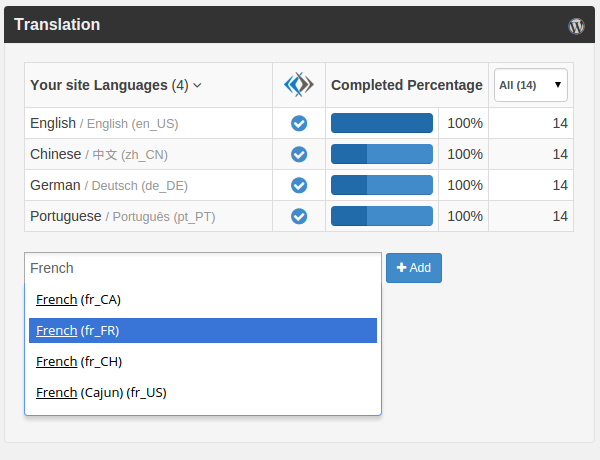
The translation dashboard allows you to view your site languages, add and remove new languages, check the overall translation progress of your site, and see…
-
Polylang and Ray Enterprise work together seamlessly. Continue to use Polylang for content that you want to translate inside WordPress, while sending other…
-
Use translation profiles. One of the most time-consuming activities of any multilingual web-site project is managing the ongoing flow of changes and additions…
-
Content type profiles. Manually choosing which content to upload and download is rarely what a content administrator wants to do, and automating the upload of…
-
The Ray Enterprise Translation plugin provides the ability to Copy, Translate, and Ignore each specific custom field. Our plugin supports Wordpress custom…
About this plugin
Ray Enterprise Translation offers convenient cloud-based localization and translation for WordPress by simplifying the process of creating and maintaining your multilingual website. Features include machine, professional, and community translation solutions that ease the manual burden of launching in new markets while improving language consistency, cutting costs, and enabling you to deliver your brand to consumers abroad in the quickest and most effective way possible.
Make your WordPress website content truly multilingual. The power to translate is now inside WordPress!
Customizable Translation Workflows
WordPress administrators use Translation Profiles to categorize content by its relative value. You associate each content type with a Translation Profile, and the plugin carries out the appropriate workflow:
-
Professional – The plugin enables you to use your own translation agency or tap into Ray Enterprise’s marketplace of more than 5,000+ in-country translators. Don’t have time to manage your own translation project? Let Ray Enterprise take care of it for you. The plugin fully automates file transfer between WordPress and Ray Enterprise. You’ll have full visibility into the translation process every step of the way. And once the translations are completed, they’ll automatically download and publish to your website according to the preferences you’ve set.
-
Community – If you’re looking to save money by avoiding professional translation, you can take the do-it-yourself approach and have your bilingual employees, partners and/or users perform translations right within WordPress. The plugin integrates with and provides use of the Ray Enterprise Workbench, a professional-grade text editor used for translating, reviewing, and post-editing multilingual content.
-
Free Automatic – Machine translation is an excellent option if you’re on a tight budget, looking for near-instant results, and are okay with less-than-perfect quality. The plugin allows you to automatically translate your site by providing the commercial API for Microsoft Translator. You can upload up to 20,000 processed words in the Ray Enterprise system for free (we calculate processed words by multiplying the source word count by the number of requested translations). Machine translations can be post-edited at any time using the Ray Enterprise Workbench.
Cloud-Based Translation Management System
Need access to an enterprise level Translation Management System designed to work directly with WordPress and other content management systems, allowing you complete transparent access with all your translation projects? The cloud-based Ray Enterprise Translation Management Systems helps your business access new markets and customers. Contact [email protected] for more information and pricing of these features.
Benefits
- Cost Savings
- Faster Translation Times
- Higher Quality
- Real-time Monitoring
- Eliminate the Copy/Paste Method of Translating
- Increased Involvement and Loyalty
- In-context Review
Features
Ray Enterprise works in conjuction with the Polylang plugin (the plumbing to make WordPress multilingual ready) allowing you to create a bilingual or multilingual WordPress site. You write posts, pages, and create categories and post tags as usual, and then define the language for each of them.
- You can use as many languages as you want. RTL language scripts are supported. WordPress languages packs are automatically downloaded and updated.
- You can translate posts, pages, media, categories, post tags, menus, widgets…
- Custom post types, custom taxonomies, sticky posts and post formats, RSS feeds and all default WordPress widgets are supported.
- The language is either set by the content or by the language code in the url, or you can use one different subdomain or domain per language.
- Categories, post tags, and some other metas are automatically copied when adding a new post or page translation.
- A customizable language switcher is provided as a widget or in the nav menu.
- The admin interface is of course multilingual too and each user can set the WordPress admin language in its profile.
- We now support localization of pages created with Elementor
- We maintain the privacy of free automatic users by deleting all completed content from our TMS older than one month and active content older than two months. To ensure this does not affect your translated content, please download your translation soon after they are complete, or set your download settings to automatic. Enterprise customers should coordinate with client success about their community’s archive and deletion timeframes.
Credits
Wherever third party code has been used, credit has been given in the code’s comments.
Do you like Ray Enterprise?
Don’t hesitate to give your feedback. It will help make the plugin better. Other contributions (helping other users on the support forum) are welcome!
Third-Party Services
This plugin relies on the following third-party services:
-
Lingotek API
- Description: This plugin uses the Lingotek API to manage translations.
- Service URL: https://myaccount.lingotek.com
- Privacy Policy: Lingotek Privacy Policy
-
Lingotek GMC
- Description: This plugin uses Lingotek GMC for loading scripts and managing locales.
- Service URL: https://gmc.lingotek.com
- Privacy Policy: Lingotek Privacy Policy
-
Lingotek Marketplace
- Description: This plugin uses the Lingotek Marketplace API for transaction translations.
- Service URL: https://marketplace.lingotek.com
- Privacy Policy: Lingotek Privacy Policy
-
Lingotek Project
- Description: This plugin uses the Lingotek project for content translation for WordPress CMS.
- Service URL: https://lingotek.com
- Privacy Policy: Lingotek Privacy Policy
-
Straker Translations Insight
- Description: This plugin uses Straker Translations Insight for freemium upgrade connectors.
- Service URL: https://insight.strakertranslations.com/lingotek-freemium-upgrade-connectors
- Privacy Policy: Straker Translations Privacy Policy
-
Polylang Plugin
- Description: This plugin integrates with the Polylang plugin for multilingual support.
- Service URL: https://wordpress.org/plugins/polylang/
- Privacy Policy: Polylang Privacy Policy
-
Gravatar
- Description: This plugin uses Gravatar to display user avatars.
- Service URL: https://www.gravatar.com
- Privacy Policy: Gravatar Privacy Policy
License
This plugin is licensed under the GNU General Public License v2.0.
– License URL: https://www.gnu.org/licenses/gpl-2.0.html
Additional Information
bohemiancoding
– Description: This plugin includes SVG files that contain metadata related to the Sketch design tool:
– Sketch Metadata URL: http://www.bohemiancoding.com
W3C
– Description: This plugin references the W3C for SVG standards.
– Service URL: http://www.w3.org
GitHub Repository
– Description: The source code for this plugin is hosted on GitHub.
– Repository URL: https://github.com/lingotek/lingotek-translation
PHP Manual
– Description: This plugin references the PHP manual for the include function.
– Service URL: http://php.net/manual/en/function.include.php
WordPress Profile
– Description: This plugin references the WordPress profile of a contributor.
– Service URL: https://profiles.wordpress.org/chouby
Questions
- What does the Ray Enterprise plugin do?
Ray Enterprise has teamed up with Polylang to offer a simple way to make your WordPress site truly multilingual. Manage all your multilingual content in the same site. No need to have a different site for each language!
- Why won’t the plugin connect to my Ray Enterprise account?
The Ray Enterprise plugin requires access to a third party API server. Your hosting provider may have a firewall in place that could be blocking those requests to outside servers. Please check with your host to allow access to Ray Enterprise’s API server. Contact [email protected] for more help.
- How can I add a language?
On the translation dashboard, click on the Translate my site into… textbox and choose from the list or start typing to quickly find a language.
- How can I remove a language?
On the translation dashboard, click on the blue check mark for the language you would like to remove. Note: if you have translated content in a language you will not be able to remove that language until that content has been deleted.
- Why can’t I upload my existing content to Ray Enterprise?
You must assign a language to content that existed before you installed the Polylang and Ray Enterprise plugins. You can do this manually or use the Ray Enterprise Language Utility to set all content that doesn’t have an assigned language to the default language. This will allow you to upload your existing content to Ray Enterprise.
- Can I use my own translation agency with Ray Enterprise?
Use your own translation agency or tap into Ray Enterprise’s network of more than 5,000+ in-country translators. Content transfer is fully automated between WordPress and Ray Enterprise. You’ll have full visibility into the translation process every step of the way. And once the translations are completed, they’ll automatically download and publish to your website according to the preferences you’ve set.
- How can I check the overall translation progress of my site?
On the translation dashboard, the bars under Completed Percentage show the translation progress of content for each language. You can filter by content type or show progress for all content.
- Why are there two different shades of blue in the progress bar?
The translation dashboard not only shows how much of your content is translated, but also indicates the language that your source content was authored in.
- Dark Blue: Indicates that this is a source language that the content was authored in.
- Light Blue: Indicates that this is a target language that the content was translated into.
sandywp / also on the shelf
Try another plugin

WPBakery Visual Composer & qTranslate-X
3.2 · 7K+ installs
Enables multilingual framework for plugin "WPBakery Visual Composer".

5.0 · 5K+ installs
Import multilingual data from WPML into Polylang.

Falang multilanguage for WordPress
5.0 · 2K+ installs
Translate WordPress content manually or with Google, DeepL, Azure and ChatGPT. Supports popular plugins like WooCommerce.…
Spin up a real WordPress site in seconds.
Test plugins, build a demo, hand a client a link — then squash it and start again. No local setup, no Docker.