sandywp / plugins / jobus

Jobus – Job Board, Recruitment & Hiring Platform
The ultimate WordPress Job Board plugin. Create a recruitment website with unlimited job listings, candidate profiles, and company pages.
Ready in seconds.
v1.15.0 90+ installs WP 6.0+ PHP 7.4+
What you get inside
8 screens-
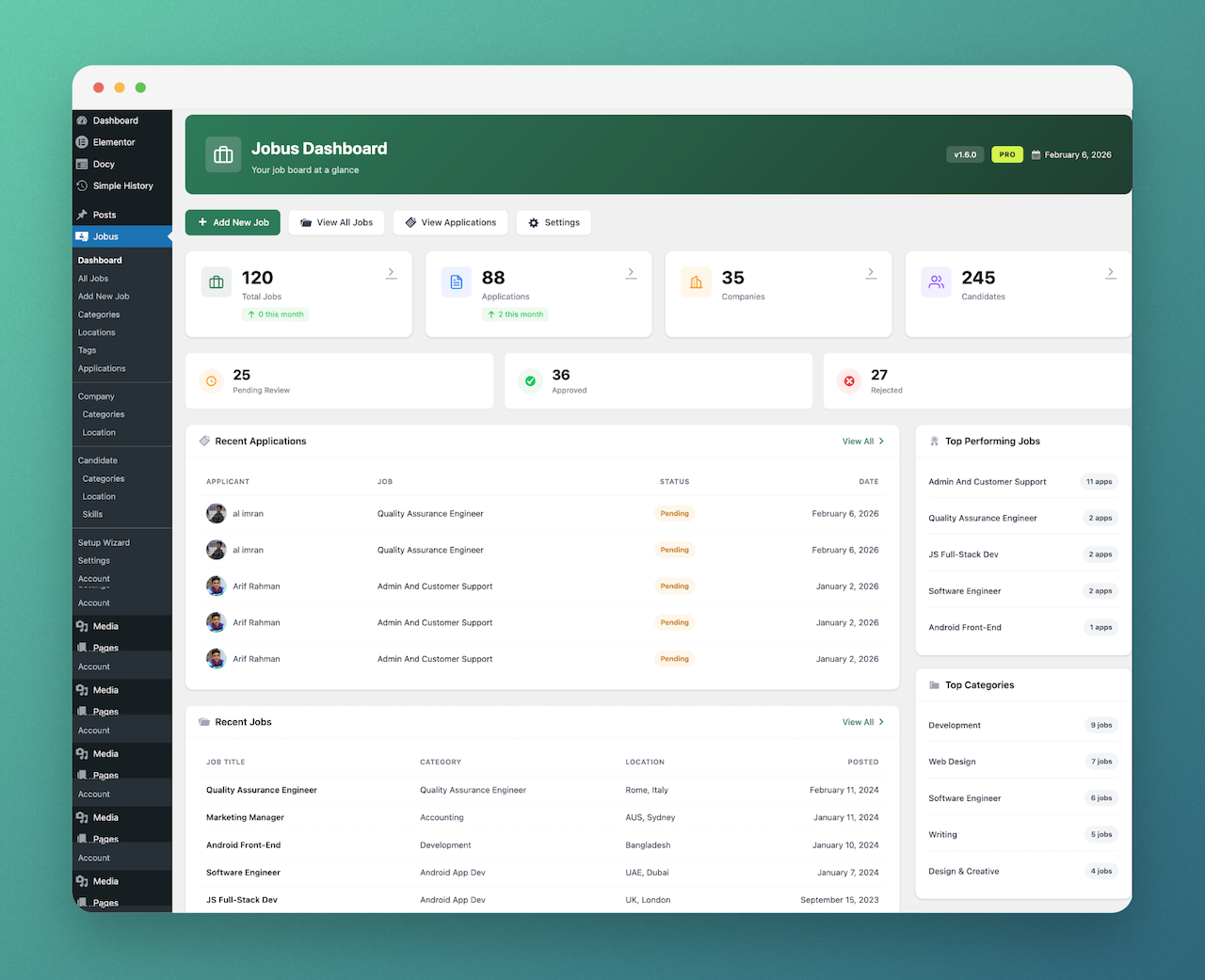
Jobus Dashboard – Central hub to manage jobs, applications, and candidates.
-
Job Listing – Professional job list layout with sidebar filters enabled.
-
Candidate Profile – Detailed candidate resume with skills and experience overview.
-
Job Specifications – Manage job attributes like salary, type, and requirements.
-
Job Archive – Grid and list views for browsing all job listings.
-
Job Details – Single job page with full details and application form.
-
Plugin Settings – Intuitive settings panel for complete plugin configuration control.
-
Login & Registration – Secure frontend login and registration forms for users.
About this plugin
Jobus is the ultimate WordPress Job Board plugin. Create a recruitment website with unlimited job listings, candidate profiles, and company pages.
Whether you need a clean corporate careers page to showcase your company’s open positions, a niche recruitment directory, or a full-scale job marketplace, Jobus delivers an effortless, modern hiring solution out of the box. It connects employers and job seekers with intuitive dashboards, rich job specifications, radius distance filtering, and direct application workflows—without writing a single line of code.
Built with usability, theme compatibility, and SEO in mind, Jobus integrates smoothly with standard WordPress themes and offers native Elementor widgets and Gutenberg blocks, allowing you to design clean job layouts with drag-and-drop ease.
Why Choose Jobus?
- Standard Theme Compatibility: Works seamlessly with standard WordPress themes (Astra, Kadence, GeneratePress, Hello Elementor, Divi, OceanWP) with zero theme lock-in.
- Zero Coding Required: Set up a complete job board in minutes using the built-in Setup Wizard.
- Elementor & Gutenberg Ready: Includes custom Elementor widgets and native Gutenberg blocks for Jobs, Search, Categories, and Tabs.
- Modern & Responsive: Pixel-perfect layout across desktop, tablet, and mobile devices.
- Fast & Lightweight: Built for speed with optimized database queries and clean template architecture.
- SEO Optimized: Built-in Schema.org structured data (
JobPosting) to help your jobs rank on Google for Jobs search results.
Key Features (Free Version)
For Employers & Companies
- Unlimited Job Postings: Create, manage, and categorize unlimited job listings from the WordPress admin.
- Job Specifications: Add rich specifications including salary ranges, job type (Full-Time, Part-Time, Remote), experience level, and deadlines.
- Location-Based Listings: Assign countries, cities, or custom locations to jobs for smooth filtering.
- External Applications: Redirect candidates directly to company career pages, LinkedIn, or external ATS forms.
- Featured & Urgent Badges: Highlight priority job posts to maximize applicant reach.
- Monetization & Paid Packages: (Pro) Sell job posting packages, featured listing badges, and tiered listings with custom job limits and duration via WooCommerce.
- Company Profiles & Directory: (Pro) Dedicated public company pages with logos and active listings.
- Frontend Job Submission: (Pro) Allow employers to submit, edit, and manage jobs directly from the frontend dashboard.
For Candidates & Job Seekers
- Direct Modal Applications: Apply to jobs directly via an interactive, lightweight AJAX application modal.
- Guest Applications: Allow applicants to submit resumes and contact details with or without registering for an account.
- Job Search & Filters: Fast, smooth job filtering by keyword, location, category, job type, and salary.
- Radius & Geolocation Search: Help candidates locate nearby job openings using distance-based location coordinates.
- Candidate Profiles & Resumes: (Pro) Public candidate resume profiles with skills, experience, and attachments.
- Job Alerts & Bookmarks: (Pro) Save jobs to bookmarks and receive automated email alerts for new matching positions.
Powerful Management Tools
- Setup Wizard: Guided 4-step setup wizard (Jobs → Setup Wizard) to configure global currency and default settings.
- Auto-Created Core Pages: Automatically generates required pages for Job Archive (
/jobus-job-archive/) and Dashboard. - Google Jobs Integration: Built-in JSON-LD structured data (Schema.org
JobPosting) for organic Google for Jobs visibility. - Social Sharing: Built-in social share buttons for job posts (LinkedIn, Twitter, Facebook, Email).
- Custom User Roles: Automatically registers and assigns dedicated Employer and Candidate roles.
- Social Login: Optional one-click login and signup using Google, Facebook, and LinkedIn.
- Demo Importer: One-click demo setup with sample jobs to test functionality instantly.
- Frontend Dashboards: Unified user portal for employers and candidates.
- WooCommerce Monetization: (Pro) Charge employers for job listings using custom WooCommerce Job Package products with custom limits and duration.
- Application Tracking System (ATS): (Pro) Move candidates through hiring stages (Applied, Screening, Interview, Hired, Rejected).
- Direct In-App Messaging: (Pro) Secure communication channel between employers and applicants.
Design & Customization
- Pre-made Templates: Ready-to-use templates for Job Lists, Single Job details, and taxonomy pages.
- Elementor Widgets: Dedicated drag-and-drop widgets for Job Listings, Search Forms, Categories, and Job Tabs.
- Gutenberg Blocks: Native WordPress block support including Job Archive and Category Tabs blocks.
- Customizable Appearance: Control brand colors, typography accents, and button borders via Jobs → Settings → Appearance.
- Modern Design & Layouts: Enjoy consistent sidebars and modern design across Job, Company, and Candidate pages.
Upgrade to Jobus Pro
Unlock the complete monetization, automation, and recruitment engine with Jobus Pro:
- Frontend Job Submission: Allow employers to submit, edit, and manage jobs directly from the frontend dashboard.
- Monetization & Paid Packages (WooCommerce): Sell single job listings, featured badges, and tiered posting packages via WooCommerce. Set custom job limits, listing duration (days), and accept payments through any gateway (Stripe, PayPal, etc.).
- Application Tracking System (ATS): Structured hiring stages: Applied → Screening → Interview → Hired / Rejected.
- Smart Candidate Matching: Automatically match applicants to jobs by distance, availability, and skills with automated email alerts.
- Company Profiles & Directory: Public company profiles, active job listings, and verified trust badges.
- Candidate Profiles & Resumes: Professional candidate resumes and searchable candidate directory.
- Job Alerts & Bookmarks: Email notifications for new matching jobs and saved job bookmarks.
- In-App Direct Messaging: Real-time messaging between employers and applicants.
- Recruitment Analytics: Track job views, clicks, and application conversion rates with visual charts.
- Premium Priority Support: Direct help from our dedicated support engineering team.
Quick Links
- Full Documentation – Complete guides and tutorials
- Get Support – Get help from our team
- View Live Demos – See it in action
- Get Jobus Pro Now – Unlock advanced functionality
Shortcodes
Jobus provides clean, lightweight WordPress shortcodes:
[jobus_job_archive]– Displays the complete, filterable job listings directory with pagination (supportsjob_layout="grid"or"list").[jobus_dashboard]– Displays the unified user portal / dashboard (login form for guests, account overview for logged-in users).[jobus_login_form]– Displays a clean frontend user authentication and login card.[jobus_logout_form]– Displays a frontend logout button with redirect handling.[jobus_company_archive]– Displays the searchable company directory (Requires Jobus Pro).[jobus_candidate_archive]– Displays the searchable candidate directory (Requires Jobus Pro).
Note: Standalone search bars, category grids, and tabbed listings are provided as Elementor Widgets and Gutenberg Blocks.
WHAT’S NEXT?
If you like Jobus, then consider checking out our other WordPress Plugins:
EazyDocs – Powerful knowledge base plugin to easily create and manage professional documentation, wikis, and helpdesk sections.
Antimanual – AI-powered assistant that automates content creation, documentation, and support, transforming static sites into dynamic experiences.
Advanced Accordion Block – Lightweight Gutenberg block for creating visually appealing, organized accordion sections with extensive styling options.
Changeloger – Transform plain text changelogs into visually stunning, organized representations with pagination and version links.
Forumax – Standalone, feature-rich community forum plugin with voting, private replies, and Elementor integration.
Spider Elements – Versatile library of 20+ creative widgets to enhance Elementor and build professional websites.
External services
Spider Themes Helpdesk (support assistant)
Jobus admin pages show a chat button that opens the Jobus documentation assistant hosted on the Spider Themes helpdesk (helpdesk.spiderthemes.net), so you can search the docs and ask questions without leaving WordPress.
Nothing is loaded from the helpdesk until you press the chat button. Hovering over the button only opens a network connection to the helpdesk so the chat loads faster; no data is sent. When you open it, the assistant is loaded in an iframe from https://helpdesk.spiderthemes.net/iframe-assistant/, and your browser sends the product name and the documentation section to show. If you opted in through the Freemius opt-in screen and you are the administrator who opted in, your name and email address are also sent so the support chat is pre-filled. Messages you type in the chat are sent to the helpdesk to be answered.
You can turn the assistant off under Jobs → Settings → General → Hide Support Chat (or with add_filter( 'jobus_support_assistant_enabled', '__return_false' );).
Questions
- Is Jobus compatible with Elementor?
Yes! Jobus includes dedicated Elementor widgets for Job Listings, Job Search, Job Categories, and Job Tabs.
- Can I use Jobus with any WordPress theme?
Yes. Jobus is designed to work with standard WordPress themes (Astra, Kadence, GeneratePress, Hello Elementor, Divi, OceanWP, etc.). For best results, select a “Full Width / Contained” page template for your job archive page.
- Why do I see a 404 error on job pages?
This happens when WordPress rewrite rules have not refreshed after activating custom post types. Simply go to Settings > Permalinks in your WordPress dashboard and click “Save Changes” to flush rewrite rules.
- Can candidates apply without an account?
Yes. Under Jobs > Settings > General, you can enable guest applications to let candidates submit their application and CV directly without registering.
- Does it support Google for Jobs?
Yes, Jobus automatically injects structured data (Schema.org
JobPosting) to help your listings appear in Google for Jobs search results.- Can I translate the plugin into my language?
Yes, Jobus is 100% translation-ready. You can translate strings using Loco Translate or WPML.
- Where can I get support?
For free support, post in the WordPress Support Forum. For Pro support, visit our Help Desk.
sandywp / also on the shelf
Try another plugin
4.4 · 10K+ installs
WordPress plugin that make it easy to add job postings to your company’s website in a structured way.

AI Job Listing – Job Board Plugin To Manage Hiring
5.0 · 90+ installs
Transform your website into a hiring hub with our WordPress Job Board Plugin. Post jobs, attract talent, and manage…

5.0 · 80+ installs
Manage Job listing from front-end & WP admin panel. JobBoard has Employer & Candidates directory & frontend…
Spin up a real WordPress site in seconds.
Test plugins, build a demo, hand a client a link — then squash it and start again. No local setup, no Docker.