sandywp / plugins / jetpack-boost

Jetpack Boost
Website Speed, Performance and Critical CSS
Speed up your WordPress site with one-click optimizations like Page Cache, Critical CSS, and Image CDN to improve Core Web Vitals.
Ready in seconds.
v4.7.0 200,000+ installs WP 6.9+ PHP 7.2+
What you get inside
4 screens-
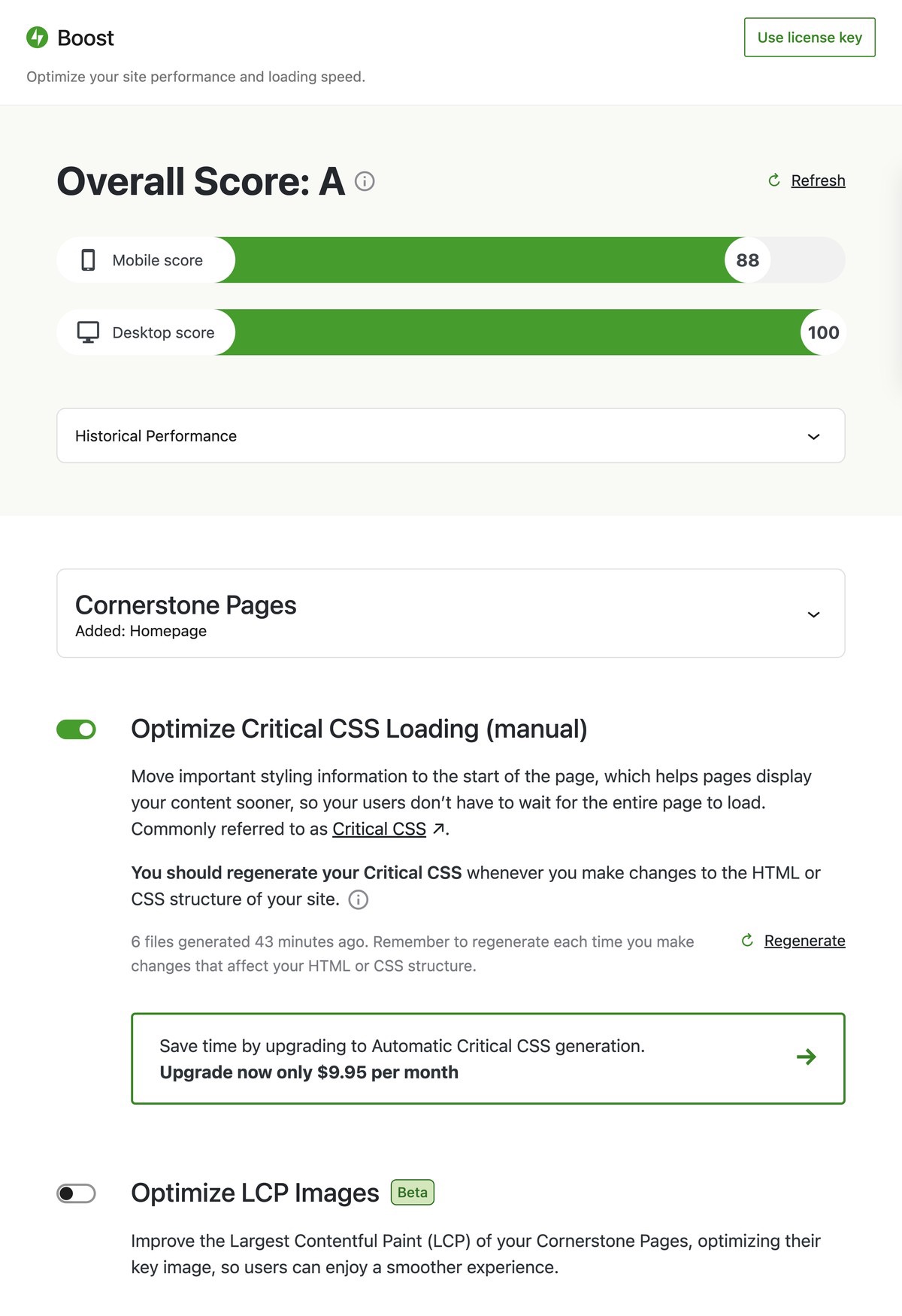
Jetpack Boost dashboard with performance scores and optimization modules.
-
Free Critical CSS generation in progress.
-
Automatic Critical CSS generation with the upgraded plan.
-
Historical performance tracking with the upgraded plan.
About this plugin
Speed up your WordPress site by optimizing page performance with Jetpack Boost. Easily activate one-click optimizations to boost your Core Web Vitals.
Did you know that a faster website:-
- Ranks higher on Google.
- Improves bounce rate (people stay on your site for longer).
- Increases your conversion rate.
Increase your website performance and speed up your website with one-click optimizations that supercharge your WordPress site’s performance and improve core web vitals scores for better search engine listings.
Improving Core Web Vitals helps you rank higher on Google. A faster website also improves your SEO, helps you reduce your bounce rate and increase your ecommerce conversion rate.
- Largest Contentful Paint (LCP): Measures loading performance. Improve your LCP and improve your website loading speed.
- First Input Delay (FID): Measures interactivity. To improve user experience pages should have a low FID.
- Cumulative Layout Shift (CLS): Measures visual stability. Lowering your CLS helps improve your user experience.
Performance Modules
Optimize your website with the same techniques used on the world’s most successful websites.
Each technique that is used to increase website performance is packaged up as a module that you can activate and try out.
Currently, the plugin has 6 performance modules available:
-
Optimize CSS Loading generates Critical CSS for your homepage, posts and pages. This can allow your content to show up on the screen much faster, particularly for viewers using mobile devices.
Read more about critical CSS generation at web.dev
-
Page Cache speeds up your site by saving pages as static files. These files are quickly served to visitors, reducing load times and enhancing user experience.
-
Defer Non-Essential JavaScript moves some tasks to after the page loads, so that important visual information can be seen sooner and your website loads quicker.
Read more about deferring JavaScript at web.dev
-
Image Guide is a must-have feature for anyone who wants to optimize the images on their website. With this guide, you can ensure that the images on your site are the right size and dimensions, which is critical for improving user experience, page speed, and site ranking. Following the tips and best practices outlined in the guide, you can reduce image file sizes and speed up your site. Check out our support page to learn more about this feature and how it can help you achieve a faster and smoother website experience for your users.
-
Image CDN allows your site to serve automatically-resized images in modern web formats directly from Jetpack’s worldwide Content Delivery Network.
Read more about Image CDNs at web.dev
-
Concatenate and Minify CSS and JS combines and shrinks your JavaScript and CSS resources to reduce the number and size of requests to your server, ensuring your content loads faster.
Read more about minifying files at web.dev
Don’t want to have to manually generate your critical CSS each time you update your site? Let us do the heavy lifting for you with automated critical CSS – each time you update your site we will automatically regenerate your critical CSS and update your performance scores. Upgrading also gives you dedicated email support access.
With 💚 by Jetpack
This is just the start!
We are working hard to bring more features and improvements to Jetpack Boost. Let us know your thoughts and ideas!
We’d also like to give a special THANK YOU to the XWP team who provided help with initial research and scoping of the plugin and were engaged with our team throughout the project.
Questions
- What does Jetpack Boost do to help speed up my WordPress site?
Jetpack Boost makes small changes to the way that data is sent from your WordPress site to your users’ browser, to enable the browser to display your site faster.
Jetpack Boost includes a growing number of separate features which can be turned on individually to improve your site’s performance. These include:
- Optimize CSS Loading: This feature determines the most important CSS that your site needs to display your site’s initial content as quickly as possible, and embeds it directly into your site header.
- Page Cache: This feature stores your website’s pages as static HTML files, bypassing the need for dynamic generation. This means visitors receive pages faster, reducing wait times and improving overall site performance.
- Defer Non-Essential JavaScript: This feature forces all of the JavaScript which is not deemed essential to displaying your site to load after your site’s main content has been loaded.
- Image CDN: This feature automatically resizes images to a more appropriate size for your visitors’ screens, converts them to modern image formats, and serves them from Jetpack’s worldwide network of servers.
- Concatenate JS: This feature reduces the size of your JavaScript resources, and automatically combines them into fewer files, allowing your site to load faster with fewer requests.
- Concatenate CSS: As with concatenating JavaScript, this feature shrinks your CSS files and allows them to load with fewer requests.
- What speed improvements can I expect when using Jetpack Boost?
Website Performance is complicated and can be affected by a number of factors. As a result, it is difficult to accurately predict how much impact it will have on each site.
Generally, the lower your speed score is to begin with, the more Jetpack Boost may impact your performance. We have seen user reports of up to 25 Speed Score points improvement simply by installing and using Jetpack Boost.
However, as performance can be impacted by so many factors, it is also possible for Jetpack Boost to have a small negative performance impact in some rare cases.
We recommend that you install Jetpack Boost, and try it for yourself. It includes a tool for measuring your Speed Score, to check what impact it has on your site.
- Can I also defer non-essential CSS with Jetpack Boost?
Jetpack Boost automatically defers non-essential CSS if its “Optimize CSS Loading” feature is enabled.
The “Optimize CSS Loading” feature identifies the most important CSS rules your site needs to display your pages as quickly as possible (commonly called “Critical CSS”), and defers all other CSS rules from loading until your main content has loaded.
- What are Web Vitals?
Web Vitals are the measurements that Google uses to better understand the user experience on a website. By improving Web Vitals scores you’re also improving the user experience on your site.
You can read more about Web Vitals on web.dev
- How does Jetpack Boost plugin improve Core Web Vitals?
Each Core Web Vital relates to an aspect of how quickly your site can load and appear on new visitors’ screens.
Jetpack Boost makes small changes to the way that data is sent from your WordPress site to your users’ browsers, to enable your content to load faster. As a result, it can improve your Core Web Vitals scores.
For example, our “Optimize CSS Loading” feature ensures the most important CSS rules are sent to users’ browsers as early as possible, improving both First Contentful Paint (FCP) and Cumulative Layout Shift (CLS) scores.
- Does this plugin require Jetpack?
Jetpack Boost is a part of the Jetpack brand, but it doesn’t require Jetpack plugin to run. This is a separate plugin from Jetpack and it will always remain that way.
- Will this plugin be able to improve performance on any website?
This plugin includes a range of performance improvements, which can help almost any WordPress site perform better.
However, if your site is already extremely well optimized, Jetpack Boost may not have much room to improve it.
Jetpack Boost includes a tool for measuring your site’s Speed Score – we encourage users to try it out and see what impact it can have for them.
- How do I know if it’s working?
Every site is different and so performance benefits for each module may vary from site to site. That’s why we recommend that you measure the performance improvements on your site by enabling the performance modules one by one. There are many tools out there that you can use for free to measure performance improvements:
Google PageSpeed measurements are built-in the Jetpack Boost dashboard.
sandywp / also on the shelf
Try another plugin

4.3 · 1M+ installs
A very fast caching engine for WordPress that produces static html files.

WP Fastest Cache – WordPress Cache Plugin
4.9 · 1M+ installs
The simplest and fastest WP Cache system
-
Get caching and more with this powerful cache plugin. Cache, optimize images, clean your database and minify for maximum…

Spin up a real WordPress site in seconds.
Test plugins, build a demo, hand a client a link — then squash it and start again. No local setup, no Docker.