sandywp / plugins / iworks-pwa

PWA — easy way to Progressive Web App
Your easy way to Progressive Web Application.
Ready in seconds.
v1.8.0 1,000+ installs WP 6.0+ PHP 8.0+
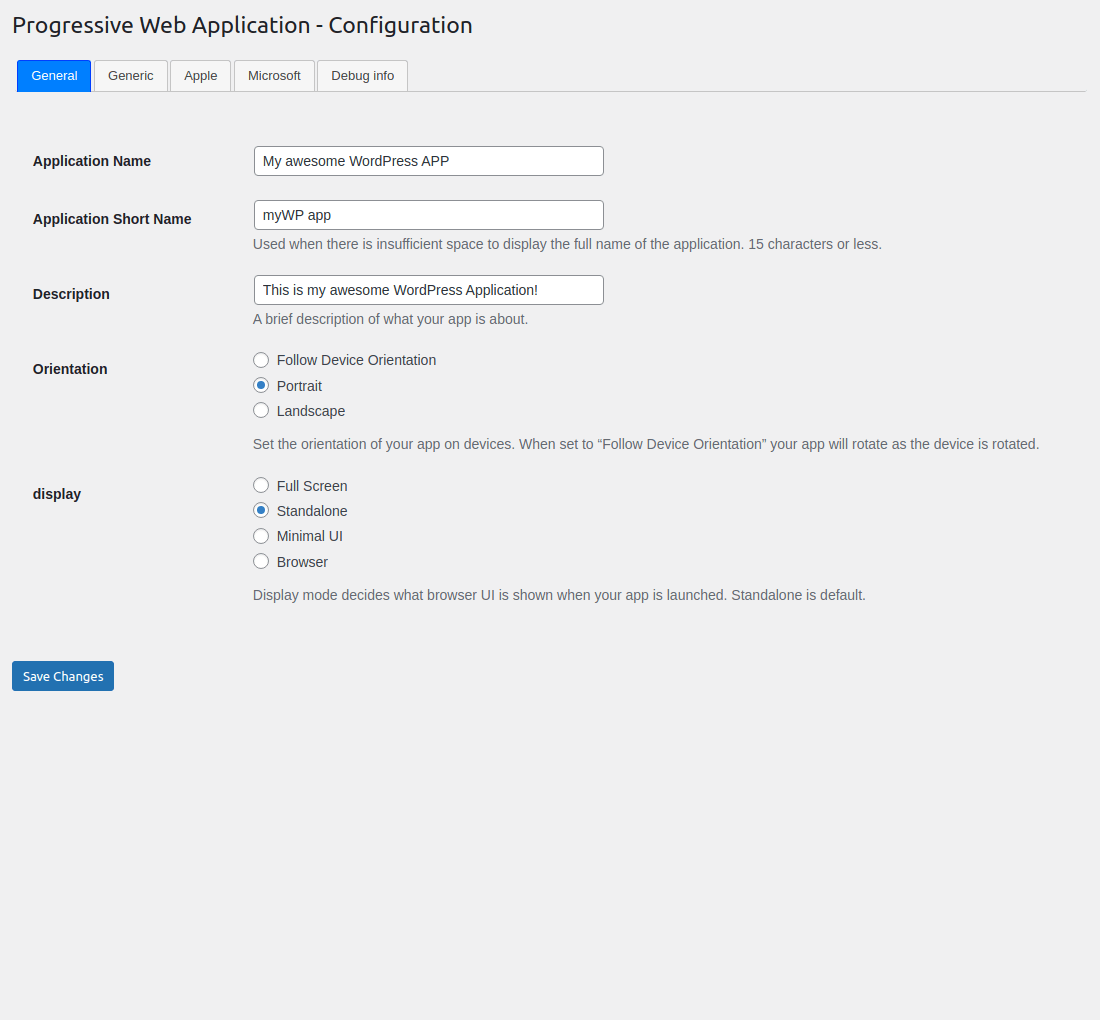
What you get inside
6 screens-
General configuration.
-
Generic configuration.
-
Apple configuration.
-
Microsoft configuration.
-
Installation app on Android.
-
Shortcuts menu on Android.
About this plugin
Progressive Web Apps (PWA) is a technology that combines the best of mobile web and the best of mobile apps to create a superior mobile web experience. They are installed on the phone like a normal app (web app) and can be accessed from the home screen.
Users can come back to your website by launching the app from their home screen and interact with your website through an app-like interface. Your return visitors will experience almost-instant loading times and enjoy the great performance benefits of your PWA!
iWorks PWA makes it easy for you to convert your WordPress website into a Progressive Web App instantly!
Once this plugin is installed, users browsing your website from a supported mobile device will see a “Add To Home Screen” notice (from the bottom of the screen) and will be able to ‘install your website’ on the home screen of their device.
iWorks PWA allow to add shortcuts for context menu to be displayed by the operating system when a user engages with the web app’s icon.
iWorks PWA is easy to configure, it takes less than a minute to set-up your Progressive Web App!
See room for improvement?
Great! There are several ways you can get involved to help make PWA — easy way to Progressive Web App better:
- Report Bugs: If you find a bug, error or other problem, please report it! You can do this by creating a new topic in the plugin forum. Once a developer can verify the bug by reproducing it, they will create an official bug report in GitHub where the bug will be worked on.
- Suggest New Features: Have an awesome idea? Please share it! Simply create a new topic in the plugin forum to express your thoughts on why the feature should be included and get a discussion going around your idea.
- Issue Pull Requests: If you’re a developer, the easiest way to get involved is to help out on issues already reported in GitHub. Be sure to check out the contributing guide for developers.
Thank you for wanting to make PWA — easy way to Progressive Web App better for everyone!
The “PWA — easy way to Progressive Web App” plugin is available also on GitHub.
Questions
- How can I translate manifest.json values?
It is only possible with WPML package.
- Install and activate
WPML Multilingual CMSandWPML String Translationplugins. - Save
manifest.jsondata onWP Admin->Settings->WPA. - Open
WP Admin->WPML-> String translation`. - Select domain
iworks-pwa. - Translate strings.
- Install and activate
- How can I add a context menu?
The shortcuts member defines an array of shortcuts or links to key tasks or pages within a web app. A user agent can use these values to assemble a context menu to be displayed by the operating system when a user engages with the web app’s icon.
- Install Menu Icons by ThemeIsle plugin.
- Go to WPA -> Appearance -> Menu.
- Open “Menu Icon Setting” from the “Add menu items” column (it should be on the bottom).
- Be sure you have “Image” checked.
- Create a custom menu and set “Display location” to “PWA Shortcuts Menu”.
- Add item.
- Select icon – it is recommended that you use a single 192×192 pixel icon.
- Save the menu.
- What is “Add to Home screen”?
Add to Home screen (or A2HS for short) is a feature available in modern browsers that allows a user to “install” a web app, ie. add a shortcut to their Home screen representing their favourite web app (or site) so they can subsequently access it with a single tap.
A2HS is supported in all mobile browsers, except iOS web view. It’s also supported in some Chromium desktop browsers.
sandywp / also on the shelf
Try another plugin

4.6 · 40K+ installs
SuperPWA helps you convert your WordPress website into a Progressive Web App instantly.
Hyper PWA – Bringing Modern Progressive Web App Experiences
4.6 · 300+ installs
Turn your WordPress site into a fast, installable Progressive Web App. Give users a seamless offline experience and native mobile…
Spin up a real WordPress site in seconds.
Test plugins, build a demo, hand a client a link — then squash it and start again. No local setup, no Docker.