sandywp / plugins / imagemagick-engine

ImageMagick Engine
Improve the quality of re-sized images by replacing standard GD library with ImageMagick.
Ready in seconds.
v2.0.0 60,000+ installs WP 6.4+ PHP 7.4+
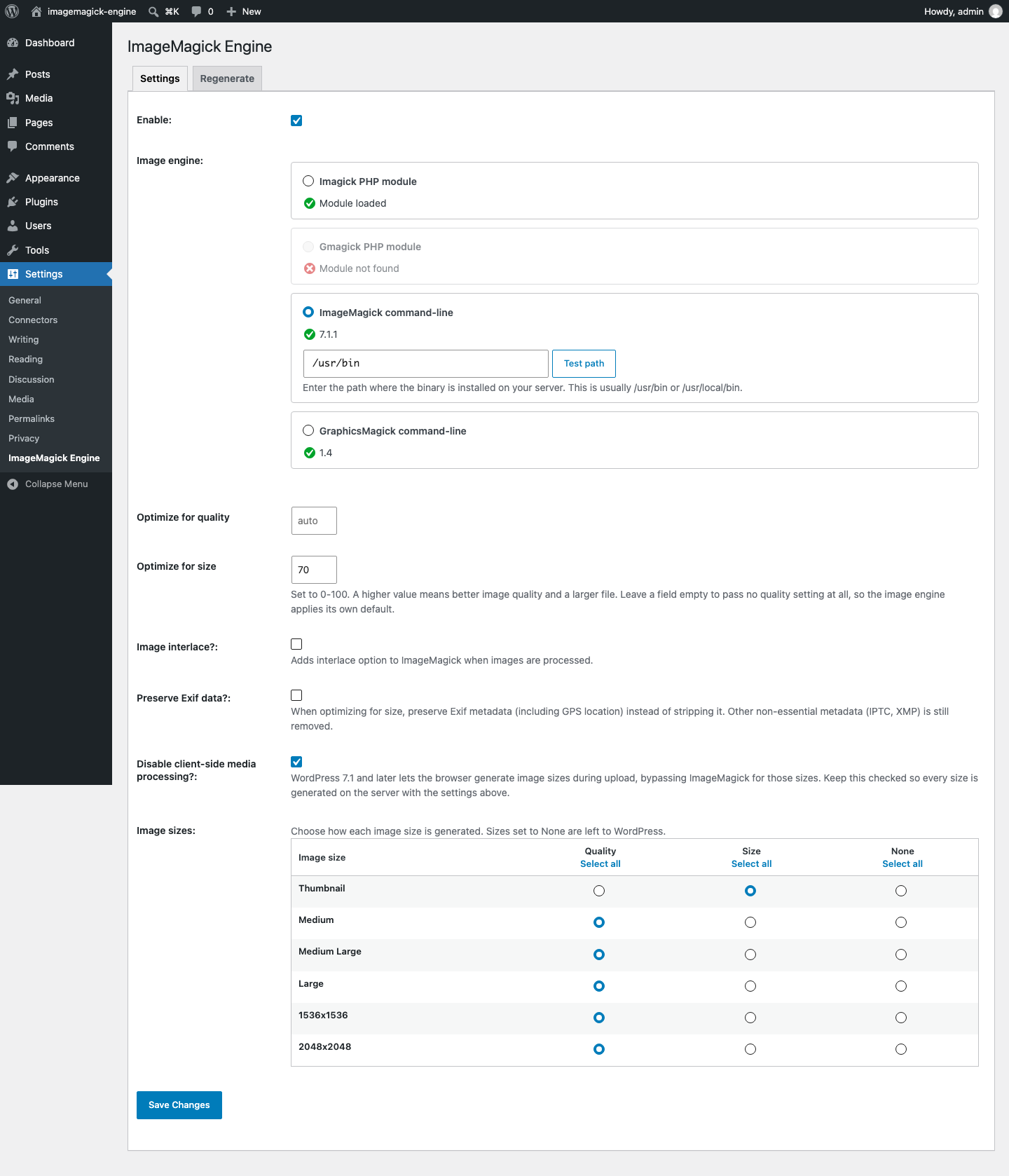
What you get inside
2 screens-
Settings: choose an image engine, see which ones your server actually has, and set how each image size is generated.
-
Regenerating existing images in adaptive batches, with progress, a time estimate and a cancel button.
About this plugin
Dramatically improve the quality of re-sized images by making WordPress use ImageMagick instead of standard GD image library.
Features
- Preserve embedded color profile in re-sized image
- Automatically recognize custom image sizes
- Allow regeneration of existing images (optionally for selected image sizes only)
- Configure image quality or use dynamically computed default value
- Optimize different image sizes for either quality or size
Languages: English, French, German, Swedish, Turkish
Requires either ImageMagick binary or Imagick PHP module.
Contribute
Code repo available on https://github.com/orangelabweb/imagemagick-engine/
Questions
- What difference does it make?
ImageMagick can result in huge improvements in the quality of re-sized images.
Take a look at the supplied screenshot, or try it yourself.
Note that the new images tend to be slightly larger than those of the standard GD library, especially if you specify a very high image quality (95+).
- How do I know if I have ImageMagick installed?
If you have the PHP module installed the plugin will find it. You can check yourself using the phpinfo() function. We also automatically check a common location for the ImageMagick executable.
If you have shell access to a Linux/UNIX server you can use “which convert” to look for the ImageMagick executable.
- How do I install ImageMagick?
You’ll need full access to your server and a bit of technical know-how. If you do not have access you’ll have to ask the server administrator.
Don’t do it yourself unless you know what you are doing.
Most Linux distributions have a package for “ImageMagick”. Some have a package for “php5-imagick”. It is possible to install the PHP module using PEAR.
You can also find binary releases at http://www.imagemagick.org including a Windows installer.
sandywp / also on the shelf
Try another plugin

10+ installs
Adds more image edit functionality to your WordPress installatin

10+ installs
Create image thumbs from WP attachments, w/ option to crop & fit to wanted size & create IMG-tags w/ correct width &…
-
Secure, lightweight, offline image inspection for the WordPress Media Library.

Spin up a real WordPress site in seconds.
Test plugins, build a demo, hand a client a link — then squash it and start again. No local setup, no Docker.