sandywp / plugins / image-watermark

Image Watermark
Secure and brand your images with automatic watermarks. Apply image or text overlays to new uploads and bulk process existing Media Library images wit …
Ready in seconds.
v2.0.12 40,000+ installs WP 6.0+ PHP 7.0+
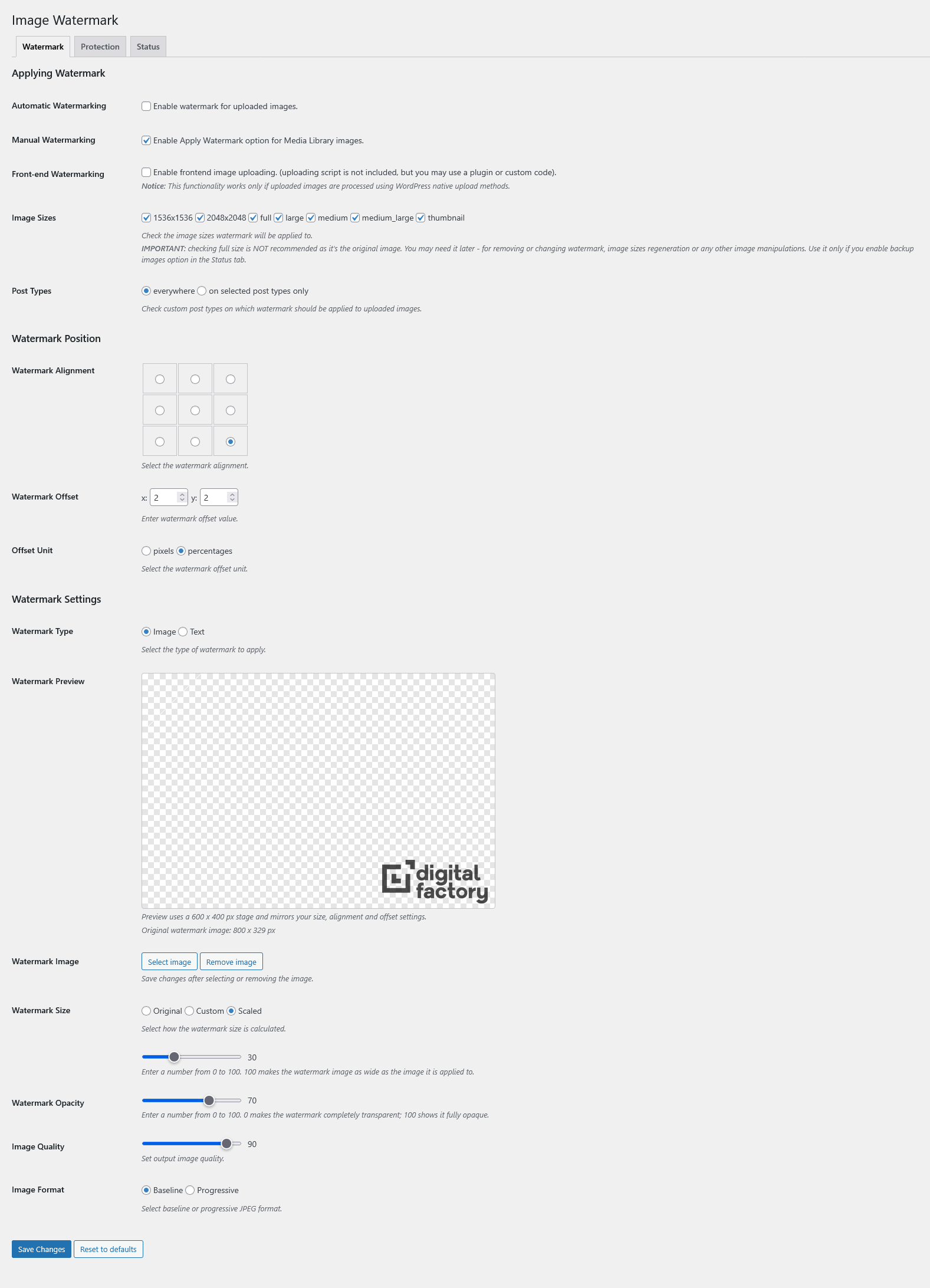
What you get inside
3 screens-
screenshot-1.png
-
screenshot-2.png
-
screenshot-3.png
About this plugin
Enhance your WordPress site’s image security and branding. Image Watermark allows you to apply image or text overlays to new uploads and bulk process existing Media Library images with ease.
Key Features:
- Watermark Types: Choose from image-based or text-based watermarks with full customization.
- Flexible Application: Automatic watermarking on uploads, manual/bulk apply/remove via Media Library.
- Advanced Customization: Position watermarks precisely, adjust sizes, opacity, and more.
- Small Image Rules: Skip watermarking for images below configurable minimum width and height thresholds.
- Backup & Restore: Secure backups for easy watermark removal.
- Image Protection: Prevent copying via right-click, drag-and-drop, and developer tools.
- Status & Diagnostics: Review PHP, image engine, and backup-folder readiness from the built-in Status tab.
- Technical Excellence: Supports JPEG, PNG, WebP; ImageMagick/GD engines; preserves metadata.
Perfect for photographers, bloggers, and businesses looking to safeguard their visual content.
For more information, check out the plugin page, documentation, or support forum.
Feature Breakdown:
Watermarking Types:
* Support for image-based watermarks (upload custom images as watermarks)
* Support for text-based watermarks (customizable fonts, colors, and sizes)
* Automatic watermarking on new uploads to the Media Library
* Manual and bulk watermarking for existing images (apply or remove via Media Library actions)
Customization & Settings:
* Flexible watermark positioning (9 alignment options with pixel or percentage-based offsets)
* Three watermark size modes: original, custom dimensions, or scaled to image size
* Adjustable watermark transparency and opacity
* Watermark preview support for image and text watermark modes
* Optional skip rules for small images based on minimum width and height thresholds
* Selective application: Choose specific post types or enable everywhere (including frontend uploads)
* Image format selection (baseline or progressive JPEG)
* Configurable image quality settings
Backup & Management:
* Automatic image backup functionality (stores originals for easy restoration)
* Option to remove watermarks (restores from backups when available)
* Optional preservation of file timestamps during backup and restore
* Secure backup storage with .htaccess protection
Image Protection:
* Disable right-click context menus on images
* Prevent image copying via drag-and-drop
* Block access to developer tools for image inspection
* Customizable protection notice/toast message displayed to users attempting to copy images
Technical Information:
* Support for JPEG, PNG, and WebP image formats
* Dual image processing engines: ImageMagick (preferred) with GD library fallback
* EXIF and IPTC metadata preservation (where supported)
* Cache-busting for immediate thumbnail updates after watermark changes
* Built-in Status tab for PHP, engine, and backup-folder diagnostics
* Translation-ready with included .pot file
Questions
- Can I remove a watermark later?
Yes. Watermark removal restores the original file from the plugin backup folder. Keep backups enabled before applying watermarks if you want removal to remain available later.
- Which image formats and libraries are supported?
Image Watermark supports JPEG, PNG, and WebP uploads. The server needs either ImageMagick or GD available, and the Status tab shows which engine is active.
- Can I skip very small images?
Yes. Enable the small-image threshold option in the Watermark settings and set a minimum width and/or height. Images below the configured limit are skipped.
- Does frontend image protection fully secure my images?
No. The right-click, drag-and-drop, and developer-tools protections are browser-side deterrents. They help discourage casual copying but should not be treated as absolute protection.
sandywp / also on the shelf
Try another plugin

4.9 · 200K+ installs
Automatically resizes huge image uploads. Are contributors uploading huge photos? Tired of manually resizing your images?…

4.8 · 200K+ installs
Formerly Easy Fancybox. The most popular WordPress lightbox plugin. Simple, fast, and responsive. Opens images, videos, PDFs, and…

Responsive Lightbox & Gallery
4.9 · 100K+ installs
The most popular lightbox plugin and responsive gallery builder for WordPress.
Spin up a real WordPress site in seconds.
Test plugins, build a demo, hand a client a link — then squash it and start again. No local setup, no Docker.