sandywp / plugins / hlb-ability-registry-mcp

HLB Ability Registry for MCP
An admin-curated ability registry for the WordPress Abilities API, with a per-ability on/off switch and optional multisite network control.
Ready in seconds.
v1.7.1 20+ installs WP 6.9+ PHP 7.4+
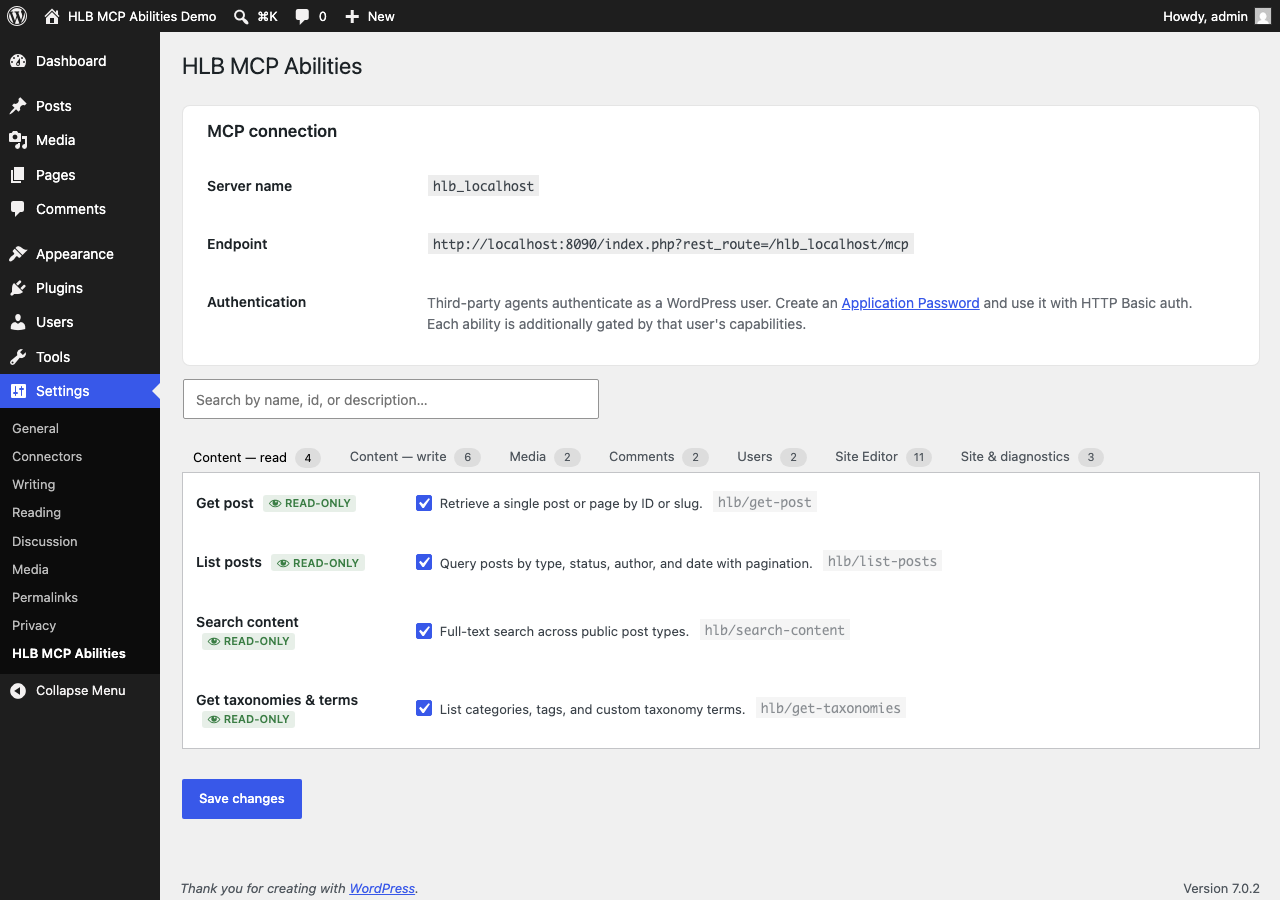
What you get inside
2 screens-
Settings screen: abilities grouped into searchable, countable categories (Content — read/write, Media, Comments, Users, Site Editor, Site & diagnostics),…
-
Live search narrows the list by name, id, or description across every category at once.
About this plugin
Most “connect AI to WordPress” tools expose either everything or nothing: a single broad REST scope, or a fixed bundle of tools the site owner can’t trim. HLB Ability Registry for MCP takes a different approach — it ships a declarative catalogue of individually-togglable WordPress Abilities, and the site owner decides exactly which ones are live, per site.
What it actually does
- Registers a curated set of abilities against WordPress core’s own Abilities API (
wp_register_ability()) — content, media, comments, users, Site Editor templates & patterns, and optional WooCommerce, SEOPress and Gravity Forms integrations when those plugins are active. - Every ability has its own admin toggle in Settings → HLB Ability Registry for MCP, searchable and grouped by category. Read-only abilities default on; write and destructive abilities default off.
- Read handlers do per-object capability checks (not just a blanket
current_user_can), so a low-privilege caller can’t read drafts or private posts by ID just because a coarse capability check passed. Listing abilities force unprivileged callers back to published content, and abilities only ever address post types the site already exposes publicly or over the REST API. - On multisite, each subsite gets its own on/off set, inherited from a network default unless a subsite administrator explicitly overrides it. An optional network mode lets the main site’s server target any subsite by id, with every permission and capability check re-run inside that subsite’s own context — nothing is granted network-wide by default.
- Requires the MCP Adapter plugin, which projects the enabled abilities onto a standard MCP server at
/wp-json/{server-slug}/mcp, so any MCP-speaking client or agent can call them. The enabled abilities are also reachable through core’s own/wp-json/wp-abilities/v1/REST routes.
Source code
Development happens in the open: https://github.com/jdbg/hlb-ability-registry-mcp
Try it without installing anything
This plugin ships a WordPress Playground blueprint so you can click through the settings screen and a live MCP endpoint in a disposable browser sandbox before installing anything on a real site. See the FAQ below for the link.
Questions
- Does this plugin require the MCP Adapter?
Yes. It declares the MCP Adapter as a required plugin, so WordPress won’t activate it until the adapter is installed and active, and won’t let you deactivate the adapter while this plugin is active. On multisite, network-activate the adapter before network-activating this plugin.
- Which abilities are enabled by default?
Read-only abilities (listing/getting posts, media, comments, taxonomies, templates, site info) default on. Anything that writes or deletes data defaults off until a site administrator turns it on explicitly.
- Can I try this before installing it?
Yes — open it in WordPress Playground: https://playground.wordpress.net/?blueprint-url=https://raw.githubusercontent.com/jdbg/hlb-ability-registry-mcp/main/blueprints/demo.json
- Is this safe on multisite?
Yes. Per-subsite settings are always intersected with the currently-available ability registry, so a stale or renamed id can never be registered. In network mode, every permission and capability check still runs inside the target subsite’s own context via
switch_to_blog(), so a non-member is denied exactly as if they’d called the API on that subsite directly.
sandywp / also on the shelf
Try another plugin

5.0 · 80K+ installs
Expose WordPress abilities as Model Context Protocol (MCP) tools, resources, and prompts for AI agents.
-
WordPress MCP server for Claude and ChatGPT with limited access, a pause switch, read-only mode, drafts you approve, playbooks…

AgizoAI Agentic Browsing Optimizer
100+ installs
Prepare WordPress for AI agents with an agentic readiness dashboard, llms.txt, WebMCP-style form metadata, read-only discovery…

Spin up a real WordPress site in seconds.
Test plugins, build a demo, hand a client a link — then squash it and start again. No local setup, no Docker.