sandywp / plugins / heroic-table-of-contents

Heroic Table of Contents
Heroic Table of Contents is the easiest way to add a table of contents to your site.
Ready in seconds.
v1.2.7 5,000+ installs WP 6.7+ PHP 8.0+
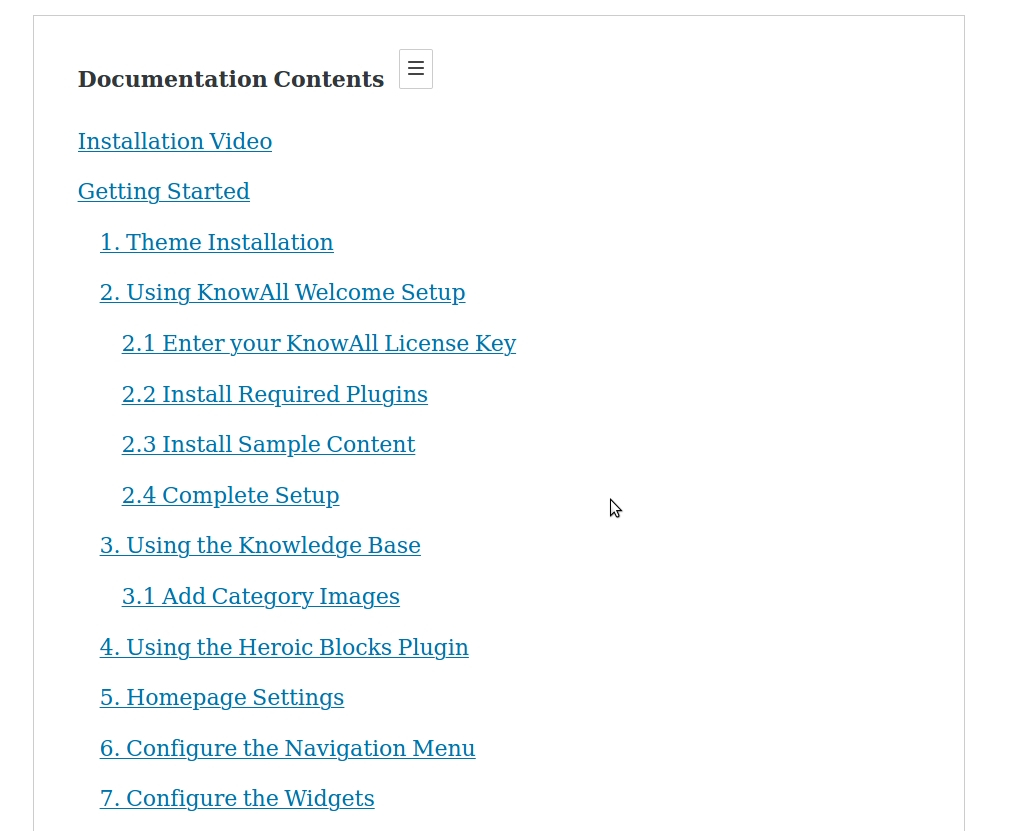
What you get inside
7 screens-
The Heroic Table of Contents Block adds a Table of Contents section to your content
-
Add the Heroic Table of Contents block using the + symbol and selecting it from the editor
-
The Table of Contents is automatically generated for headings (H1, H2, H3 etc)
-
Includes 4 built in styles, collapsible contents listing and select headings to include/exclude
-
Show/hide and relabel headings by clicking on the icons when the block is selected
-
Choose contents list style
-
Add custom links to the Table of Contents (beta feature)
About this plugin
WordPress Table of Contents Plugin
Heroic Table of Contents is the easiest way to add a Table of Contents to your site.
A contents or index section allows readers to easily navigate pages on your site. The Heroic Table of Contents block automatically detects headings on a page, 4 built-in-styles, options for display and more.
Features:-
- Add a contents section to pages in seconds.
- Choose from 4 pre-made Table of Contents styles.
- Hide and relabel headings without altering the original content.
- Choose which headings to display in the Table of Contents.
- Expand and collapse the content section.
- Place the contents section anywhere.
- Choose bulleted, numbered or plain lists
- Use multiple Table of Contents blocks to break up and sub-index lengthy content.
- Works with templates and individual posts/pages with Template Mode
- Automatic template detection with helpful context-aware guidance
- Mobile friendly
- SEO friendly
About HeroThemes
HeroThemes develop some of the best WordPress plugins, tools and themes, with over 26,000 customers and counting. If you like this plugin and want more news, themes and plugins, you can do the following:
- Get the KnowAll Knowledge Base theme for WordPress, create a WordPress powered knowledge base site in minutes.
- Check out the best WordPress Knowledge Base plugin.
- Answer Frequently Asked Questions with Heroic FAQs plugin for WordPress.
- Follow HeroThemes on Twitter & Facebook.
Questions
- Who should use Heroic Table of Contents?
This plugin allows you to add a Contents (Table of Contents, index, page navigation or whatever you want to call it) to your WordPress posts, pages and articles.
- Will Heroic Table of Contents work with my theme?
Heroic Table of Contents is designed to work with any WordPress theme.
- Is Heroic Table of Contents translation ready?
Yes, Heroic Table of Contents has full translation and localization support.
- When should I enable Template Mode?
Enable “Template Mode (Post Content Scope)” when adding the Table of Contents block to post templates, page templates, or custom post type templates. Leave it disabled when adding the block directly to individual posts or pages. Template Mode tells the block to scan for headings within post-content blocks, which is necessary for template-based usage. The plugin will automatically detect if you’re working in a template and show a helpful warning if Template Mode needs to be enabled.
- I have a question
Feel free to contact us directly via herothemes.com/contact/ for any questions.
- How do I get support?
If you have trouble with the Heroic Table of Contents WordPress plugin, you can get help on the support forums here at wordpress.org or by checking out or knowledge base at herothemes.com/support/.
sandywp / also on the shelf
Try another plugin

Table of Contents Plus – Automatic Table of Contents for Posts & Pages
4.4 · 200K+ installs
Automatically add a table of contents to your posts and pages, with smooth scrolling, anchor links, and simple styling options.

4.8 · 50K+ installs
Speed up your WordPress site by adding high-performance keys (database indexes) to your MariaDB / MySQL database tables.

4.9 · 2K+ installs
Name directory (glossary) with many options like multiple directories, integrated search, non-latin characters, recaptcha, HTML…
Spin up a real WordPress site in seconds.
Test plugins, build a demo, hand a client a link — then squash it and start again. No local setup, no Docker.