sandywp / plugins / greek-multi-tool

Greek Multi Tool
Latin permalinks and media file names for Greek sites (ELOT 743), one-click conversion of old Greek URLs with 301 redirects, and an accent checker.
Ready in seconds.
v4.0.0 1,000+ installs WP 6.2+ PHP 7.4+
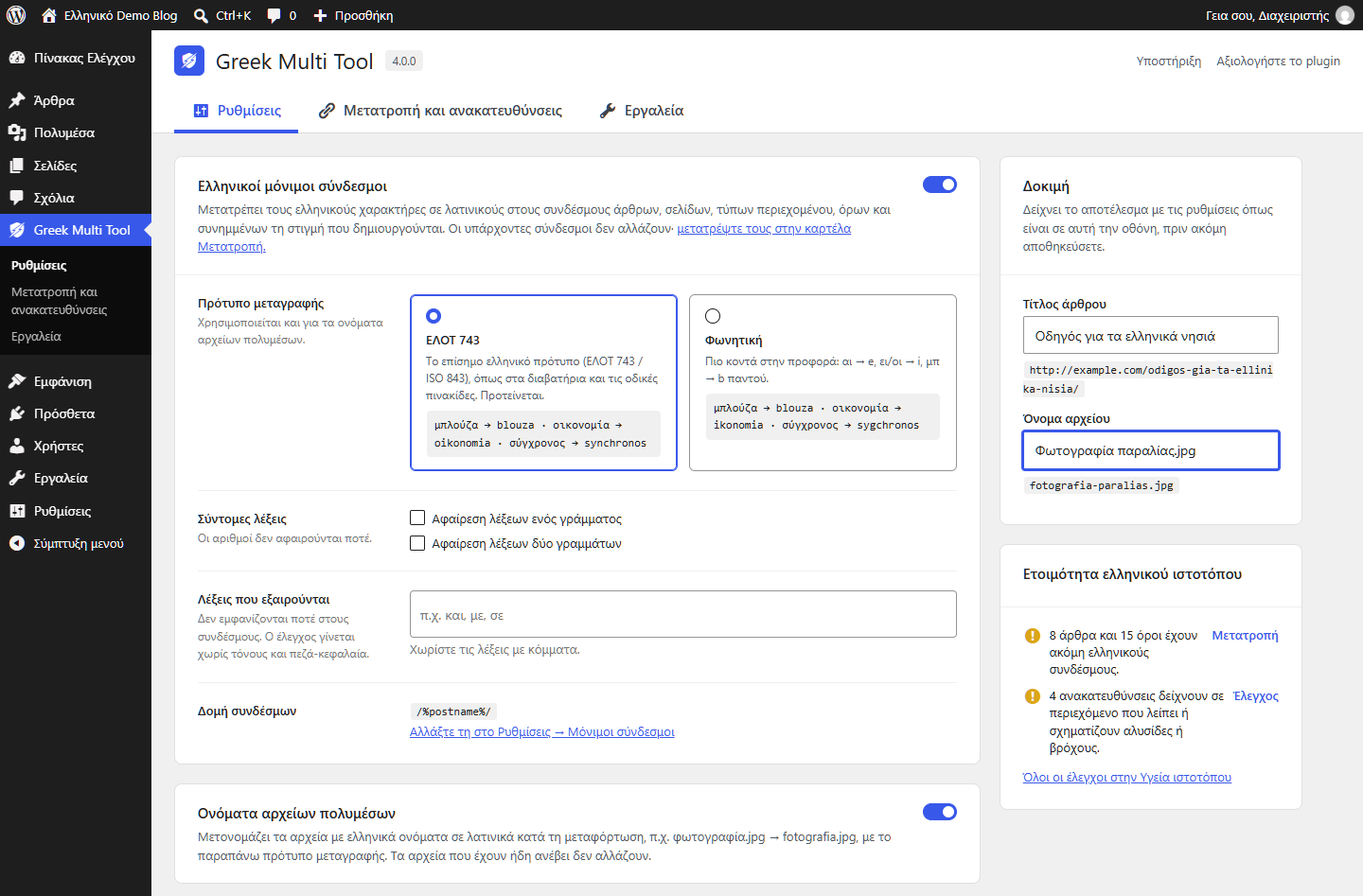
What you get inside
6 screens-
Settings: choose the transliteration standard (ELOT 743 by default) and see a live preview of the permalink and file name.
-
Conversion: preview which old Greek URLs will change before converting.
-
Redirects: every converted URL gets a 301 redirect, checked for missing destinations, chains and loops.
-
Tools: build a menu from your category tree and run the WP-CLI commands.
-
Site Health: checks whether your site is set up for Greek.
-
Block editor: the accent check panel finds missing or wrong accents in titles and content.
About this plugin
Greek Multi Tool does a small number of things that a Greek WordPress site needs and WordPress itself does not do, and it does them with the official Greek transliteration standard.
Greek permalinks
New posts, pages, custom post types, terms and attachments get Latin permalinks as they are created: Οι καλύτερες ιδέες becomes /oi-kalyteres-idees/ instead of /%ce%bf%ce%b9-.... Choose the standard:
- ELOT 743 (default for new installations): the official Greek transliteration standard (ELOT 743:2001, identical to ISO 843:1997), the one used in passports and road signs, as adopted by the United Nations.
μπλούζα → blouza,αυτοκίνητο → aftokinito,σύγχρονος → synchronos. - Phonetic: closer to pronunciation (
αι → e,ει/οι → i,μπ → b). - 3.x compatibility: existing installations keep exactly the permalinks version 3.x produced (
μπλούζα → mplouza). It is offered only while it is selected, so you can switch to ELOT 743 whenever you want; existing permalinks never change by themselves.
Optionally remove one- and two-letter words from permalinks (numbers are never removed) and keep a list of excluded words, matched regardless of accents and letter case.
Media file names
Uploaded files with Greek names get Latin names with the same standard: φωτογραφία.jpg → fotografia.jpg. Files that are already uploaded are not renamed.
Convert old permalinks, with 301 redirects
Content published before the plugin keeps its Greek permalinks until you convert it. The converter:
- shows a preview first (counts per content type, a sample of old and new URLs, how many will need a numeric suffix) and writes nothing until you confirm you have a backup,
- works in batches, so it is safe on large sites; an interrupted run can be continued or discarded, and what was converted until then can still be undone,
- changes only the slug: content, dates and revisions are untouched (no revision is created),
- keeps the new slug unique and lets WordPress remember the old one as well,
- records a 301 redirect for every old URL, including child pages and child terms whose URL changed because their parent did. Redirects are always recorded; the “301 redirects” switch only decides whether they are served,
- can be undone: the previous permalinks come back and the Latin addresses redirect to them (posts through WordPress’ own old-slug redirect, pages, other hierarchical content and terms through redirects the undo records). It is also available in WP-CLI.
Redirects are served only for requests WordPress cannot resolve itself (404s, and feeds of addresses that no longer exist), so a live page is never hijacked. The query string of the old address is carried over. They follow the post or term, so they keep working even if you change the permalink structure later, and they cover paginated and feed URLs of the old address. Check them for missing destinations, chains and loops, edit or delete them, export and import CSV. A term whose Greek slug is changed by hand in wp-admin gets a redirect too, while saving a term or a post without touching its slug keeps the slug as it is, even when it is still Greek. Old Greek addresses of categories and tags that versions 2.x and 3.x converted (they only worked through on-the-fly transliteration) are found and redirected.
Accent check
A panel in the editor sidebar (and a meta box in the classic editor) points out words whose accent is probably wrong: multi-syllable words without an accent, monosyllables with one, accented capitals, interrogative πού/πώς, and more.
Greek readiness in Site Health
Checks that show up in Tools → Site Health, and in a card on the plugin screen:
- the site language is Greek when the content is,
- the theme declares
lang="el"on the page (browsers then drop accents on capitals and screen readers use the right language), - the database collation ignores accents in search (verified with a real query, never changed by the plugin),
- how many posts, terms and media files still have Greek names,
- whether any redirect is broken.
Category menus
Build a navigation menu that follows your category tree: choose the source (post categories, or WooCommerce product categories when WooCommerce is active), give the menu a name, and the plugin creates a WordPress menu with the same hierarchy, ready in Appearance → Menus. Added or moved categories? Build it again with the same name and the “replace” option, and the menu is rebuilt in place.
Hooks and WP-CLI
Filters: grmlt_convertible_post_types, grmlt_convertible_taxonomies, grmlt_conversion_batch_size, grmlt_render_shortcodes_on_frontend, grmlt_settings_tabs.
Actions: grmlt_post_slug_converted( $post_id, $old, $new ), grmlt_term_slug_converted( $term_id, $taxonomy, $old, $new ), grmlt_conversion_finished( $state ), grmlt_settings_tab_{$id}.
Functions for themes: grmlt_slugify( $text, $args ), grmlt_transliterate_greek( $text ).
WP-CLI: wp grmlt convert [--dry-run], wp grmlt undo-conversion, wp grmlt redirects check|export|import, wp grmlt acf-restore-keys [--write] [--regenerate-keys] [--undo=<file>].
Questions
- Will my existing permalinks change when I update to 4.0?
No. Existing permalinks only change when you run the converter: the transliteration never touches a slug that already exists, whether Greek or Latin, and saving a post or a term without changing its slug keeps it. Sites updating from 2.x or 3.x keep the transliteration they used for new content (“3.x compatibility” for the former Simple mode, “Phonetic” for Advanced), so nothing changes until you choose ELOT 743 in the settings.
- How do I switch to ELOT 743?
Greek Multi Tool → Settings → Transliteration standard → ELOT 743 → Save. From then on new permalinks follow the standard. Existing ones stay as they are; convert them with Conversion & redirects if you want them to match.
- Where did Greek dates, uppercase accent removal, enhanced search and Greek excerpts go?
They were removed in 4.0 because WordPress covers them when the site is set up correctly, and the plugin’s versions were worse:
- Dates: with the site language set to Greek, WordPress prints Greek month and day names in the right grammatical case (
wp_date(),wp_maybe_decline_date()). - Capitals without accents: with
lang="el"on the page, Chrome, Firefox, Safari and Opera remove the accents themselves when text is set in capitals with CSS. - Search: the database collation decides whether
πενσαfindsπένσα; the plugin’s own search never actually worked. - Excerpts: WordPress trims Greek text by words correctly.
Site Health now tells you whether your site meets those conditions. Themes that called
grmlt_format_greek_date()orgrmlt_greek_excerpt()keep working (the functions are deprecated and now use the WordPress equivalents).- Dates: with the site language set to Greek, WordPress prints Greek month and day names in the right grammatical case (
- What happens to the redirects if I deactivate or delete the plugin?
While the plugin is deactivated the redirects do not run. If you delete the plugin, its tables and settings are removed. The old slugs the converter stored in WordPress’ own
_wp_old_slugmeta stay, so WordPress itself keeps redirecting old post URLs.- Does it work with ACF, WooCommerce and page builders?
Yes. ACF internal post types are never converted and ACF operations are skipped by the transliteration. WooCommerce product and category permalinks are converted like any other public content. The accent check reads the text of page builder content (WPBakery, Elementor and others) and the Yoast SEO analysis receives clean text for it.
- My ACF fields broke after “Convert All Old Permalinks” in an old version.
That bug was fixed in 3.4.1. Run
wp grmlt acf-restore-keysfor a report of every damaged field, sub field, field group, post type, taxonomy and options page, and add--writeto restore the keys; a backup of the changed rows is kept inwp-content/uploads/grmlt-acf-backups/, a folder closed to the web, and--undoputs it back. Field keys come back from the values stored with them; the keys of groups, post types and taxonomies come back from the site’s acf-json folder if it has one, otherwise--write --regenerate-keysgives them new keys. Back up the database first. See the Tools tab.
sandywp / also on the shelf
Try another plugin

AutoConvert Greeklish Permalinks
4.9 · 40K+ installs
Convert Greek characters to Latin on all your site's permalinks instantly.

Cyr to Lat Reloaded – Transliteration of Links and File Names
4.5 · 30K+ installs
Convert Cyrillic, Georgian and Greek URLs and file names to readable Latin characters. Works on slugs, attachments and taxonomies…

5.0 · 8K+ installs
Automatically removes accented characters from text content uppercase transformed through CSS.
Spin up a real WordPress site in seconds.
Test plugins, build a demo, hand a client a link — then squash it and start again. No local setup, no Docker.