sandywp / plugins / gravity-forms-google-analytics-event-tracking

Event Tracking for Gravity Forms
Easily add event tracking using Gravity Forms and your Google Analytics or Google Tag Manager account. Supports Google Analytics v3 and Gravity Forms …
Ready in seconds.
v2.5.0 10,000+ installs WP 5.5+ PHP 5.6+
What you get inside
4 screens-
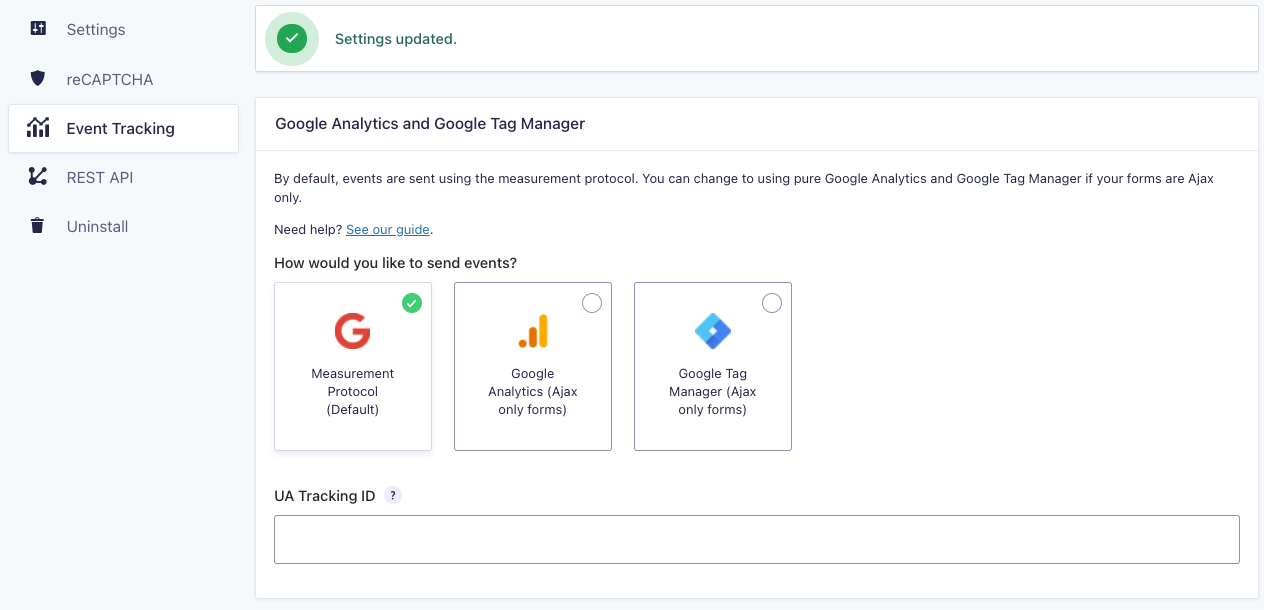
The Gravity Forms setting screen where you setup your event tracking.
-
The form settings feed list.
-
The feed settings page
-
Partial entries add-on section
About this plugin
Gravity Forms has launched an official Google Analytics Add-on. It is the successor to this plugin.
This plugin provides an easy way to add event tracking to your Gravity Forms using Google Analytics and Google Tag Manager.
This plugin support Google Analytics 3 and Google Analytics 4.
Also supports:
- Pagination events
- JS only events
- Google Tag Manager
Setup Guide
Looking for help setting things up? Read Our Setup Guide
Minimum Requirements
- Gravity Forms 2.5
- Google Analytics Universal Analytics v3
- Google Tag Manager (optional)
Features
- Submit events to Google Analytics using the Measurement Protocol, JavaScript, or using Google Tag Manager
- Add multiple event feeds with conditionals
- Custom event categories, actions, labels and even values
- Track form pagination events
- Dynamic event value on payment forms (integration with the payment add-ons including Paypal Standard, PayPal Pro, Stripe, etc…)
For payment based forms, you can leave the value blank to convert using the total payment amount.
Development happens on GitHub.
Please Rate the Plugin or Give Back to show support.
Get the official Gravity Forms Google Analytics Add-on
The official Gravity Forms add-on is here and is the successor to this plugin.
Find out more details about the Gravity Forms Google Analytics Add-on.
Questions
- What are the plans for this plugin now that an official Add-on is out?
This plugin will continue to be maintained. No new features are planned, however. Users are encouraged to use the official Gravity Forms Google Analytics Add-on for more up-to-date features and support.
- Do this plugin support Google Analytics 4?
Check out this post and YouTube Playlist for how to integrate with Google Analytics 4.
- How do I track pagination?
- How do I track using JavaScript only?
See Going Advanced.
- Does this work with Google Tag Manager?
- Can I set values for my form conversions?
Yes, the video above shows you how. Please note that values can be integers only, so the result may be rounded up or down.
- Can I set a value for pagination?
Yes, check out our filters on GitHub.
- Can I track when a user has filled out a form field, but not submitted?
You may use the Partial Entries add-on, but it is not recommended. Use pagination events instead.
Check out the video below for an explanation:
sandywp / also on the shelf
Try another plugin
-
The best free Google Analytics plugin for WordPress. See how visitors find and use your website so you can grow your business…

GTM4WP – A Google Tag Manager (GTM) plugin for WordPress
4.5 · 700K+ installs
Advanced tag management for WordPress with Google Tag Manager

WP Statistics – Simple, privacy-friendly Google Analytics alternative
4.1 · 500K+ installs
Cookieless, privacy-friendly WordPress analytics. Clear graphs and visitor data kept on your own server.

Spin up a real WordPress site in seconds.
Test plugins, build a demo, hand a client a link — then squash it and start again. No local setup, no Docker.