sandywp / plugins / gotmls

Anti-Malware Security and Brute-Force Firewall
This Anti-Malware scanner searches for Malware, Viruses, and other security threats and vulnerabilities on your server and it helps you fix them.
Ready in seconds.
v4.23.90 100,000+ installs WP 3.3+ PHP 5.6+
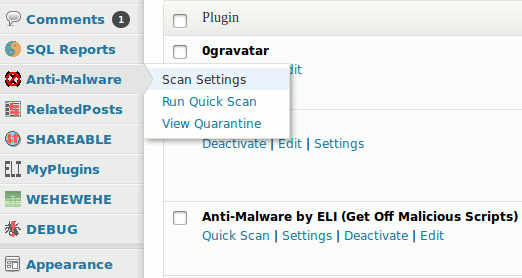
What you get inside
5 screens-
The menu showing Anti-Malware options.
-
The Scan Setting page in the admin.
-
An example scan that found some threats.
-
The results window when "Automatic Repair" fixes threats.
-
The Quarantine showing threats that have been fix already.
About this plugin
Features:
- Download Definition Updates to protect against new threats.
- Run a Complete Scan to automatically remove known security threats, backdoor scripts, and database injections.
- Firewall block SoakSoak and other malware from exploiting Revolution Slider and other plugins with known vulnerabilites.
- Upgrade vulnerable versions of timthumb scripts.
Premium Features:
- Patch your wp-login and XMLRPC to block Brute-Force and DDoS attacks.
- Check the integrity of your WordPress Core files.
- Automatically download new Definition Updates when running a Complete Scan.
Register this plugin at GOTMLS.NET and get access to new definitions of “Known Threats” and added features like Automatic Removal, plus patches for specific security vulnerabilities like old versions of timthumb. Updated definition files can be downloaded automatically within the admin once your Key is registered. Otherwise, this plugin just scans for “Potential Threats” and leaves it up to you to identify and remove the malicious ones.
NOTICE: This plugin makes calls to GOTMLS.NET to check for updates not unlike what WordPress does when checking your plugins and themes for new versions. Staying up-to-date is an essential part of any security plugin and this plugin can let you know when there are new plugin and definition update available. If you’re allergic to “phone home” scripts then don’t use this plugin (or WordPress at all for that matter).
Special thanks to:
- Clarus Dignus for design suggestions and graphic design work on the banner image.
- Jelena Kovacevic and Andrew Kurtis of webhostinghub.com for providing the Spanish translation.
- Marcelo Guernieri for the Brazilian Portuguese translation.
- Umut Can Alparslan for the Turkish translation.
- Micha Cassola for the German translation.
- Robi Erwin Setiawan for the Indonesian translation.
Questions
- Why should I register?
If you register on GOTMLS.NET you will have access to download definitions of New Threats and added features like automatic removal of “Known Threats” and patches for specific security issues like old versions of timthumb and brute-force attacks on wp-login.php. Otherwise, this plugin only scans for “Potential Threats” on your site, it would then be up to you to identify the good from the bad and remove them accordingly.
- How do I patch the Revolution Slider vulnerability?
Easy, if you have installed and activated my this Anti-Malware plugin on your site then it will automatically block attempts to exploit the Revolution Slider vulnerability.
- How do I patch the wp-login vulnerability?
The WordPress Login page is susceptible to a brute-force attack (just like any other login page). These types of attacks are becoming more prevalent these days and can sometimes cause your server to become slow or unresponsive, even if the attacks do not succeed in gaining access to your site. This plugin can apply a patch that will block access to the WordPress Login page whenever this type of attack is detected. Just click the Install Patch button under Brute-force Protection on the Anti-Malware Setting page. For more information on this subject read my blog.
- Why can’t I automatically remove the “Potential Threats” in yellow?
Many of these files may use eval and other powerful PHP function for perfectly legitimate reasons and removing that code from the files would likely cripple or even break your site so I have only enabled the Auto remove feature for “Know Threats”.
- How do I know if any of the “Potential Threats” are dangerous?
Click on the linked filename to examine it, then click each numbered link above the file content box to highlight the suspicious code. If you cannot tell whether or not the code is malicious just leave it alone or ask someone else to look at it for you. If you find that it is malicious please send me a copy of the file so that I can add it to my definition update as a “Know Threat”, then it can be automatically removed.
- What if the scan gets stuck part way through?
First just leave it for a while. If there are a lot of files on your server it could take quite a while and could sometimes appear to not be moving along at all even if it really is working. If it still seems stuck after a while then try running the scan again, be sure you try both the Complete Scan and the Quick scan.
- How did I get hacked in the first place?
First, don’t take the attack personally. Lots of hackers routinely run automated script that crawl the internet looking for easy targets. Your site probably got hacked because you are unknowingly an easy target. This might be because you are running an older version of WordPress or have installed a Plugin or Theme with a backdoor or known security vulnerability. However, the most common type of infection I see is cross-contamination. This can happen when your site is on a shared server with other exploitable sites that got infected. In most shared hosting environments it’s possible for hackers to use an one infected site to infect other sites on the same server, sometimes even if the sites are on different accounts.
- What can I do to prevent it from happening again?
There is no sure way to protect your site from every kind of hack attempt. That said, don’t be an easy target. Some basic steps should include: hardening your password, keeping all your sites up-to-date, and run regular scans with Anti-Malware software like GOTMLS.NET
Spin up a real WordPress site in seconds.
Test plugins, build a demo, hand a client a link — then squash it and start again. No local setup, no Docker.