sandywp / plugins / fluid-checkout
Fluid Checkout for WooCommerce – Lite
Fluid Checkout is a free WooCommerce checkout plugin to help more shoppers finish their order: easy for new buyers, fast for repeat orders.
Ready in seconds.
v5.0.1 20,000+ installs WP 6.5+ PHP 7.4+
What you get inside
7 screens-
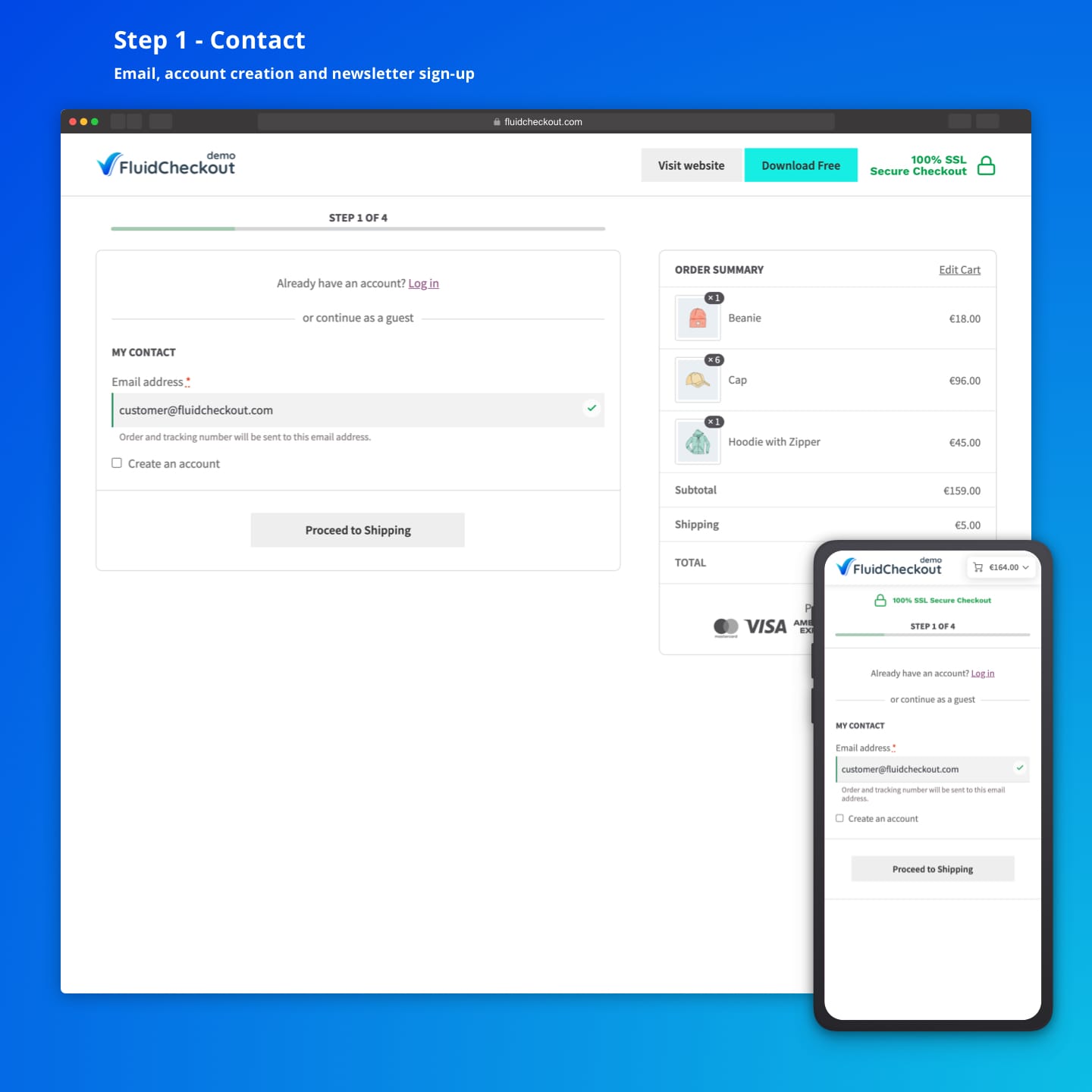
Step 1 - Contact: Email, account creation and newsletter sign-up
-
Step 2 - Shipping: Shipping address, shipping method, additional order notes
-
Step 3 - Billing: Billing address and company information
-
Step 4 - Payment: Payment options and discounts
-
Single Step: All fields are displayed in one single step.
-
Settings: Multi-step or single-step layout, choose a logo and header color, enable/disable features
-
Theme Deli: The checkout page looks and feels like your website, even with highly styled themes
About this plugin
Help more shoppers finish their order with a WooCommerce checkout that’s easy for first time buyers and faster for repeat purchases.
Fluid Checkout Lite is a free WooCommerce checkout plugin that replaces the default checkout page with a mobile first, multi-step or one page checkout. Built to finish more orders, it asks for each piece of information at the right moment, shows fewer checkout fields, and still looks and feels like your own store.
Works with popular themes and payment gateways like Stripe and PayPal. Using the WooCommerce Checkout block? Fluid Checkout automatically replaces it with its own checkout form, so you don’t need to rebuild your checkout page.
Built with accessibility in mind and designed to support WCAG 2.2 Level AA on the checkout page, so shoppers in the US, the EU and everywhere else can complete their order.
Trusted by thousands of active WooCommerce sites.
Live demo
Try the checkout yourself before you install:
- Fluid Checkout Lite demo: the free checkout
- Fluid Checkout PRO demo: cart, checkout and thank you pages
Why use Fluid Checkout
- Help reduce abandoned carts: A clear, guided checkout with fewer open fields and instant feedback helps more buyers finish their order.
- Faster for repeat customers: Saved details and skipped steps take returning buyers to payment sooner, and guest checkout stays simple.
- Keeps your store’s look: Works with your theme and payment gateways out of the box, and you can customize without code.
- Easy to install: Activate the plugin and the guided setup helps you configure your checkout, with a live preview of your checkout pages.
Top notch plugin and support team!
Cleanest and easiest checkout plugin on the market – it will save you a lot of headache in setting up your checkout flow and the support team is active/responsive and consistently working to improve. Just go ahead download and activate this one 🔥🔥🔥
@vsonacci
Insane how great this is!
This plugin radically modernizes and cleans up the WooCommerce checkout.
While doing a better job at UX & Conversion Optimization, it’s also more compatible with plugins.
Quite insane how the developer is doing this. And a free plugin!!@allancaeg
Upgrade to Fluid Checkout PRO for the full purchase journey.
Fluid Checkout PRO brings the same experience to the cart, order pay and thank you pages. It adds Google Address Autocomplete, the Address Book, account matching, delayed account creation, edit cart at checkout, the EU-VAT Assistant and more.
Fluid Checkout PRO is one standalone plugin: all Lite features, all PRO features, and the Address Book, Google Address Autocomplete and EU-VAT Assistant, with priority support.
See all Fluid Checkout PRO features
Free features in Fluid Checkout Lite
-
Multi-step or one page checkout: Choose a checkout split into easy steps, or show all fields on a single page. The layout changes, but your checkout still looks and feels like your store.
-
Optimized for mobile: Fluid Checkout is built for small screens first, then enhanced for desktop. Fields such as phone and email open the right keyboard on mobile devices.
-
Shipping before billing: Customers think about where to send their order before they think about invoices. Fluid Checkout asks for the shipping address first and copies it to billing when both are the same.
-
Fewer checkout fields on screen: Optional fields such as “Company”, “Address line 2” and “Order notes” are hidden behind an “Add” link. Anyone who needs a field can add it in one click.
-
Instant field validation: The default WooCommerce checkout only checks fields after customers click “Place order”. Fluid Checkout checks fields right away and shows clear feedback, so the “Place order” button is the last thing customers click.
-
Coupon code field that does not distract: An open coupon field can send customers away to hunt for codes, and some never come back. Fluid Checkout shows the coupon field in a collapsed section. Customers who have a code can still find it easily.
-
Trust badges on the checkout page: Add payment icons, security badges, guarantees, reviews or testimonials to widget areas at key positions on the checkout page.
-
Customer data saved automatically: Customers never lose what they typed. After a page refresh or a later visit, they continue where they left off. Payment details are never saved, for security reasons.
-
Skip completed steps: Repeat customers skip the steps that already have all required information. They can still review and change any detail before placing the order.
-
Shipping phone field: Add a separate phone field for delivery questions, in addition to the billing phone field.
-
Works with the WooCommerce Checkout block: Fluid Checkout automatically replaces the WooCommerce Checkout block with its own checkout form.
-
Better accessibility: Support for keyboard navigation and screen readers on the checkout page.
-
Translated into 83 languages: With right-to-left languages support.
PRO features
Fluid Checkout PRO is a single plugin with everything for your checkout: all features of Fluid Checkout Lite, all PRO features, and the Address Book, Google Address Autocomplete and EU-VAT Assistant. PRO is standalone and does not need Fluid Checkout Lite installed.
-
Google Address Autocomplete: Shipping and billing addresses are completed from Google suggestions as customers type. Customers type less, and you get fewer address mistakes. Needs a Google API key.
-
Address Book: Customers can save multiple shipping and billing addresses, choose default ones, and pick a saved address at checkout and in the cart shipping calculator.
-
Account matching: Guests whose email already has an account can still check out. No more “an account is already registered” error. The order is still linked to their existing account.
-
Delayed account creation: No account fields to distract at checkout and no forced account, which can help more buyers finish their order. Customers can create an account after the order is placed.
-
Optimized cart page and edit cart at checkout: Cart contents and totals update automatically, with no “Update cart” button. Mobile friendly quantity buttons, inline stock messages, cross sells and a layout that matches your checkout. Customers can also change quantities or remove products right on the checkout page, so you might even skip the cart page.
-
Design templates and layouts: Choose the Classic, Boxed, Split or Minimalist design. Use a 1 column or 2 column layout, show the order summary at the top on mobile, and switch to a breadcrumbs style progress bar that shows each step name.
-
Checkout design customization without code: Use the Design editor to change colors, styles for buttons and form fields and more from the settings page, with a live preview. No custom CSS or theme code required.
-
Express checkout buttons in one place: Groups the express buttons added by compatible payment plugins, such as Google Pay, Apple Pay and Amazon Pay, together at the top of the checkout. PRO does not add these buttons itself. They come from your payment plugin.
-
EU-VAT Assistant: Check EU VAT numbers and remove VAT for eligible EU businesses. It keeps proof of each check and can confirm the customer’s billing country when needed.
-
Thank you and order pay pages: A clear order overview with relevant actions, an order status progress bar and payment instructions when needed. The same layout is used for orders in the customer account. The order pay page matches your checkout, with the most relevant order details at the top.
-
Billing first, or one address for both: Choose the address order that fits your store. Billing first works well for gifts and B2B orders.
-
International phone numbers: Phone numbers with country code, checked for the right length.
-
Local pickup: When customers choose local pickup or in-store collection, the shipping address fields are hidden.
-
Gift messages: Let customers add a gift message to their order and print it on packing slips from supported invoice and packing slip plugins.
-
Trust badges and coupon field on more pages: Add trust badges to the cart, order pay and thank you pages. Show the coupon field in more positions on the checkout page, and on the cart page.
-
Priority support and licenses for multiple sites: PRO includes priority support. Licenses for multiple sites are available and easily managed from your account on our website.
See all Fluid Checkout PRO features
Try the Fluid Checkout PRO demo
Fully Customizable
Adjust the checkout from the settings page. Choose a multi-step or one page layout, enable or disable features, and set your logo and header color. Use the live preview in the settings pages to test your changes before saving them.
With Fluid Checkout PRO, no code is needed for most customizations with the built-in design settings. Learn more about no code customization:
No code customization with the design editor
Coming soon to Fluid Checkout PRO: the Checkout Editor. Edit your checkout fields with the checkout fields editor, and edit or create custom checkout steps and sub-steps (or sections and sub-sections in the one page layout).
Developers can go further with template files and many action and filter hooks. See our guides:
- Customize button colors and styles
- Customize colors of elements on Fluid Checkout
- Customize template files
- Hooks reference for Fluid Checkout Lite
Tested WooCommerce Themes
Fluid Checkout is explicitly compatible with 90+ themes, and most other themes work out of the box.
See all themes explicitly compatible with Fluid Checkout
We test popular themes and add compatibility for them in every update, including:
- Astra
- Avada
- Blocksy
- Divi
- Flatsome
- GeneratePress
- Hello Elementor
- Kadence
- OceanWP
- Shoptimizer
- Storefront
- Woodmart
- (… and many more)
Don’t see your theme? No problem. If your theme is not listed, it does not mean it won’t work. Only that we have not tested it yet or there was no compatibility issue to fix.
Try Fluid Checkout now and if you experience any issues please let us know through our support page and we’ll look into it.
Compatible with popular plugins
Fluid Checkout is explicitly compatible with 150+ plugins, and most other plugins work out of the box.
See all plugins explicitly compatible with Fluid Checkout
Page editors
- WordPress block editor (Gutenberg)
- Elementor (free and PRO)
- Divi Builder
- Avada Builder
- Breakdance
- Oxygen Builder
Payment gateways
- WooCommerce Stripe Gateway
- WooCommerce PayPal Payments
- WooCommerce Amazon Pay
- Payment Plugins for Stripe WooCommerce
- Payment Plugins for PayPal WooCommerce
- Klarna Payments for WooCommerce
- Mercado Pago payments for WooCommerce
- (… and many more)
Express checkout buttons grouped at the top (PRO)
With PRO, the express buttons added by these payment plugins are grouped together at the top of the checkout:
- WooCommerce Stripe Gateway
- WooPayments
- WooCommerce Amazon Pay
- Payment Plugins for Stripe WooCommerce
- Payment Plugins for PayPal WooCommerce
- Payment Plugins Braintree For WooCommerce
- (… and many more)
Subscription plugins
- WooCommerce Subscriptions
- Woo All Products for Subscriptions (PRO feature)
- SUMO Subscriptions
Other plugins
- Checkout Field Editor for WooCommerce (free and PRO) by ThemeHigh
- CartFlows
- Germanized for WooCommerce
- German Market
- Brazilian Market on WooCommerce
- Klaviyo
- MailPoet
- Brevo for WooCommerce
- (… and many more)
Don’t see a plugin? No problem. If a plugin or payment method is not listed, it does not mean it won’t work. Only that we have not tested it yet or there was no compatibility issue to fix.
Try Fluid Checkout now and if you experience any issues please let us know through our support page and we’ll look into it.
Translations
We understand translations and localization is very important to all users worldwide.
Fluid Checkout is fully localized and translatable using the built-in WordPress functions, and currently translated into 83 languages out of the 132 languages supported by WordPress, which should include all the most used languages. All translations are done automatically through DeepL or Google Translate as available on those services.
Right-to-left languages are supported. The plugin will adjust its layout to right-to-left languages as expected.
IMPORTANT NOTES:
– Languages with variations will use the same language file. For example, when the website is in German the translation used will be German (Formal). For all Spanish speaking countries, the translation used will be Spanish (Spain).
– All official translations were made using automated methods such as Google Translate or DeepL, so some translation errors are expected. If you encounter any errors in the translation to your language, please contact our support and we’ll evaluate and fix them.
See our documentation on How to translate Fluid Checkout plugins into your language.
Questions
- Is there a Fluid Checkout PRO version?
Yes. You can view all details, pricing and list of features of the Fluid Checkout PRO version on our website.
- What is the difference between Fluid Checkout Lite and PRO?
Fluid Checkout Lite is free and optimizes your WooCommerce checkout page. Fluid Checkout PRO includes everything in Lite and brings the same experience to the cart, order pay and thank you pages. It adds features such as Google Address Autocomplete, the Address Book, account matching, edit cart at checkout and the EU-VAT Assistant, plus priority support. When you activate Fluid Checkout PRO 5.0 or newer, it automatically deactivates Fluid Checkout Lite.
Fluid Checkout PRO is a single plugin with everything for your checkout. Licenses for multiple sites are available and easily managed from your account on our website. See all Fluid Checkout PRO features.
- Do I need to keep Fluid Checkout Lite installed when I upgrade to PRO?
No. Fluid Checkout PRO 5.0+ is a standalone plugin that includes all Lite features, so it does not need Fluid Checkout Lite installed. When you activate PRO, it automatically deactivates Fluid Checkout Lite, so you don’t have to do it yourself. You can delete Lite afterwards.
In versions before 5.0 Lite is required for PRO to work. That is no longer the case.
- Will Fluid Checkout work with my payment gateway?
Most payment gateways work out of the box, including popular ones such as Stripe, PayPal and Amazon Pay. Some payment plugins may need adjustments.
If you have any issues using Fluid Checkout with your payment gateway please let us know through our support page and we’ll look into it.
- What is the best checkout plugin for WooCommerce?
The best checkout plugin is the one that helps your customers finish their order without changing how your store works. Look for a mobile first checkout, fewer checkout fields, guest checkout, and compatibility with your theme and payment gateways. Fluid Checkout covers all of these, is free to start with Fluid Checkout Lite, and is trusted by thousands of active WooCommerce sites.
- How can I speed up checkout and reduce abandoned carts in WooCommerce?
Ask only for what you need, at the right moment. Fluid Checkout helps with checkout optimization out of the box: it hides optional fields, checks each field as customers type, saves what they entered, and lets repeat customers skip completed steps. With PRO, Google Address Autocomplete, the Address Book and account matching make checkout even faster.
- Is there a free one page checkout for WooCommerce?
Yes. Fluid Checkout Lite is free and lets you choose a one page checkout or a multi-step checkout and see which one works best for you without having to rebuild your checkout again. Change the layout in WP Admin > Fluid Checkout > Settings.
- Does Fluid Checkout work with the WooCommerce block based checkout?
Yes. Fluid Checkout automatically replaces the WooCommerce Checkout block with its own checkout form, so you don’t need to rebuild your checkout page. With the optimized cart page turned on, Fluid Checkout PRO does the same for the WooCommerce Cart block.
sandywp / also on the shelf
Try another plugin
Brazilian Market on WooCommerce
4.8 · 60K+ installs
Adds Brazilian checkout fields in WooCommerce

4.6 · 40K+ installs
Add Google reCAPTCHA to your WooCommerce Checkout, Login, and Registration Forms. 100% free!

FunnelKit – Funnel Builder Plugin for WooCommerce Checkout
5.0 · 30K+ installs
Create high-converting WooCommerce checkout pages, thank you pages & sales funnels with the highest-rated WordPress funnel…
Spin up a real WordPress site in seconds.
Test plugins, build a demo, hand a client a link — then squash it and start again. No local setup, no Docker.