sandywp / plugins / fileorganizer

FileOrganizer
WordPress File Manager
FileOrganizer is an intuitive file manager to easily edit, delete, upload, download, and manage all your WordPress files and folders right from the da …
Ready in seconds.
v1.2.0 200,000+ installs WP 5.5+ PHP 5.5+
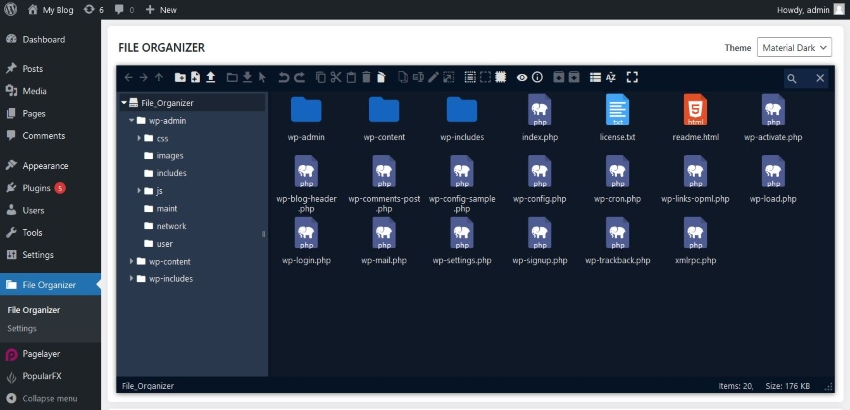
What you get inside
6 screens-
File Manager Screen
-
Edit File
-
Delete File
-
Make a folder
-
Download archived zip file
-
File archive as ZIP
About this plugin
FileOrganizer is a lightweight and easy-to-use WordPress file manager. Organize and manage your WordPress files with FileOrganizer without any control panel or FTP access. You can access, upload, download, edit, delete, zip, cut, copy, and paste files even outside the WordPress root directory.
Free Features
- Files and directory Management: Supports all file operations on a remote server such as create files or directory, upload, download, rename, copy, etc.
- Drag & drop: Easy drag-and-drop file transfer for uploading and moving files.
- Built-in editor: FileOrganizer has a built-in editor for editing code and files.
- Archive creation / extraction: Create or extract archives with one click(.zip, .tar)
- File Previews: Supports previews for common file types including PDFs, pictures, videos, audio, and thumbnails.
- Responsive: FileOrganizer is compatible with tablets and smartphones.
- Search: The built-in search feature makes it simple to find your files.
- File View: Offers both icons and list views for easy navigation.
- Image Thumbnails: Display thumbnails for image files.
- Support Shortcuts: Common keyboard shortcuts such as cut, copy, paste, etc. are available.
- Toolbar: Rich Toolbar and context menu are available.
- Directory Size: Calculates size of the directory.
- File/Directory Info: File or directory information can retrived by simply right-clicking a file and choosing Get Info.
Info
Do you have questions related to FileOrganizer ? Use the following links :
Questions
- How to install FileOrganizer
Go To your WordPress install -> Plugins -> Add New Button -> In Search Box, Look For FileOrganizer -> Click on Install.
Spin up a real WordPress site in seconds.
Test plugins, build a demo, hand a client a link — then squash it and start again. No local setup, no Docker.