sandywp / plugins / featured-image-from-url

Featured Image from URL (FIFU)
Use remote media as the featured image and beyond.
Ready in seconds.
v6.0.6 60,000+ installs WP 5.6+ PHP 8.1+
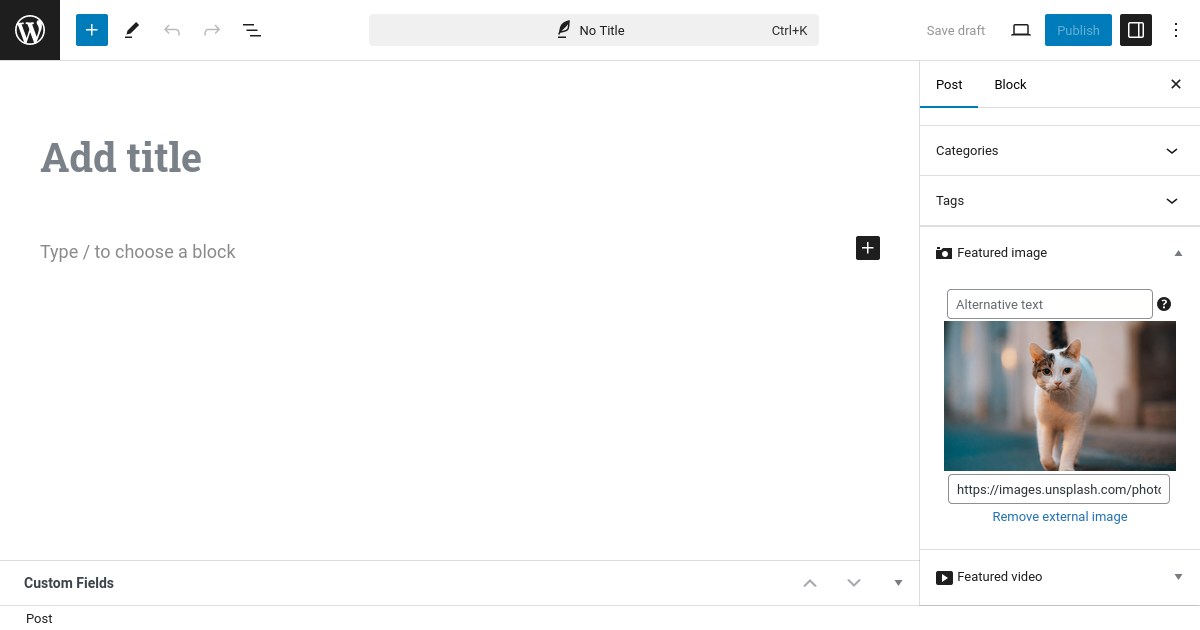
What you get inside
8 screens-
Featured image
-
Image search
-
Featured image settings
-
WooCommerce remote product image
-
Quick Edit
-
Elementor integration
-
Category image
-
Settings → Help
About this plugin
WordPress plugin for remote featured images and more
FIFU has helped thousands of websites worldwide save storage, processing resources, and time since 2015.
If you are tired of wasting time and resources with thumbnail regeneration, image optimization, and never-ending imports, this plugin is for you.
Featured image
Use a remote image as the featured image of your post, page, custom post type, or WooCommerce product.
- Remote featured image
- Featured image alternative text
- Optimized images
- Make all images square
- Image search with Unsplash
- Default featured image
- Hide featured media
- Modify post content
- Auto set image title
- Featured image column
- Quick Edit
- [PRO] Image search with a search engine
- [PRO] Disable right-click
- [PRO] Save in the media library
- [PRO] Replace not found image
- [PRO] Custom popup
- [PRO] bbPress and BuddyBoss Platform integration
- [PRO] Page redirection
Category image
Use a remote image for categories and other supported taxonomy terms.
- Remote category image
- Category image alternative text
Automatic featured media
- Auto set featured media from post content
- [PRO] Auto set featured image using post title and a search engine
- [PRO] Auto set featured media using web page address
- [PRO] Auto set product images from ASIN
- [PRO] Auto set featured media from custom field
- [PRO] Auto set screenshot as featured image
- [PRO] Auto-share on social media
Automation
- WP-CLI integration
- Developer functions
- [PRO] Add-on for WP All Import
- [PRO] WooCommerce import
- [PRO] Advanced REST API integrations
WooCommerce
- Remote product image
- Lightbox and zoom
- Remote product category image
- [PRO] Gallery for remote images
- [PRO] Gallery for remote videos
- [PRO] Category images auto set
- [PRO] Variable product image tools
- [PRO] Variation image tools
- [PRO] Gallery for variation images
- [PRO] Save in the media library
- [PRO] FIFU product gallery
- [PRO] Quick Buy
- [PRO] Add image to order email
Featured video
The PRO version supports featured videos from services and external video files.
- [PRO] Featured video
- [PRO] Watch later
- [PRO] Video thumbnail
- [PRO] Play button
- [PRO] Minimum width
- [PRO] Video controls
- [PRO] Autoplay on mouseover
- [PRO] Autoplay
- [PRO] Playback loop
- [PRO] Mute
Widgets for Elementor
- Featured image
- [PRO] Featured video
Fields for Gravity Forms
- Featured image
- [PRO] Featured video
- [PRO] Featured slider
Fields for Dokan
- Featured image
- [PRO] Product gallery
Other PRO features
- [PRO] Featured audio
- [PRO] Featured slider
- [PRO] Image and video galleries
- [PRO] Shortcodes
- [PRO] Advanced WooCommerce media features
Functions for developers
- Featured image:
fifu_dev_set_image($post_id, $image_url) - Product category image:
fifu_dev_set_category_image($term_id, $image_url) - [PRO] Featured video:
fifu_dev_set_video($post_id, $video_url) - [PRO] Featured slider:
fifu_dev_set_slider($post_id, $url_list, $alt_list) - [PRO] Product image + Image gallery:
fifu_dev_set_image_list($post_id, $image_url_list) - [PRO] Product video + Video gallery:
fifu_dev_set_video_list($post_id, $video_url_list) - [PRO] Product category video:
fifu_dev_set_category_video($term_id, $video_url)
FIFU Cloud
- Cloud storage
- Global CDN
- Optimized thumbnails
- Automatic cloud upload and deletion scheduling
- Hotlink protection
Links
Questions
- Why isn’t the preview button working?
Your image URL may be invalid. Check Settings → Getting started.
- Does FIFU save images in the WordPress media library?
No. FIFU is designed to work with external images. Features that save remote images in the WordPress media library are available in FIFU PRO.
- Why is the featured image displayed twice?
Check whether the option that adds featured media to the post content is enabled unnecessarily.
- Why is the featured image not displayed?
Check whether Hide Featured Media is enabled.
- Why are there no changes after updating settings?
Clear any page, object, or CDN caches used by the site.
- Is any action necessary before removing FIFU?
If you no longer need FIFU-generated metadata, use the cleanup tools available in FIFU settings before removing the plugin.
- What metadata does FIFU create?
FIFU creates database records that allow WordPress components and integrations to work with remote images.
- What are the disadvantages of remote images?
Remote images do not automatically have the same locally generated thumbnails as WordPress media-library images. FIFU provides features such as Optimized Images to handle this use case.
sandywp / also on the shelf
Try another plugin

Conditionally display featured image on singular posts and pages
4.8 · 30K+ installs
Easily control whether the featured image appears in the single post or page view (doesn't hide it in archive/list view).

3.6 · 10K+ installs
To Hide Featured Image on single post/page.

8K+ installs
Daddy Plus is a useful plugin for WordPress theme by Themes Daddy.
Spin up a real WordPress site in seconds.
Test plugins, build a demo, hand a client a link — then squash it and start again. No local setup, no Docker.