sandywp / plugins / export-woocommerce-customer-list

PiWeb Export Customers Users & Guest customer to CSV for WooCommerce
Export WooCommerce customer list CSV, export WooCommerce guest customer list CSV, export WordPress users CSV, Product Customer List for WooCommerce
Ready in seconds.
v2.2.13 1,000+ installs WP 3.0.1+
What you get inside
6 screens-
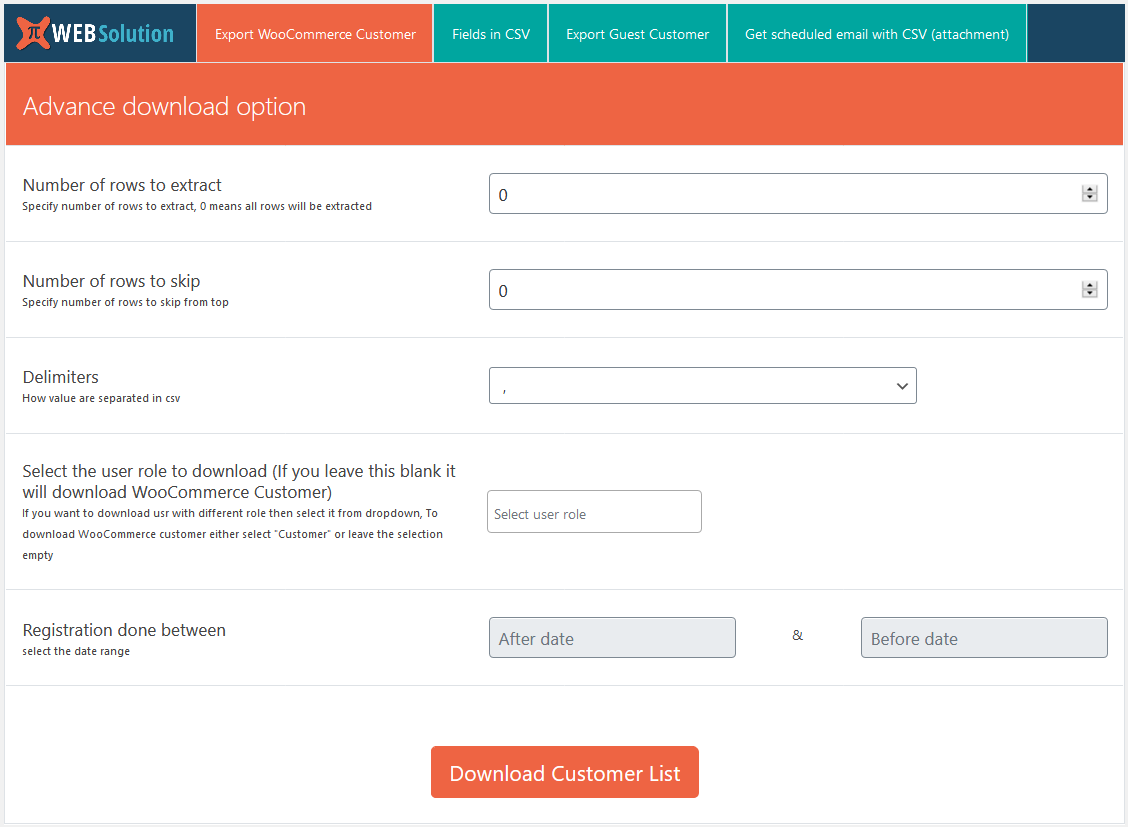
Exporting registered customer list by export WooCommerce customer list plugin
-
Configure field to be exported
-
Option to include custom order meta data in export WooCommerce customer list plugin
-
Exporting guest customer list
-
Sending customer list in email attachment automatically
About this plugin
Export WooCommerce customer list or export users with one click.
- Download complete customer list
- Download customer list by skipping rows from the top
- Limit the number of customer list rows in the exported CSV
- Modify the fields that you want in the generated CSV
- You can save the fields needed in the CSV so you don’t have to do this again; from next time onwards, you can directly click download
- Automate the whole customer list exporting process and receive the customer list in your inbox
- Set the email ID on which you want to receive the email
- Export customer user meta data
PRO Version
Here are the features of the PRO version of Export customer list:
Buy PRO version, Limited-period offer | Documentation
- All the features of the FREE version
- It allows you to download customers based on their registration dates
- It allows you to give custom labels to the columns of the generated CSV
- You can download users based on the registration date range
- You can set frequency of the automated email, to be Hourly, Twice Daily, Daily, or Weekly
- The list that you will receive will contain only the users registered during this time period
- You can download Guest customer data in a separate CSV
- You can filter out the guest customer list based on their order status
- You can filter out the guest customer list based on their order placement date
- Export users: You can download any other registered user data by selecting their role, so now you can download WooCommerce customer or normal WordPress user data as well
- Download customer records based on the product they have purchased
- You can make a condition for downloading the Product Customer List of only those customers who purchased product A and product B together in a single order
- You can control the fields you want to download in the Product Customer List records
-
You can restrict the Product Customer List by date of purchase or order status as well
-
This plugin can export custom data fields stored in:
User meta data, stored in the xx_usermeta table
Order meta data, stored in the xx_postmeta table
For registered customers: The plugin first tries to search for the custom field in user meta data, and if it is not found there, then it searches order meta data to find the value
For guest customers: It directly searches order meta data for the custom field data -
You can receive registered customer, guest customer or both customer records in email attachments
Privacy
If you choose to opt in from the plugin settings, or submit optional feedback during deactivation, this plugin may collect basic technical information, including:
- Plugin version
- WordPress version
- WooCommerce version
- Site URL
- Deactivation reason (if submitted)
This data is used solely to improve plugin quality, compatibility, and features. No personal or user-specific data is collected without consent.
Questions
- I just installed the plugin; I can’t find its settings page
You can find its download page or options page in
Tools >> Export customer- I want all the WooCommerce customer fields in the exported CSV
Yes, just click the Download button; it will contain all the fields of the WooCommerce customer
- Can I save the fields I need in the exported CSV
Yes, you can save the fields needed, so next time when you download, only the selected fields will be exported to the CSV
- Can I modify the label of the exported CSV fields
Yes, in the PRO version you can modify the field labels and save them too, so when you download the CSV it will have the modified fields. That way, you can directly use this CSV in your external system
- I want to receive the exported customer CSV via email
Yes, you can do this. Just enter your email and it will send the exported CSV list as an attachment via email twice daily, and the list will contain all the customers on your site
- I don’t want to receive emails twice daily, can I change the frequency of the email
Yes, in the PRO version you can change the frequency of the customer list email that you receive. You can set the frequency to be Hourly, Twice Daily, Daily, or Weekly
- The CSV that I receive contains all the customers on my site, can I receive customers registered in that time interval
Yes, in the PRO version you will only receive the customers registered during that particular time interval. So if you have set Weekly, you will receive one email at an interval of 7 days, and it will contain a list of customers registered during that 7-day interval
- I want to modify the subject and the message of the email
The PRO version allows you to change the subject and message of the email
sandywp / also on the shelf
Try another plugin

Product Customer List for WooCommerce
4.9 · 9K+ installs
Display a list of customers who bought a specific product at the bottom of the product edit page in WooCommerce and send them…

10+ installs
This plugin helps the woocommerce shop owners to search for customer by their mobile numbers. Plugin creats a list of customers…

5.0 · 10+ installs
Filter, sort, and export WordPress users to CSV using powerful UI-driven meta queries (roles, dates, numeric ranges, regex, and…
Spin up a real WordPress site in seconds.
Test plugins, build a demo, hand a client a link — then squash it and start again. No local setup, no Docker.