sandywp / plugins / error-log-monitor

Error Log Monitor
Adds a Dashboard widget that displays the latest messages from your PHP error log. It can also send logged errors to email.
Ready in seconds.
v1.7.12 20,000+ installs WP 4.5+ PHP 7.4+
What you get inside
2 screens-
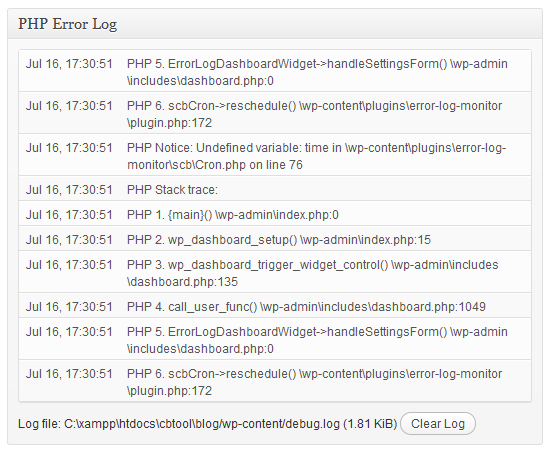
The "PHP Error Log" widget added by the plugin.
-
Dashboard widget configuration screen.
About this plugin
This plugin adds a Dashboard widget that displays the latest messages from your PHP error log. It can also send you email notifications about newly logged errors.
Features
- Automatically detects error log location.
- Explains how to configure PHP error logging if it’s not enabled yet.
- The number of displayed log entries is configurable.
- Sends you email notifications about logged errors (optional).
- Configurable email address and frequency.
- You can easily clear the log file.
- The dashboard widget is only visible to administrators.
- Optimized to work well even with very large log files.
Usage
Once you’ve installed the plugin, go to the Dashboard and enable the “PHP Error Log” widget through the “Screen Options” panel. The widget should automatically display the last 20 lines from your PHP error log. If you see an error message like “Error logging is disabled” instead, follow the displayed instructions to configure error logging.
Email notifications are disabled by default. To enable them, click the “Configure” link in the top-right corner of the widget and enter your email address in the “Periodically email logged errors to:” box. If desired, you can also change email frequency by selecting the minimum time interval between emails from the “How often to send email” drop-down.
sandywp / also on the shelf
Try another plugin

4.8 · 1M+ installs
Loginizer is a WordPress security plugin which helps you fight against bruteforce attacks.

4.4 · 900K+ installs
Redux is a simple, truly extensible, and fully responsive options framework for WordPress themes and plugins. It ships with an…

4.6 · 300K+ installs
Lets you edit the WordPress admin menu. You can re-order, hide or rename menus, add custom menus and more.
Spin up a real WordPress site in seconds.
Test plugins, build a demo, hand a client a link — then squash it and start again. No local setup, no Docker.