sandywp / plugins / email-log

Email Log
Log and view all outgoing emails from WordPress. Very useful if you have to debug email related problems or have to store sent emails for auditing.
Ready in seconds.
v2.63 80,000+ installs WP 4.0+ PHP 5.6+
What you get inside
5 screens-
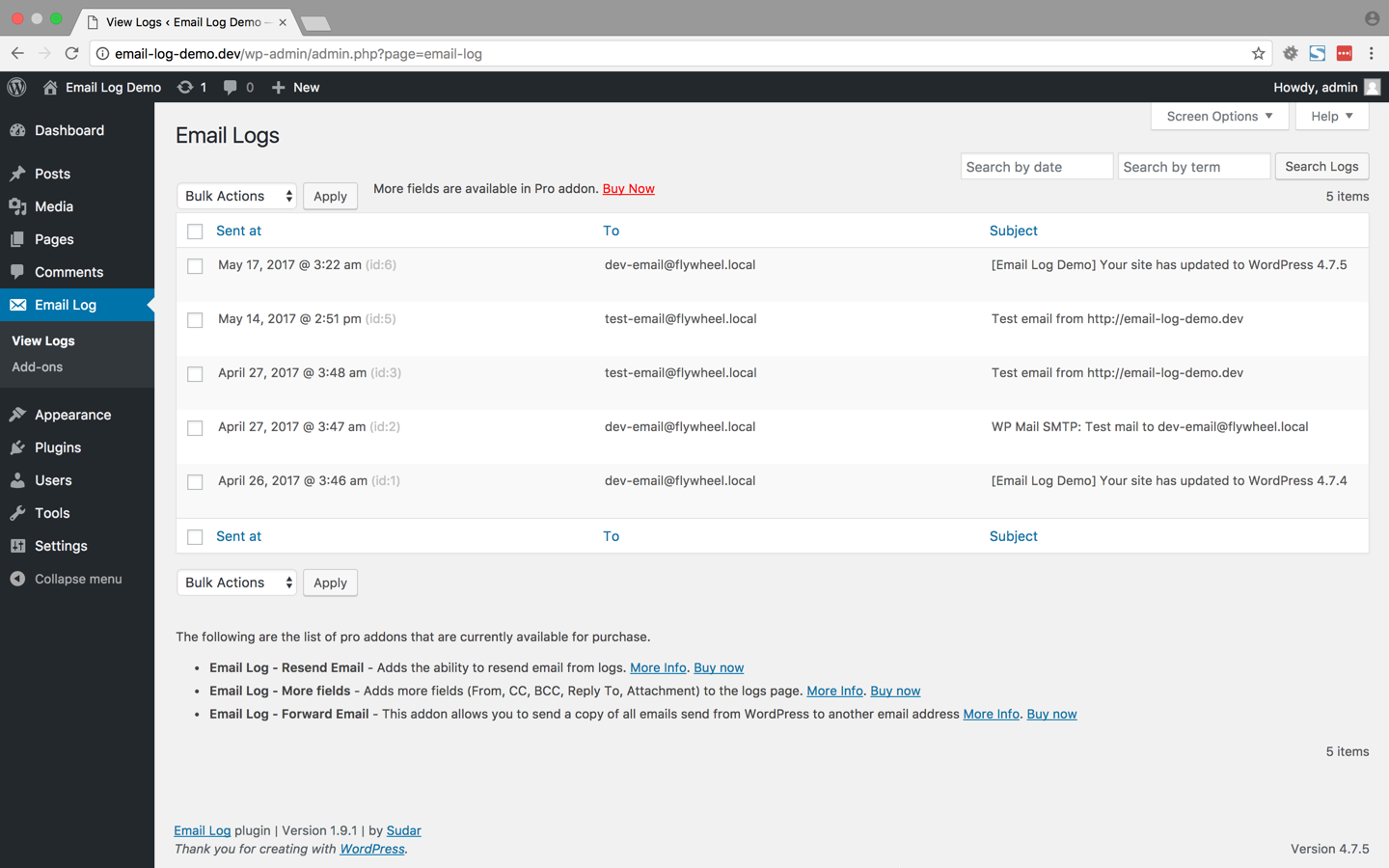
The above screenshot shows how the logged emails will be displayed by the Plugin
-
This screenshot shows how you can configure the email display screen. You can choose the fields and the number of emails per page
-
The above screenshot shows the HTML version (if available) of the logged email that you choose to view
-
The above screenshot shows the text version of the logged email that you choose to view
-
The above screenshot shows how you can search logged emails by date
About this plugin
Email Log is a WordPress plugin that allows you to easily log and view all emails that were sent from WordPress.
This would be very useful for debugging email related problems in your WordPress site or for storing sent emails for auditing purposes, especially on ecommerce sites that are setup with either WooCommerce or Easy Digital Downloads.
You can perform advanced actions like re-sending email, automatically forwarding emails, export logs and automatically monitor email deliverability with the PRO version.
Works with WordPress Multisite as well.
Viewing logged emails
The logged emails will be stored in a separate table and can be viewed from the admin interface.
While viewing the logs, the emails can be filtered or sorted based on the date, email, subject etc.
Deleting logged emails
In the admin interface, all the logged emails can be delete in bulk or can also be selectively deleted based on date, email and subject.
If you want to automatically delete the email logs after some days upgrade to the PRO version.
Resend email (PRO version)
Resend the email directly from the email log. You can modify the different fields of the email before resending it.
More Fields (PRO version)
Get access to additional fields in the email log page. The following are the additional fields that are added in the pro version.
- From
- CC
- BCC
- Reply To
- Attachment
Forward email (PRO version)
Pro version allows you to send a copy of all the emails send from WordPress to another email address.
You can choose whether you want to forward through to, cc or bcc fields.
This can be extremely useful when you want to debug by analyzing the emails that are sent from WordPress.
Export email logs (PRO version)
Export the email logs as a CSV file for further processing or record keeping.
Documentation
You can find fully searchable documentation in the doc section of the Email Log website.
Questions
- The content of the email is not getting logged when I am using wpmandrill plugin
wpmandrill plugin has a bug that prevents this plugin from logging the content of the email.
More details about the bug is available at https://wordpress.org/support/topic/mandrill-is-changing-the-names-of-args-in-the-filter?replies=1.
I have asked the author of the plugin to fix it and it might get fixed it the next release.
Meanwhile, I have added a hack to handle this condition in v1.7.3 of my plugin. So if the content is not getting logged, then upgrade to v1.7.3.
sandywp / also on the shelf
Try another plugin

WP Mail SMTP by WPForms – The Most Popular SMTP and Email Log Plugin
4.8 · 4M+ installs
Make email delivery easy for WordPress. Connect with SMTP, Gmail, Outlook, SendGrid, Mailgun, SES, Zoho, + more. Rated #1…

MC4WP: Mailchimp for WordPress
4.8 · 1M+ installs
The #1 Mailchimp plugin for WordPress. Allows you to add a multitude of newsletter sign-up methods to your site.

Easy WP SMTP – WordPress SMTP and Email Logs: Gmail SMTP, Office 365, Outlook,…
4.6 · 500K+ installs
Make SMTP email sending and delivery easy. Configure Gmail SMTP, Outlook, Brevo, SendGrid, Mailgun, SendLayer or connect to any…
Spin up a real WordPress site in seconds.
Test plugins, build a demo, hand a client a link — then squash it and start again. No local setup, no Docker.