sandywp / plugins / easy-login-woocommerce

Login & Register Forms
Popup, Slider, Profile & WooCommerce
Give your WordPress or WooCommerce website a modern login experience with beautiful, fast, and fully customizable forms.
Ready in seconds.
v4.0.3 40,000+ installs WP 3.0.1+
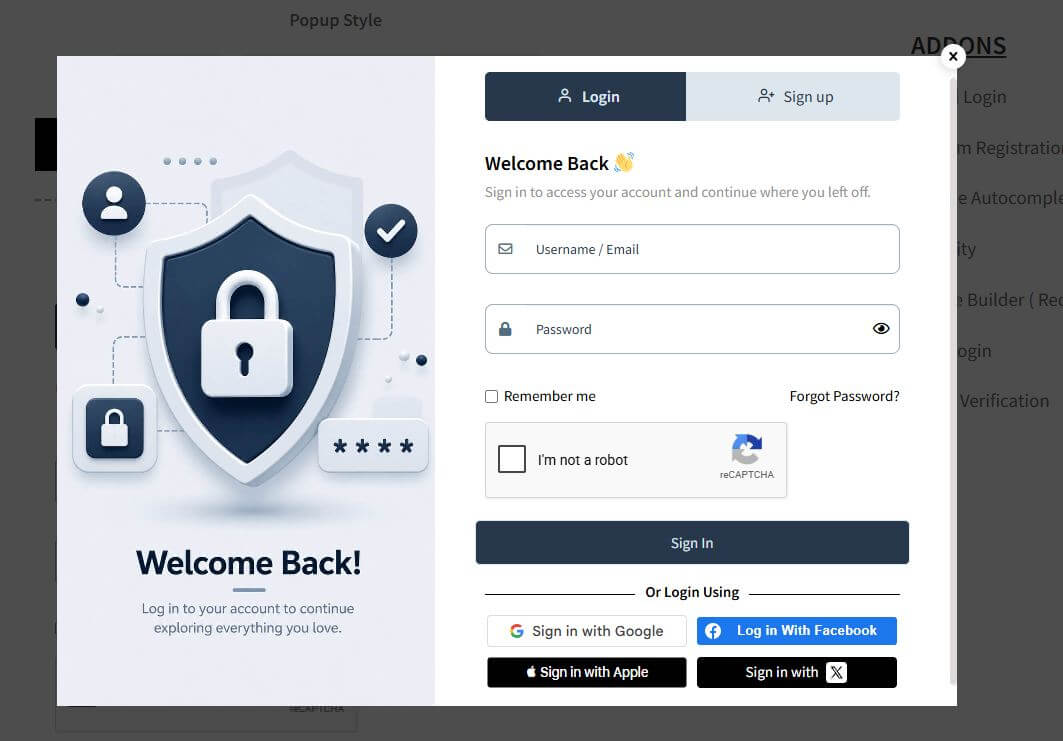
What you get inside
8 screens-
Registration Form.
-
Lost Password Form
-
Reset password form.
-
Available registration Fields
-
Customizable Field
-
General Settings 1
-
General Settings 2
-
Style Settings 1
About this plugin
Give your WordPress or WooCommerce website a modern login experience with beautiful, fast, and fully customizable forms.
✔ Login
✔ Registration
✔ Lost Password
✔ Reset Password
✔ User Profile
Choose how your forms appear:
⭐ Popup
⭐ Slider
⭐ Inline
No more redirecting users to the default WordPress login page. Keep visitors on your website with a smooth, AJAX-powered experience that helps increase registrations and conversions.
Perfect for WooCommerce stores, membership websites, online communities, LMS platforms, and business websites.
❤️ Why You’ll Love It
-
AJAX-powered forms (no page reloads)
-
Different layouts
-
Custom Field Manager
-
Flexible shortcodes
-
Beautiful & fully customizable design
-
WPML compatible
-
Lightweight, fast & developer friendly
Power Up with Add-ons
🌐 Social Login
Allow users to log in or register instantly using their favorite social accounts.
Supported providers
- Apple
- X (Twitter)
- LINE
Perfect for increasing registrations and reducing signup abandonment.
🔐 OTP Login & Two-Factor Authentication (2FA)
Offer secure, passwordless authentication using one-time verification codes.
Features
- Passwordless login via Email, SMS or WhatsApp OTP
- Two-Factor Authentication (2FA)
- Authenticator app support
- Verify phone numbers during registration
- Verify phone numbers during WooCommerce checkout
- Reduce fake accounts and fraudulent orders
✉️ Email Verification & User Approval
Protect your website from fake registrations.
Verification methods
- Verification Code
- One-Click Verification Link
- Manual User Approval
📝 Custom Registration Fields
Create registration forms tailored to your business.
Features
- Unlimited custom fields
- Text, Textarea, Select, Radio, Checkbox, File Upload and more
- Display fields on User Profile
- Display fields on WooCommerce My Account
- Reuse WooCommerce billing & shipping fields
🛡️ Security
Protect your forms against spam, bots and brute-force attacks.
Includes
- Google reCAPTCHA v2 & v3
- Cloudflare Turnstile
- Friendly Captcha (GDPR-friendly)
- Password Strength Meter
- Login Attempt Limiter
📍 Address Autocomplete
Automatically fill billing and shipping addresses using Google Places Autocomplete for faster checkout and more accurate customer information.
❤️ Built for Performance
Built with performance in mind, the plugin is lightweight, responsive and developer-friendly. It integrates seamlessly with both WordPress and WooCommerce while maintaining fast page loads and a smooth user experience.
Questions
- How to setup?
- Go to apperance->menus
- Under Login Popup Tab , select the desired option.
- Shortcodes
Please check “How to use” tab under plugin settings for more information.
Use shortcode [xoo_el_pop] to include it anywhere on the website. ( See info tab in settings to know more )
[xoo_el_pop type=”login” display=”button” text=”Login” change_to=”logout” redirect_to=”same”]For Inline form
[xoo_el_inline_form active=”login”]You can also trigger popup using class.
Login – xoo-el-login-tgr
Register – xoo-el-reg-tgr
Lost Password – xoo-el-lostpw-tgr
For eg: Login- How to translate?
- Download PoEdit.
- Open the easy-login-woocommerce.pot file in PoEdit. (/plugins/easy-login-woocommerce/languages/
easy-login-woocommerce.pot) - Create new translation & translate the text.
- Save the translated file with name “easy-login-woocommerce-Language_code”. For eg: German(easy-login-woocommerce-de_DE)
, French(easy-login-woocommerce-fr_FR). — Language code list - Save Location: Your wordpress directory/wp-content/languages/
- How to override templates?
Plugin template files are under templates folder.
Copy the template to your theme/templates/easy-login-woocommerce folder
If the template file is under sub directory, say in /globals folder then the copy directory will be
theme/templates/easy-login-woocommerce/globals/ For more info, check template header description
sandywp / also on the shelf
Try another plugin

Wordfence Security – Firewall, Malware Scan, and Login Security
4.7 · 5M+ installs
Firewall, Malware Scanner, Two Factor Auth, and Comprehensive Security Features, powered by our 24-hour team. Make security a…
-
Easily improve site security with WordPress Hardening, Two-Factor Authentication (2FA), Login Protection, Vulnerability Detection…

Limit Login Attempts Security – Login Security, 2FA, Firewall, Brute Force…
4.8 · 1M+ installs
WordPress login security with brute force protection, Two-factor authentication (2FA/MFA), firewall, IP/country blocking, and…

Spin up a real WordPress site in seconds.
Test plugins, build a demo, hand a client a link — then squash it and start again. No local setup, no Docker.