sandywp / plugins / easy-image-gallery

Easy Image Gallery
Easily create an image gallery on your posts, pages or any custom post type
Ready in seconds.
v1.5.5 4,000+ installs WP 3.5+ PHP 7.4.0+
What you get inside
7 screens-
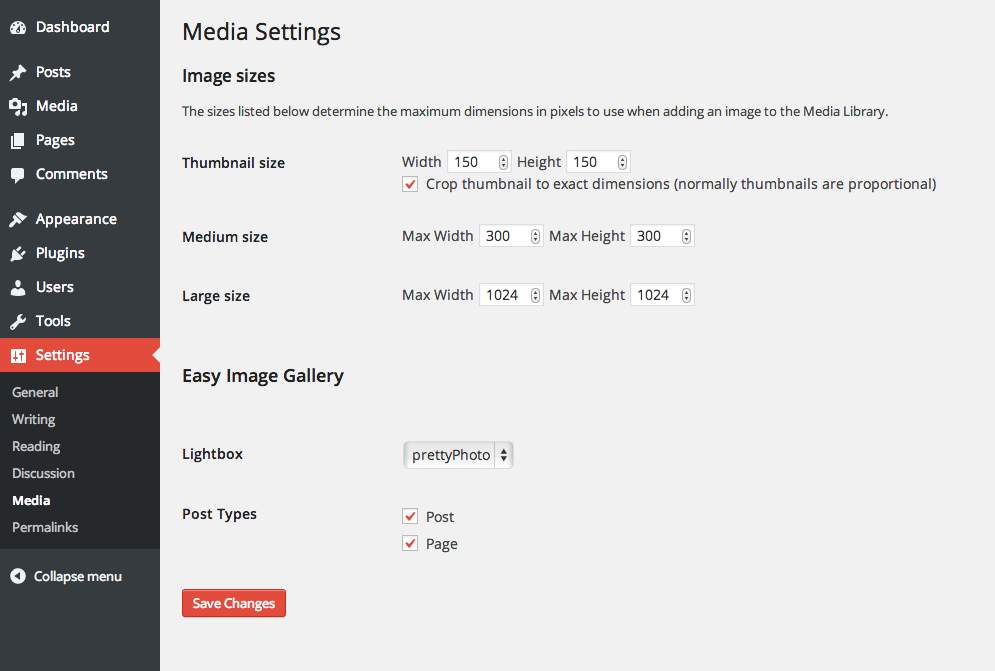
The plugin's simple configuration screen. Any existing custom post types will appear here
-
The plugin's simple metabox that is added to the publish/edit screens
-
You can select multiple images to insert into the gallery
-
The plugin's Image Gallery metabox after images have been inserted and the post has been saved
-
The front-end of the website showing the gallery which has been automatically appended to the content
-
Clicking on an image launches the lightbox. Here it's shown with prettyPhoto
About this plugin
This plugin allows you to easily create an image gallery on any post, page or custom post type.
Images are can be added and previewed from the metabox. Images can be re-ordered by drag and drop.
About:
There comes a time when you need more flexibility than the standard WP gallery offers, That’s when this plugin steps in.
This plugin’s goal is to make it easy to create a gallery and place it wherever you need.
A perfect example would be to create a product gallery for an ecommerce website and then
have the flexibility to position it where you wanted to match your theme’s design.
Features:
- Added the possibility to add two or more different galleries on one page
- Drag and drop re-ordering
- Add gallery to any post, page or custom post type
- If more than one image is added to the gallery, the images become grouped in the lightbox so you can easily view the next one
- CSS and JS are only loaded on pages where needed
- Images link to larger versions (can be turned off)
- Fully Localized (translation ready) with .mo and .po files
- Add multiple images to the gallery at once
- Uses the thumbnail size specified in Settings -> Media
- Custom webfont icon for hover effect
Whats’ New
- Added Gutenberg Support
- Added New Gallery – Luminous
Usage
Use the shortcode or the function to show the gallery.
Shortcode Usage
Use the following shortcode anywhere in the content area to display the gallery
[easy_image_gallery gallery="XXX"]
Where “XXX” is the ID of the gallery item.
Template Tag Usage
The following template tag is available to display the gallery
if( function_exists( 'easy_image_gallery' ) ) {
    echo easy_image_gallery( "XXX" );
}
Where “XXX” is the ID of the gallery item.
If you use the template tag above, you will need to remove the default content filter:
Developer Friendly
- Modify the gallery HTML using filters
- Developed with WP Coding Standards
- Easily add your preferred lightbox script via hooks and filters
- Easily unhook CSS and add your own styling
- Pass in a different image size for the thumbnails via filter
- Minimalistic markup and styling
Stay up to date
Become a fan on Facebook
https://www.facebook.com/DevriXLtd
Follow us on Twitter
https://twitter.com/wpdevrix
Questions
- Why my galleries don’t show up after an update to Version 1.3 or above?
In Version 1.3 of the plugin, we’ve added a major update. Now, you have the ability to add more than one galleries to your posts or pages.
For that reason, we have to introduce Gallery ID as an argument for the shortcode. E.g. you need to use [easy_image_gallery gallery=”XXX”], where XXX is the ID of the gallery you want to display.
Each of your galleries in the edit screen of your page or post will generate a new shortcode which you’ll be able to use in the page or post editor.
- Where are the plugin’s settings?
In your WordPress admin under Settings -> Media
- How can I use a different thumbnail size for each post type?
sandywp / also on the shelf
Try another plugin

4.3 · 4K+ installs
Advanced CSS Editor is a lightweight plugin that lets you write different CSS code for each device (desktop, tablets, and mobile…

Call To Action Customizable Block
5.0 · 1K+ installs
Easily add customizable call to action blocks in your posts and pages with the Call To Action Customizable Block for Gutenberg.

5.0 · 1K+ installs
Eazy Enable Blogroll brings back the one and only WordPress Blogroll Feature, with nearly one click!
Spin up a real WordPress site in seconds.
Test plugins, build a demo, hand a client a link — then squash it and start again. No local setup, no Docker.