sandywp / plugins / dynamic-blog-grid-filters-for-elementor

Dynamic Blog Grid & Filters for Elementor
Create fast, responsive, and filterable blog grids with category & tag filters, pagination, and mobile off-canvas filters for Elementor.
Ready in seconds.
v1.0.1 10+ installs WP 6.0+ PHP 7.4+
What you get inside
4 screens-
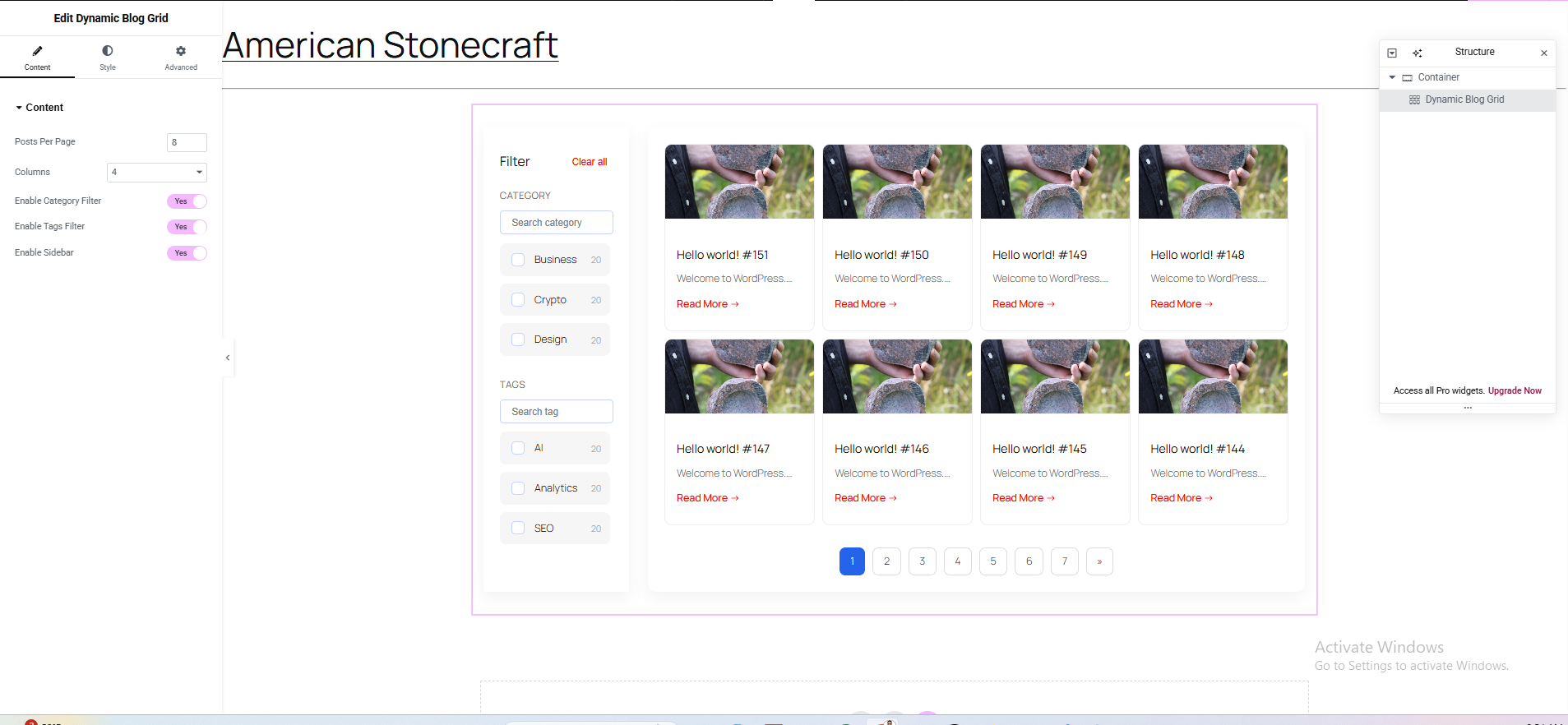
Elementor Widget Settings – Configure the Dynamic Blog Grid & Filters widget, adjust layout, enable/disable category and tag filters, and set pagination…
-
Blog Grid with Filters on Live Site – Frontend example showing posts filtered by categories and tags in a clean, responsive grid layout.
-
Mobile Off-Canvas Filter Panel – Responsive filter panel for mobile devices that slides in from the side for a touch-friendly experience.
-
Pagination and Loading Skeleton – Demonstrates AJAX-like pagination with a preloader skeleton effect for better user experience.
About this plugin
Dynamic Blog Grid & Filters for Elementor lets you build modern, responsive, and highly customizable blog/post grids directly inside Elementor.
Designed for performance and UX, this plugin provides:
- Live category & tag filters
- Clean grid-based blog layouts
- Mobile off-canvas filter panel
- Pagination support
- Skeleton preloader
- Touch-friendly UI
Perfect for blogs, magazines, news portals, and content-heavy websites.
Features
- Elementor native widget
- Filter posts by category and tag
- Responsive grid layout (desktop, tablet, mobile)
- Mobile-only off-canvas filter panel
- Search inside filters
- Filter item counters
- Pagination support
- Lightweight & performance optimized
- Developer-friendly structure
How It Works
- Install and activate Elementor
- Install and activate this plugin
- Open a page with Elementor
- Drag Dynamic Blog Grid & Filters widget
- Configure grid layout, filters, pagination, and styles
Roadmap
- Custom post type support
- Advanced pagination
- URL-based filters
- Elementor Loop Builder integration
Questions
- Does this plugin require Elementor?
Yes. Elementor must be installed and activated.
- Does it support custom post types?
Not in version 1.0. Support for CPTs is planned.
- Is AJAX filtering supported?
Yes. Posts are filtered and paginated using AJAX for a smooth user experience.
- Is this plugin free?
Yes. A PRO version is planned with advanced features.
sandywp / also on the shelf
Try another plugin

HUSKY – Products Filter for WooCommerce Professional
4.6 · 80K+ installs
HUSKY - WooCommerce Products Filter Professional (former name is WOOF) – flexible, easy and robust professional filter for…

Category AJAX Filter – Posts, Custom Post Types & Product Filter
4.9 · 6K+ installs
AJAX filter & WooCommerce product filter. Instantly filter posts, custom post types & products by category, taxonomy,…

Better Post & Filter Widgets for Elementor
5.0 · 3K+ installs
The only free pro-grade Elementor filtering system for posts, taxonomies, custom fields, ACF, WooCommerce, WPML & more. Ditch…
Spin up a real WordPress site in seconds.
Test plugins, build a demo, hand a client a link — then squash it and start again. No local setup, no Docker.