sandywp / plugins / duplicate-wp-page-post

Duplicate Page and Post
Duplicate pages, posts and custom post types with a single click.
Ready in seconds.
v2.9.8 70,000+ installs WP 4.1+ PHP 5.6+
What you get inside
4 screens-
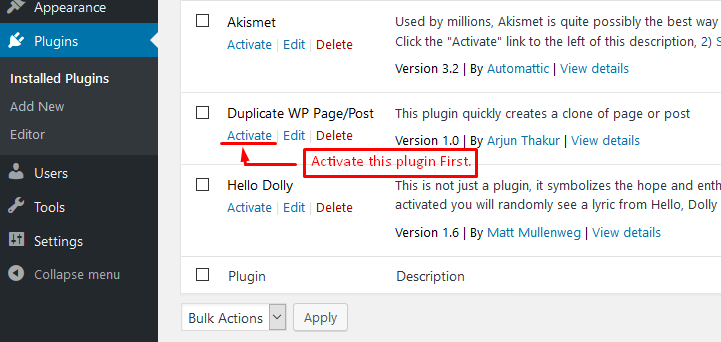
Activate the plugin - The plugin can be activated from the WordPress Plugins page by clicking the Activate button.
-
Plugin Settings - Configure the editor, duplicate status, redirect behavior, title prefix and suffix, duplicate link text, and other plugin options from the…
-
Duplicate pages - The Duplicate option is available directly from the Pages listing, making it easy to clone a page with one click.
-
Duplicate posts - The Duplicate option is available directly from the Posts listing, making it easy to clone a post with one click.
About this plugin
Duplicate Page and Post provides a simple way to create a clone of pages, posts and custom post types. The duplicate can be created with the post status selected in the plugin settings.
The plugin is lightweight and focused on fast, straightforward content duplication. Existing plugin settings are preserved when updating to newer versions.
Major features of this plugin include
- Create a clone of a particular page.
- Create a clone of a particular post.
- Create a clone of a particular custom post type (CPT).
- Option to select editor (Classic and Gutenberg).
- Option to add text before and after duplicated post and page titles.
- Option to customize the text shown for the Duplicate action.
- Option to select the status of duplicated posts.
- Option to select the redirect behavior after duplication.
♥️ Enjoying the Plugin?
Please consider giving a review. Your feedback helps us improve the plugin and helps other WordPress users discover it.
Questions
- How do I duplicate a page or post?
After activating the plugin, go to the Pages or Posts list. Use the Duplicate action for the content you want to copy. The duplicated content will be created using the status and redirect options selected in the plugin settings.
- Can I customize the title of duplicated content?
Yes. You can use Duplicate Post Prefix and Duplicate Post Suffix to customize the title of duplicated content.
For example:
- Prefix:
Copy of→Copy of About Us - Suffix:
Copy→About Us -- Copy
You can also customize the text displayed for the Duplicate action.
- Prefix:
- Can I duplicate custom post types?
Yes. Duplicate Page and Post supports duplicating posts, pages, and supported custom post types. The available content types depend on the post types registered by your WordPress site and the plugin configuration.
- Why don’t I see the Duplicate button in the Gutenberg editor?
If you are using the WordPress block editor (Gutenberg), go to Settings → Duplicate Page and Post and select Gutenberg Editor under Select Editor. This allows the Duplicate action to appear correctly on the edit screen.
sandywp / also on the shelf
Try another plugin

4.5 · 70K+ installs
Clone Post or Page with it's contents and settings in just one click.

4.2 · 60K+ installs
Duplicate pages, posts, and custom post types with one click. Create templates, preserve content states, and speed up workflows.

Fast Page & Post Duplicator
4.7 · 50K+ installs
Make a copy of posts and pages with just one click.
Spin up a real WordPress site in seconds.
Test plugins, build a demo, hand a client a link — then squash it and start again. No local setup, no Docker.