sandywp / plugins / download-monitor

Download Monitor
Powerful Download Manager Plugin for WordPress
Ready in seconds.
v5.2.8 80,000+ installs WP 6.4+ PHP 7.4+
What you get inside
4 screens-
Easily add downloads to your website with our Gutenberg block!
-
The main admin screen lists your downloads using familiar WordPress UI.
-
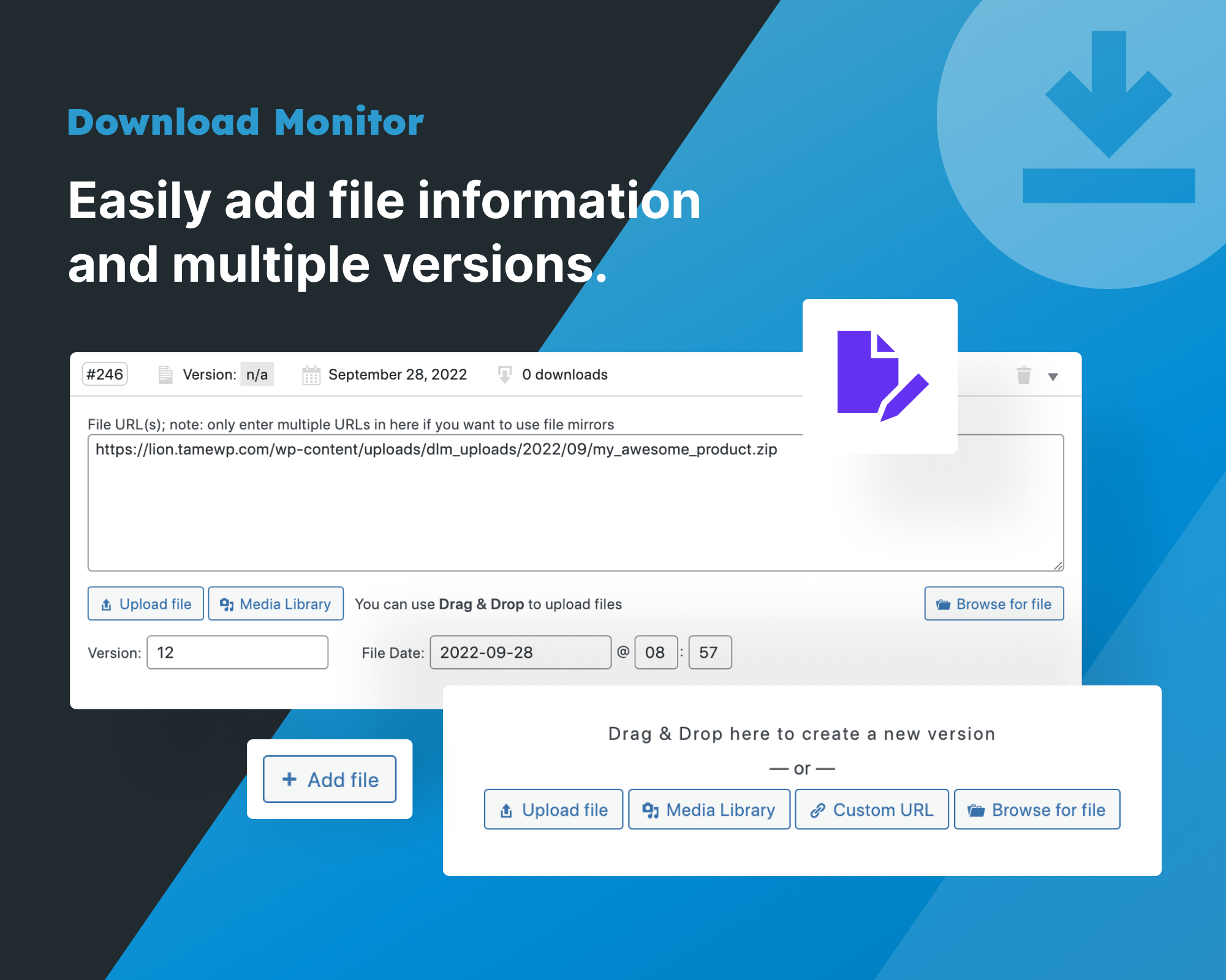
Easily add file information and multiple versions.
-
The quick add panel can be opened via a link about the post editor. This lets you quickly add a file and insert it into a post.
About this plugin
Powerful Download Manager Plugin for WordPress
Download Monitor is a powerful download manager plugin for handling downloadable files, adding download links to your posts or pages, and tracking downloads.
Download Monitor has been featured on the websites of some of the most popular and leading businesses in the WordPress ecosystem, such as WPBeginner, Pagely, Jilt, WP Fusion & Kinsta.
See how easy it is to list a download on your WordPress site
Download Monitor Extensions available when purchasing a Pro plan
- Buttons: Create beautiful, fully customizable download buttons for your files.
- Downloading Page: Serve your downloads from a separate page.
- Google Drive: Lets you use the files hosted on your Google Drive as Download Monitor files.
- Advanced Access Manager: Create advanced download limitations per download and on a global level.
- Email Notification: Trigger an email notification whenever one of your files is downloaded.
- Document Library Manage: Display files in fast, searchable tables or grids with sorting, filters, and flexible styling. Your documents, easy to find.
- Lock downloads option: Set restrictions to your download functionality using MailChimp Lock, Email Lock, CAPTCHA,
- Gravity Forms Gated Content: easily create a download gate with Gravity Forms. Require users to fill-in a form before accessing a download.
- Ninja Forms Lock: if you are an user of Ninja Forms, you can also use this to require users to fill-in of a form before accesing a download.
- WPForms Gated Content: gate your downloads by first requesting users to submit a form build using WPForms.
- Contact Form 7 Lock: request the submission of a Contact Form 7 form before providing access to the download.
Documentation
We have a large Knowledge Base on our Download Monitor website that contains documentation about how to how to setup and use Download Monitor.
How-to Guides
Are you a new Download Monitor user? Read these articles on how to get your files ready for download with Download Monitor:
How to install Download Monitor
How to add your first download in Download Monitor
How to list your first download on your website with the download shortcode
More advanced topics that a lot of people find interesting:
Learn more about the different ways you can style your download buttons
Learn more about how to customize your download buttons
Learn more about what actions and filters are available in Download Monitor
Contributing and reporting bugs
You can contribute code to this plugin via GitHub: https://github.com/WPChill/download-monitor
You can contribute localizations via Transifex https://www.transifex.com/projects/p/download-monitor/
Help & Support
- Search our extensive knowledge base for documentation about installing the plugin/the extensions, available settings and how to use them.
- Browse Download monitor’s WordPress forum to find answers to your queries or create a new topic.
- Contact us directly for support.
3rd party or external service disclaimer
The plugin connects to our website through an API call (https://download-monitor.com/?dlm-all-extensions=true) in order to request a list of available extensions.
IT DOES NOT SEND ANY DATA NOR DO WE COLLECT INFORMATION FROM THE REQUEST
Our privacy policy can be found at this URL https://download-monitor.com/privacy-policy/
Questions
- Can I upload .xxx filetype using the uploader?
Download Monitor uses the WordPress uploader for uploading files. By default these formats are supported:
- Images – .jpg, .jpeg, .png, .gif
- Documents – .pdf, .doc, .docx, .ppt, .pptx, .pps, .ppsx, .odt, .xls, .xlsx
- Music – .mp3, .m4a, .ogg, .wav
- Video – .mp4, .m4v, .mov, .wmv, .avi, .mpg, .ogv, .3gp, .3g2
To add more you can use a plugin, or filters. This post is a good resource for doing it with filters: Change WordPress Upload Mime Types.
- Can I link to external downloads?
Yes, you can use both local paths and external URLs.
- My Download links 404
Download links are powered by endpoints. If you find them 404’ing, go to Settings > Permalinks and save. This will flush the permalinks and allow our endpoints to be added.
- Download counts are not increasing when I download something
Admin hits are not counted, log out and try again!
sandywp / also on the shelf
Try another plugin

4.1 · 100K+ installs
This File Management & Digital Store plugin will help you to control file downloads & sell digital products from your WP…

Easy Digital Downloads – eCommerce Payments and Subscriptions made easy
4.7 · 40K+ installs
The #1 eCommerce plugin to sell digital products & subscriptions. Accept payments with Stripe & PayPal. Sell ebooks,…

Download Manager Addons for Elementor
2.2 · 6K+ installs
Download Manager Addons for Elementor
Spin up a real WordPress site in seconds.
Test plugins, build a demo, hand a client a link — then squash it and start again. No local setup, no Docker.