sandywp / plugins / cyr2lat

Cyr-To-Lat
Convert Non-Latin characters in post, page and term slugs to Latin characters.
Ready in seconds.
v7.1.0 300,000+ installs WP 6.0+ PHP 7.4+
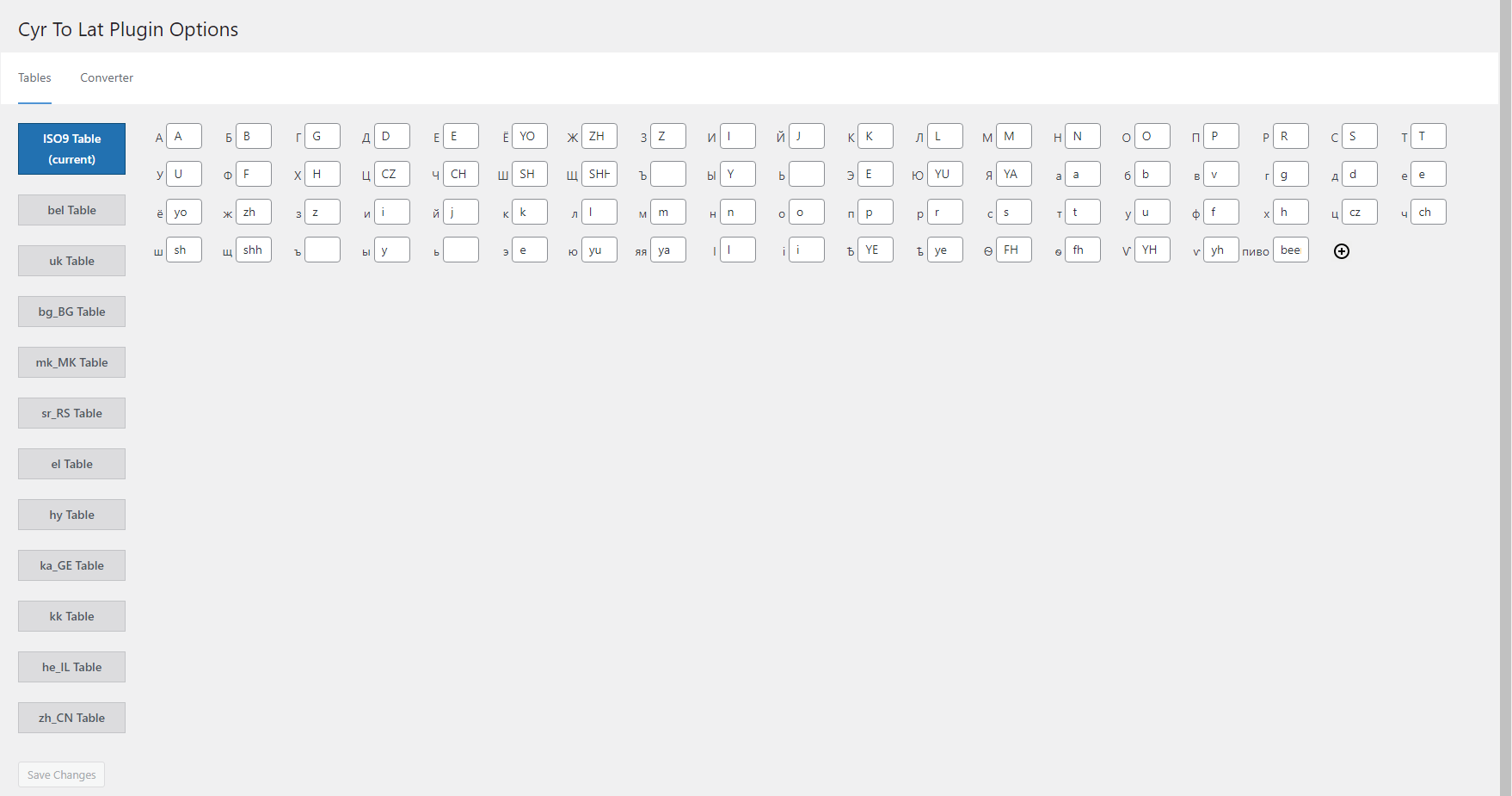
What you get inside
4 screens-
Tables settings page
-
Converter settings page
-
Block editor with transliterated slug
-
WPML Certificate
About this plugin
Converts Cyrillic characters in post, page, and term slugs to Latin characters. Useful for creating human-readable URLs.
Features
- The only plugin with a fully editable transliteration table. Allows adding/removing and editing pairs like ‘Я’ => ‘Ya’, or even ‘Пиво’ => ‘Beer’
- Converts post, page, custom post type, and term slugs through explicit WordPress save and REST/Gutenberg paths
- Converts any number of existing post, page, and term slugs in background processes or with WP-CLI
- Saves existing post and page permalinks integrity
- Performs transliteration of attachment file names
- Supports WooCommerce product, product taxonomy, global attribute, local attribute, variation, and frontend cart slug flows without automatic migration of existing attributes
- The plugin supports Russian, Belorussian, Ukrainian, Bulgarian, Macedonian, Serbian, Greek, Armenian, Georgian, Kazakh, Hebrew, and Chinese characters
- Has many advantages over similar plugins
- Officially compatible with WPML
Based on the original Rus-To-Lat plugin by Anton Skorobogatov.
Sponsored by Blackfire.
Plugin Support
Questions
- How can I define my own substitutions?
Add this code to your theme’s
functions.phpfile:/** * Modify conversion table. * * @param array $table Conversion table. * * @return array */ function my_ctl_table( $table ) { $table['Ъ'] = 'U'; $table['ъ'] = 'u'; return $table; } add_filter( 'ctl_table', 'my_ctl_table' );- How can I redefine non-standard locale?
For instance, if your non-standard locale is uk_UA, you can redefine it to
ukby adding the following code to your theme’sfunction.phpfile:/** * Use non-standard locale. * * @param string $locale Current locale. * * @return string */ function my_ctl_locale( $locale ) { if ( 'uk_UA' === $locale ) { return 'uk'; } return $locale; } add_filter( 'ctl_locale', 'my_ctl_locale' );- How can I define my own transliteration of titles?
Add similar code to your theme’s
functions.phpfile:/** * Filter title before sanitizing. * * @param string|false $result Sanitized title. * @param string $title Title. * * @return string|false */ function my_ctl_pre_sanitize_title( $result, $title ) { if ( 'пиво' === $title ) { return 'beer'; } return $result; } add_filter( 'ctl_pre_sanitize_title', 10, 2 );- How can I control the legacy sanitize_title bridge?
Version 7.0 uses explicit slug handlers for posts, terms, WooCommerce attributes, and other known save paths. A legacy
sanitize_titlebridge remains as a compatibility fallback for broad calls that older integrations may still rely on.You can disable the broad fallback with this code:
add_filter( 'ctl_enable_legacy_sanitize_title_bridge', '__return_false' );The filter receives the current default value,
$title,$raw_title, and$context. Explicit known contexts, such as WordPress save handling, continue to use the dedicated 7.0 slug paths.For debugging unknown bridge calls, define
CYR_TO_LAT_DEBUG_LEGACY_SANITIZE_TITLE_BRIDGEastrue. This diagnostic log is disabled by default and is not enabled byWP_DEBUG.- How can I define my own transliteration of filenames?
Add similar code to your theme’s
functions.phpfile:/** * Filter filename before sanitizing. * * @param string|false $result Sanitized filename. * @param string $filename Title. * * @return string|false */ function my_ctl_pre_sanitize_filename( $result, $filename ) { if ( 'пиво' === $filename ) { return 'beer'; } return $result; } add_filter( 'ctl_pre_sanitize_filename', 10, 2 );- How can I allow the plugin to work on the frontend?
Add the following code to your plugin’s (or mu-plugin’s) main file. This code won’t work being added to a theme’s functions.php file.
/** * Filter status allowed Cyr To Lat plugin to work. * * @param bool $allowed * * @return bool */ function my_ctl_allow( bool $allowed ): bool { $uri = isset( $_SERVER['REQUEST_URI'] ) ? sanitize_url( wp_unslash( $_SERVER['REQUEST_URI'] ) ) : ''; if ( 0 === strpos( $uri, '/divi-comments' ) ) { return true; } return $allowed; } add_filter( 'ctl_allow', 'my_ctl_allow' );- How can I limit post types for background conversion?
Add similar code to your theme’s
functions.phpfile:/** * Filter post types allowed for background conversion. * * @param array $post_types Allowed post types. * * @return array */ function my_ctl_post_types( $post_types ) { return [ 'post' => 'post', 'page' => 'page', 'attachment' => 'attachment', 'product' => 'product', 'nav_menu_item' => 'nav_menu_item', ]; } add_filter( 'ctl_post_types', 'my_ctl_post_types' );- How can I convert many posts/terms using wp-cli?
Use the following command in the console:
wp cyr2lat regenerate [--post_type=<post_type>] [--post_status=<post_status>]Where
-post_type is a list of post types,
-post_status is a list of post statuses.
sandywp / also on the shelf
Try another plugin
4.6 · 80K+ installs
Converts Cyrillic, European and Georgian characters in post, term slugs and media file names into Latin characters.

Cyrlitera – Transliteration of Links and File Names
4.5 · 40K+ installs
Convert Cyrillic and Georgian URLs and file names to Latin. Works for all post types, pages, and terms. Custom characters, URL…

Cyr to Lat Reloaded – Transliteration of Links and File Names
4.4 · 30K+ installs
Convert Cyrillic, Georgian and Greek URLs and file names to readable Latin characters. Works on slugs, attachments and taxonomies…
Spin up a real WordPress site in seconds.
Test plugins, build a demo, hand a client a link — then squash it and start again. No local setup, no Docker.