sandywp / plugins / custom-taxonomy-order-ne

Custom Taxonomy Order
Allows for the ordering of categories and custom taxonomy terms through a simple drag-and-drop interface
Ready in seconds.
v4.0.2 50,000+ installs WP 4.1+ PHP 7.0+
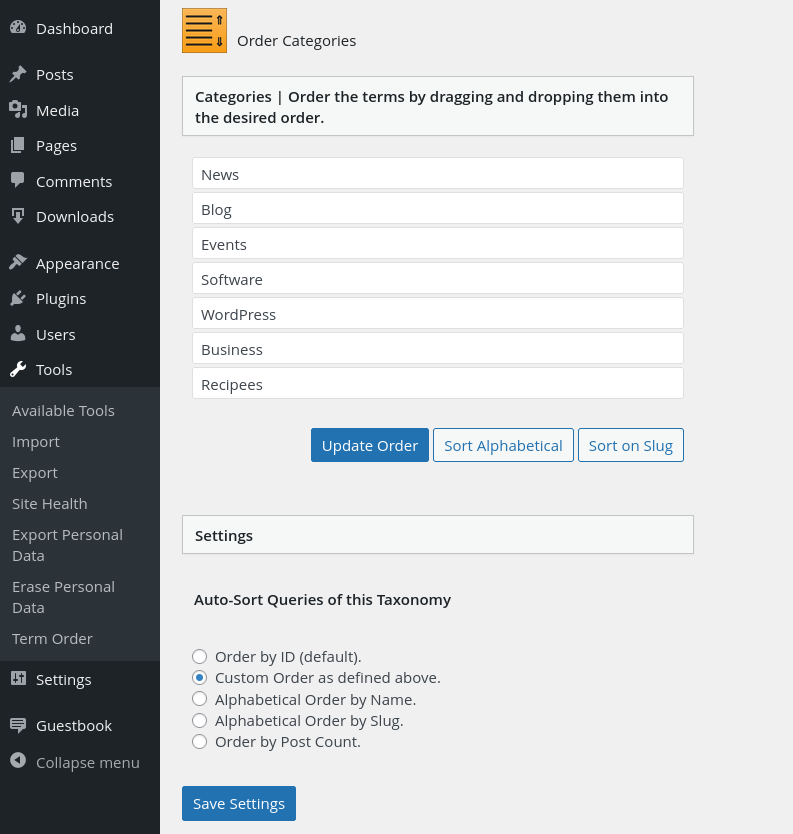
What you get inside
1 screen-
Screenshot of the menu page for Custom Taxonomy Order. The WordPress menu completely left lists the "Term Order" main page. The left metabox lists the toplevel…
About this plugin
Custom Taxonomy Order is a plugin for WordPress which allows for the ordering of taxonomy terms.
It supports the following features:
- Order (custom) terms through a simple drag-and-drop interface.
- No custom coding needed. It uses standard WordPress filters.
- It uses the available WordPress scripts and styles.
- The plugin is lightweight, without any unnecessary scripts to load into the admin.
- It falls in line gracefully with the look and feel of the WordPress interface.
- It is located under the Tools > Term Order menu in the backend.
- Translated or translatable.
- Custom functions to order the taxonomies themselves.
- There is no Pro version, everything works in the Free version.
Compatibility
This plugin is compatible with ClassicPress.
Contributions
This plugin is also available in Codeberg.
Questions
- I sorted the terms in the WordPress backend, but I don’t see it changed in the frontend
Did you set the option for that taxonomy to use that custom order? Make sure to check it so the filters run
with your taxonomy.- How do I sort the terms when using a custom query?
When you use default functions like get_terms or get_categories, this should not be needed.
If you do need to, you can apply the sorting for the taxonomy by using:
‘orderby’ => ‘term_order’.- I use get_term_children but the terms do not get sorted
This function only fetches the ID’s of the terms, so it is impossible to sort them by term_order. If you do need the sort_order, use a function like get_terms with the ‘child_of’ parameter. That will fetch an array of WP_Term objects that can be sorted.
- I have a custom taxonomy that uses the Tag Cloud functionality, but it doesn’t sort like it should.
If it is a much used plugin, can you tell me what is the name for the taxonomy?
In the customtaxorder_wp_get_object_terms_order_filter it needs to be added, and the get_terms filter should not run
on that taxonomy. The tag_cloud_sort filter should do that.If it is a custom taxonomy, you can also use a filter:
<?php add_filter( 'customtaxorder_exclude_taxonomies', 'add_taxonomy_to_customtaxorder_exclude_taxonomies' ); function add_taxonomy_to_customtaxorder_exclude_taxonomies( $taxonomies ) { $taxonomies[] = 'directory'; // name of your tag taxonomy. return $taxonomies; } ?>- I’m using the_tags function, but it doesn’t sort as it should.
There is a bug with the the_tags function, where it will sort according to the setting for categories.
This happens in the ‘customtaxorder_apply_order_filter’ function where the $args has two taxonomies but only one orderby can be returned.- I use WooCommerce Attributes and Categories.
This plugin only supports sorting the attributes/terms. These are the items like S, M and L.
For sorting the taxonomies like ‘size’, you need to sort them on Woo’s attributes page.For Products Categories, you can change the order on Product > Categories.
There’s a three-line icon next to each category, you can hold it and drag the category up or down to change the order.- What capabilities are needed?
For sorting the terms you need the manage_categories capability.
- Can I sort the taxonomies themselves?
There is an admin page to sort them, and save them in the database.
You can use a function to sort taxonomies themselves like this:
<?php
$taxonomy_objects = get_object_taxonomies( 'post', 'objects' );
$taxonomy_objects = customtaxorder_sort_taxonomies($taxonomy_objects);
foreach (  $taxonomy_objects as $tax ) {
    echo $tax->name . "<br />";
}
?>
The function requires a parameter with an array of taxonomy objects.
sandywp / also on the shelf
Try another plugin

Category Order and Taxonomy Terms Order
4.5 · 500K+ installs
Drag-and-drop ordering for Categories & any taxonomy (hierarchically) using a Drag and Drop Sortable JavaScript capability.

Terms Order WP – Categories And Taxonomies Order Plugin
5.0 · 800+ installs
This Plugin is useful to order or reorder default blog category and custom post type taxonomy and terms, plugin is ready to use…

5.0 · 500+ installs
The WP Category Sort plugin allows you to easily reorder your categories the way you want via drag and drop.
Spin up a real WordPress site in seconds.
Test plugins, build a demo, hand a client a link — then squash it and start again. No local setup, no Docker.