sandywp / plugins / custom-field-template

Custom Field Template
The Custom Field Template plugin extends the functionality of custom fields.
Ready in seconds.
v2.8.1 30,000+ installs WP 2.1+
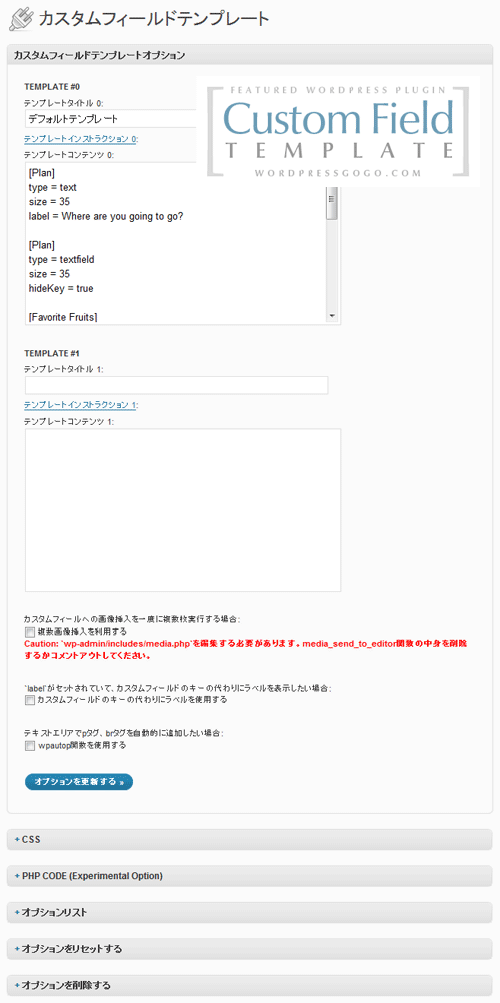
What you get inside
2 screens-
Custom Field Template - Settings
-
Custom Field Template
About this plugin
The Custom Field Template plugin adds the default custom fields on the Write Post/Page. The template format is almost same as the one of the rc:custom_field_gui plugin. The difference is following.
We have finally published a manual site for the custom field template plugin. You can also use the custom field refinement search for posts in the admin panel. Please check here.
- You can set any number of the custom field templates and switch the templates when you write/edit the post/page.
- This plugin does not use the ini file for the template but set it in the option page of the plugin.
- Support for TinyMCE in the textarea.
- Support for media buttons in the textarea. – requires at least 2.5.
- Support for multiple fields with the same key.
- Support for hideKey and label options.
- You can see the full option list in the setting page of the plugin.
- You can customize the design of custom field template with css.
- You can replace custom keys by labels.
- You can use wpautop function.
- You can use PHP codes in order to set values. (experimental,
code = 0) - You can set an access user level in each field. (
level = 1) - Supprt for inserting custom field values into tags automatically. (
insertTag = true) - Adds [cft] Shortcode to display the custom field template. (only shows the attributes which have
output = true) - Adds template instruction sections.
- Adds the value label option for the case that values are diffrent from viewed values. (
valueLabel = apples # oranges # bananas) - Adds the blank option. (
blank = true) - Adds the break type. Set CSS of ‘#cft div’. (
type = break) - Adds [cft] Shortcode Format.
- Adds the sort option. (
sort = asc,sort = desc,sort = order) - Support for Quick Edit of custom fields. (tinyMCE and mediaButton are not supported yet)
- Support for the custom field search. (only shows the attributes which have
search = true.) - Adds [cftsearch] Shortcode Format. (under development)
- Adds PHP codes for the output value. (
outputCode = 0) - Adds PHP codes before saving the values. (
editCode = 0) - Adds the save functionality.
- Adds the class option. (
class = text) - Adds the auto hook of
the_content(). (experimental) - You can use the HTML Editor in the textarea. (
htmlEditor = true) - Adds the box title replacement option.
- Adds the select option of the post type.
- Adds the value count option.
- Adds the option to use the shortcode in the widhet.
- Adds the attributes of JavaScript Event Handlers. (
onclick = alert('ok');) - Adds the Initialize button.
- Adds the attributes of before and after text. (
before = blah,after = blah) - Adds the export and import functionality.
- Adds the style attribute. (
style = color:#FF0000;) - Adds the maxlength attribute. (
maxlength = 10) - Adds the attributes of multiple fields. (
multiple = true,startNum = 5,endNum = 10,multipleButton = true) - Adds the attributes of the date picker in
texttype. (date = true,dateFirstDayOfWeek = 0,dateFormat = yyyy/mm/dd) - Adds the filter of page template file names (Thanks, Joel Pittet).
- Adds the attribute of
shortCodein order to output the shortcode filtered values. (shortCode = true) - Adds the attribute of
outputNonein case there is no data to output. (outputNone = No Data) - Adds the attribute of
singleListattribute in order to output with<ul><li>if the value is single. ex)singleList = true - Adds the file upload type. (
type = file) - Adds the fieldset type. (
type = fieldset_open,type = fieldset_close) - Adds the option to deploy the box in each template.
Localization
- Belorussian (by_BY) – Marcis Gasuns
- Catalan (ca) – Andreu Llos
- Czech (cs_CZ) – Jakub
- German (de_DE) – F J Kaiser
- Spanish (es_ES) – Dario Ferrer
- Farsi (fa_IR) – Mehdi Zare
- French (fr_FR) – Nicolas Lemoine
- Hungarian (hu_HU) – Balazs Kovacs
- Indonesian (id_ID) – Masino Sinaga
- Italian (it_IT) – Gianni Diurno
- Japanese (ja) – Hiroaki Miyashita
- Dutch (nl_NL) – Rene
- Polish (pl_PL) – Difreo
- Brazilian Portuguese (pt_BR) – Caciano Gabriel
- Russian (ru_RU) – Sonika
- Swedish (sv_SE) – Pontus Carlsson
- Turkish (tr_TR) – Omer Faruk
- Ukranian (uk_UA) – Andrew Kovalev
- Uzbek (uz_UZ) – Alexandra Bolshova
- Chinese (zh_CN) – hurri zhu
If you have translated into your language, please let me know.
Are you interested in other plugins? See the following site CMS x WP.
Known Issues / Bugs
Uninstall
- Deactivate the plugin
- That’s it! 🙂
Questions
- How can I use this plugin?
The template format is basically same as the one of the rc:custom_field_gui plugin.
See the default template and modify it.- How can I display the custom fields?
- Use the cft shortcode. In the edit post, write down just
[cft]. If you would like to specify the post ID,[cft post_id=15]. You can also set the template ID like[cft template=1]. - Do you want to insert a particular key value? Use
[cft key=Key_Name]. - If you set the format of the custom fields, use
[cft format=0]. - Auto Hook of
the_content()in the option page of this plugin may help you do this. You can use [cft] shortcodes here. You can switch the cft formats in each category.
- Use the cft shortcode. In the edit post, write down just
Spin up a real WordPress site in seconds.
Test plugins, build a demo, hand a client a link — then squash it and start again. No local setup, no Docker.