sandywp / plugins / custom-elementor-icons

Custom Icons for Elementor and WPBakery
Upload your own IcoMoon icon fonts and use them in Elementor, WPBakery and the block editor (Gutenberg). No FontAwesome required.
Ready in seconds.
v1.1.1 10,000+ installs WP 5.8+ PHP 7.1+
What you get inside
5 screens-
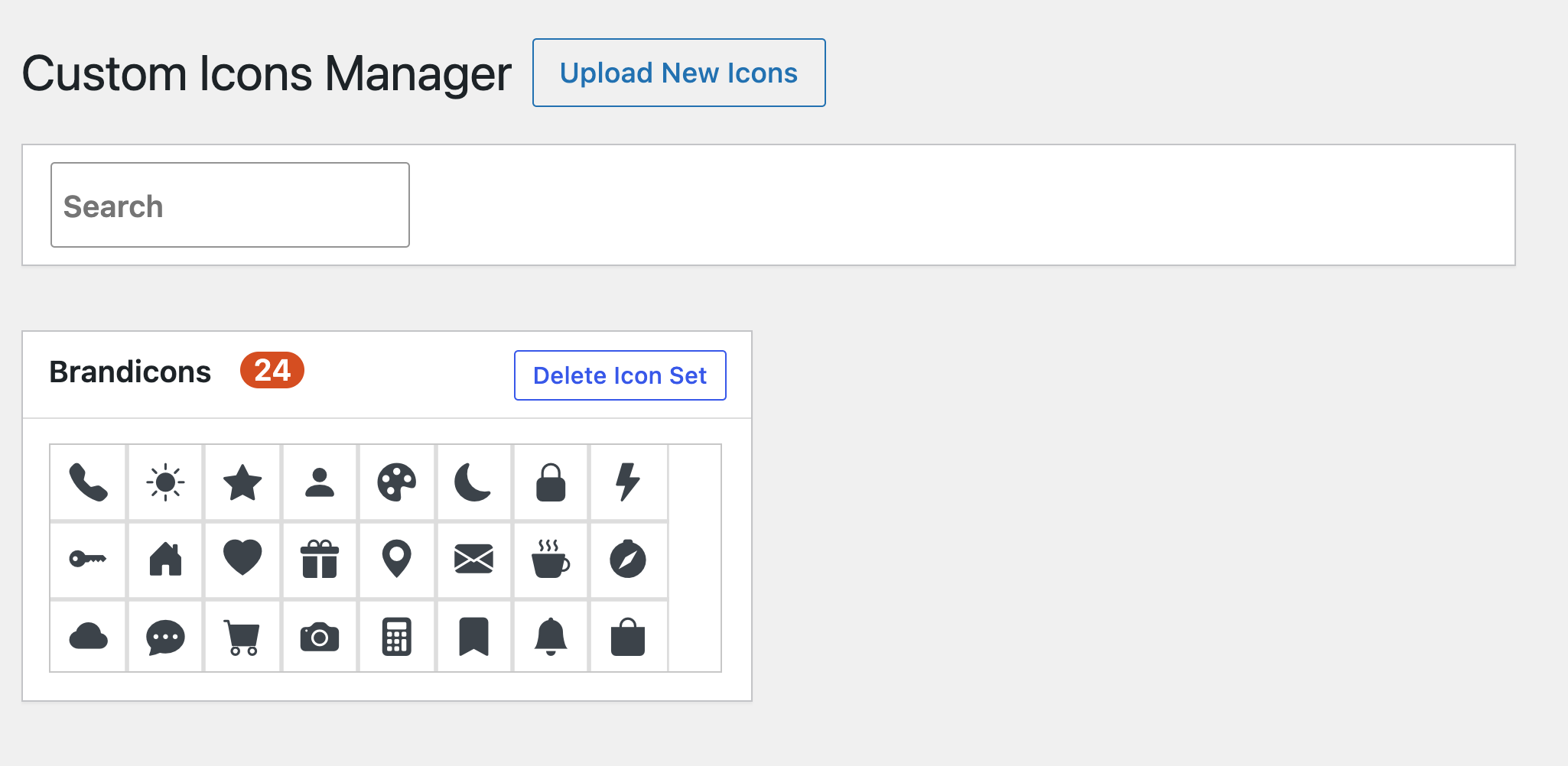
The Custom Icons manager: an uploaded icon set with search and delete.
-
The uploaded icon set appears as its own tab in the icon library of the page builder.
-
A custom icon chosen in an icon control.
-
The custom icons on the front end of the site.
-
The Custom Icon block in the block editor, with the icon picker in the sidebar.
About this plugin
Custom Icons for Elementor and WPBakery lets you add your own icon fonts to WordPress and pick them in the icon controls of Elementor and WPBakery Page Builder. Instead of relying on a stock icon library, you can use a custom icon set that matches your brand.
Generate an icon font with the free IcoMoon app, upload the ZIP file on the plugin’s “Custom Icons” page, and your icons appear next to the built-in ones in the page builder. A “Custom Icon” block brings the same icons to the block editor.
Features
- Upload custom icon fonts as a ZIP file exported from IcoMoon
- Icons show up as an extra tab in Elementor’s icon library
- Icons are available in the WPBakery Page Builder icon picker
- “Custom Icon” Gutenberg block: custom icons in the block editor, with a searchable icon grid, size, color and alignment
- Add as many icon sets as you need
- Icon manager in the admin menu with search across all uploaded icons
- Delete an icon set with one click
- Uploads are validated: only font files with allowed extensions are extracted from the ZIP, and size limits apply
How to add custom icons to Elementor
- Create your icon set in the IcoMoon app and download it as a ZIP file.
- In WordPress open “Custom Icons” in the admin menu and click “Upload New Icons”.
- Select or upload the ZIP file in the media library and insert it.
- Edit a page with Elementor, add an Icon widget (or any element with an icon control), open the icon library and pick your set from its tab.
How to add custom icons in the block editor
- Upload your icon set on the “Custom Icons” page.
- Edit a post or page, click the add-block button and search for “Custom Icon” (Design category).
- Pick an icon from the grid in the block sidebar and set its size, color and alignment.
For WPBakery, choose your icon set in the icon type dropdown of the Icon element and select an icon.
Requirements
Elementor and/or WPBakery Page Builder must be installed to use the icons in the page builder. The ZIP must be an IcoMoon export that contains the selection.json file. Limits: up to 300 files per ZIP, 5 MB per file and 20 MB in total.
Questions
- How do I add a custom icon in the block editor?
Insert the “Custom Icon” block, then choose the icon in the block sidebar. The block lists the icons of every set you uploaded on the Custom Icons page. Without an uploaded set it shows a link to that page.
- How do I upload an icon font to Elementor?
Open “Custom Icons” in the WordPress admin menu, click “Upload New Icons” and choose your IcoMoon ZIP file. Then open the icon library of any Elementor icon control and look for your icon set in its own tab.
- Which icon font formats are supported?
ZIP files exported from the IcoMoon app. The archive must contain IcoMoon’s selection.json together with the font files. Archives from other generators, including Fontello, are not accepted.
- Does it work with WPBakery Page Builder?
Yes. After you upload an icon set it is available in the icon picker of WPBakery’s Icon element.
- Why do my icons not appear?
Make sure the ZIP is an unmodified IcoMoon export and that the upload finished without an error message. Then clear your page, server and CDN caches and, in Elementor, regenerate the CSS. If you see a different error after uploading, check the file size limits listed above.
- Can I delete an icon set?
Yes. Click “Delete Icon Set” on the set’s box in the Custom Icons page. Renaming a set is not supported: the set takes its name from the uploaded font.
- Who can upload icon sets?
By default only administrators. The Custom Icons page requires the manage_options capability and uploading requires update_plugins.
sandywp / also on the shelf
Try another plugin

Skyboot Custom Icons for Elementor – Elementor Icons library – 14300+ Icons
5.0 · 200K+ installs
Skyboot Custom Icons for Elementor expands your Elementor icons library with custom icons, perfect for website owners who use the…

Payment Gateway Icons For WooCommerce
5.0 · 1K+ installs
Customize the payment gateway icons that appear on the WooCommerce checkout page.

500+ installs
Dicode Icons Pack by Designinvento provides ability to add custom font icons to your website from all time top icon libraries.
Spin up a real WordPress site in seconds.
Test plugins, build a demo, hand a client a link — then squash it and start again. No local setup, no Docker.