sandywp / plugins / custom-css-js

Simple Custom CSS and JS
Easily add Custom CSS or JS to your website with an awesome editor.
Ready in seconds.
v3.54 600,000+ installs WP 4.2+ PHP 5.2.4+
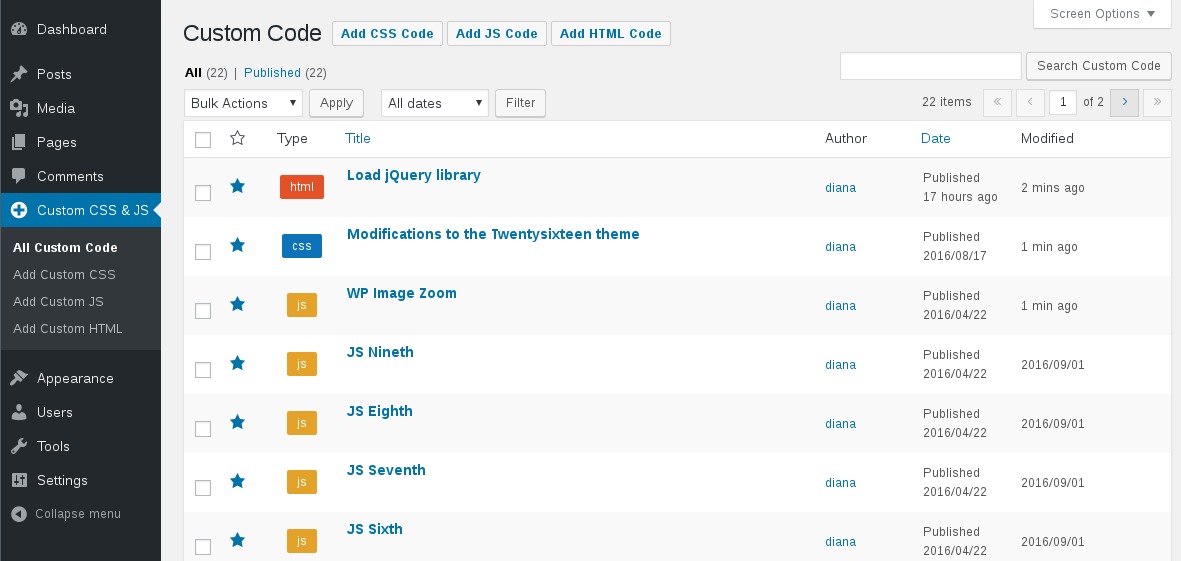
What you get inside
4 screens-
Manage Custom Codes
-
Add/Edit Javascript
-
Add/Edit CSS
-
Add/Edit HTML
About this plugin
Customize your WordPress site’s appearance by easily adding custom CSS and JS code without even having to modify your theme or plugin files. This is perfect for adding custom CSS tweaks to your site.
Features
- Text editor with syntax highlighting
- Print the code inline or included into an external file
- Print the code in the header or the footer
- Add CSS or JS to the frontend or the admin side
- Add as many codes as you want
- Keep your changes also when you change the theme
Questions
- What if I want to add multiple external CSS codes?
If you write multiple codes of the same type (for example: two external CSS codes), then all of them will be printed one after another
- Will this plugin affect the loading time?
When you click the
Savebutton the codes will be cached in files, so there are no tedious database queries.- Does the plugin modify the code I write in the editor?
No, the code is printed exactly as in the editor. It is not modified/checked/validated in any way. You take the full responsability for what is written in there.
- My code doesn’t show on the website
Try one of the following:
1. If you are using any caching plugin (like “W3 Total Cache” or “WP Fastest Cache”), then don’t forget to delete the cache before seing the code printed on the website.
2. Make sure the code is in Published state (not Draft or in Trash).
3. Check if thewp-content/uploads/custom-css-jsfolder exists and is writable- Does it work with a Multisite Network?
Yes.
- What if I change the theme?
The CSS and JS are independent of the theme and they will persist through a theme change. This is particularly useful if you apply CSS and JS for modifying a plugin’s output.
- Can I use a CSS preprocesor like LESS or Sass?
For the moment only plain CSS is supported, but you can check out the Pro version in case you need a CSS preprocessor.
- Can I upload images for use with my CSS?
Yes. You can upload an image to your Media Library, then refer to it by its direct URL from within the CSS stylesheet. For example:
div#content {
background-image: url(‘http://example.com/wp-content/uploads/2015/12/image.jpg’);
}
sandywp / also on the shelf
Try another plugin

5.0 · 10+ installs
Add unlimited custom CSS and custom JavaScript to WordPress from the admin panel, with a live code editor, autocomplete, and…

10+ installs
Easily inject HTML, CSS, JS, styles, scripts & tracking code via hooks / shortcodes with safe mode, scheduling, revisioning…
Spin up a real WordPress site in seconds.
Test plugins, build a demo, hand a client a link — then squash it and start again. No local setup, no Docker.