sandywp / plugins / core-rollback

Core Rollback
Seamless rollback of WordPress Core to latest release or any outdated, secure release using the Core Update API and core update methods.
Ready in seconds.
v1.4.3 20,000+ installs WP 4.1+ PHP 5.6+
What you get inside
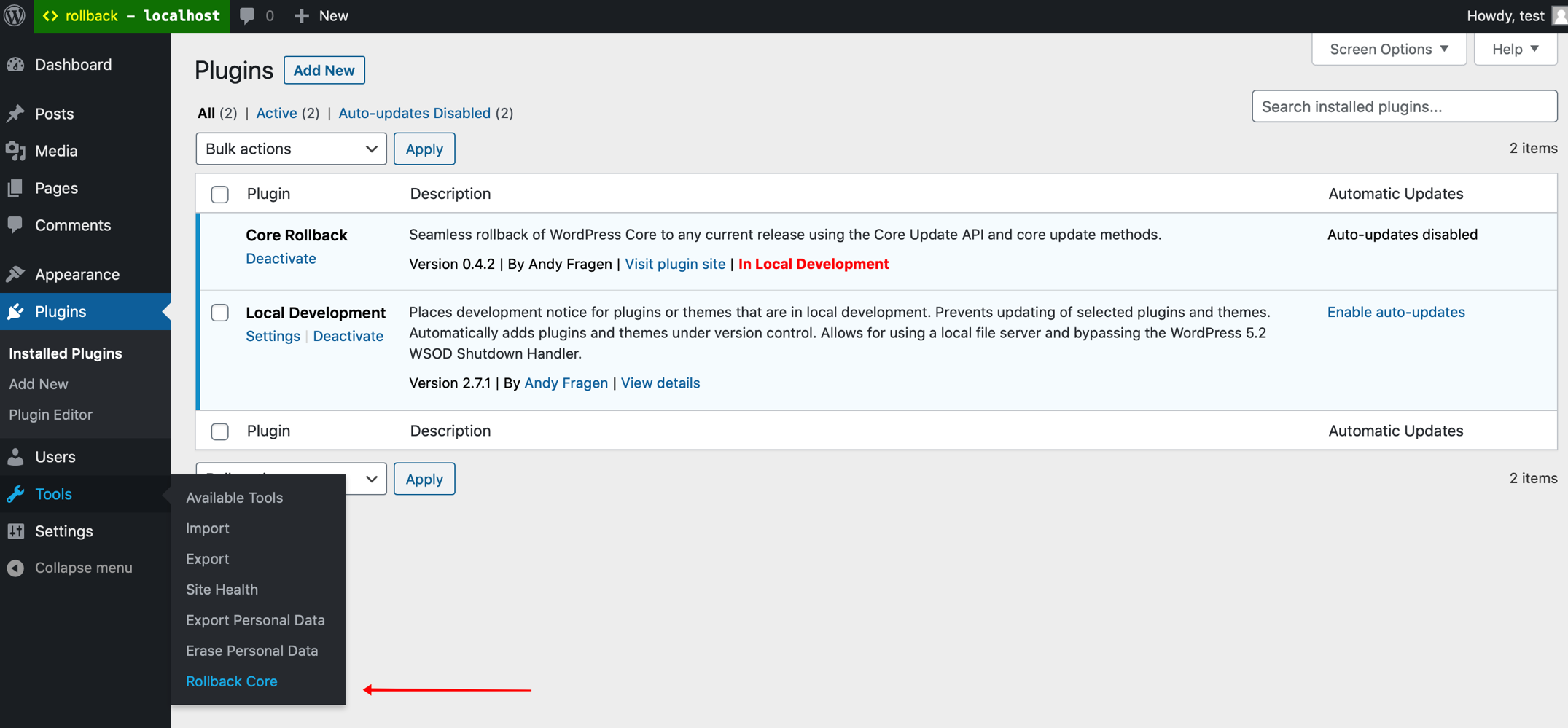
3 screens-
Tools menu item
-
Rollback Core action dropdown
-
Re-install Now button for rollback
About this plugin
Seamless rollback of WordPress Core to latest release or any outdated, secure release using the Core Update API and core update methods. Only latest release and outdated, secure releases are offered. Refer to https://api.wordpress.org/core/stable-check/1.0/ Logo from a meme generator. Original artwork by Allie Brosh.
Usage
From the Tools menu select Rollback Core, select the version you wish to rollback to from the dropdown and click Rollback. You will be directed to the update-core.php page where you should see a button to Re-install your specified version. If you move away from the update-core.php page before clicking the Re-install button you will have 15 seconds to return and complete the process or you will need to start over.
In multisite use the Settings menu.
WARNING: Downgrading WordPress Core may leave your site in an unusable state requiring a complete reinstall or a forced reinstall using WP-CLI, wp core update --force --version=5.5.3. It may also leave your site broken due to a plugin or theme incompatibility. Use at your own risk.
Rollbacks use your current locale.
PRs are welcome.
sandywp / also on the shelf
Try another plugin

WP Downgrade | Specific Core Version
4.8 · 100K+ installs
Automatically downgrad or update to any WordPress version you want directly from the backend.

4.7 · 20K+ installs
Adds extra options to WordPress' built-in Automatic Updates feature.
5.0 · 1K+ installs
Sanitize file names and enhance security.
Spin up a real WordPress site in seconds.
Test plugins, build a demo, hand a client a link — then squash it and start again. No local setup, no Docker.