sandywp / plugins / content-visibility-for-divi-builder

Content Visibility for Divi Builder
Content Visibility for Divi Builder.
Ready in seconds.
v5.03 2,000+ installs WP 5.5+ PHP 7.0+
What you get inside
4 screens-
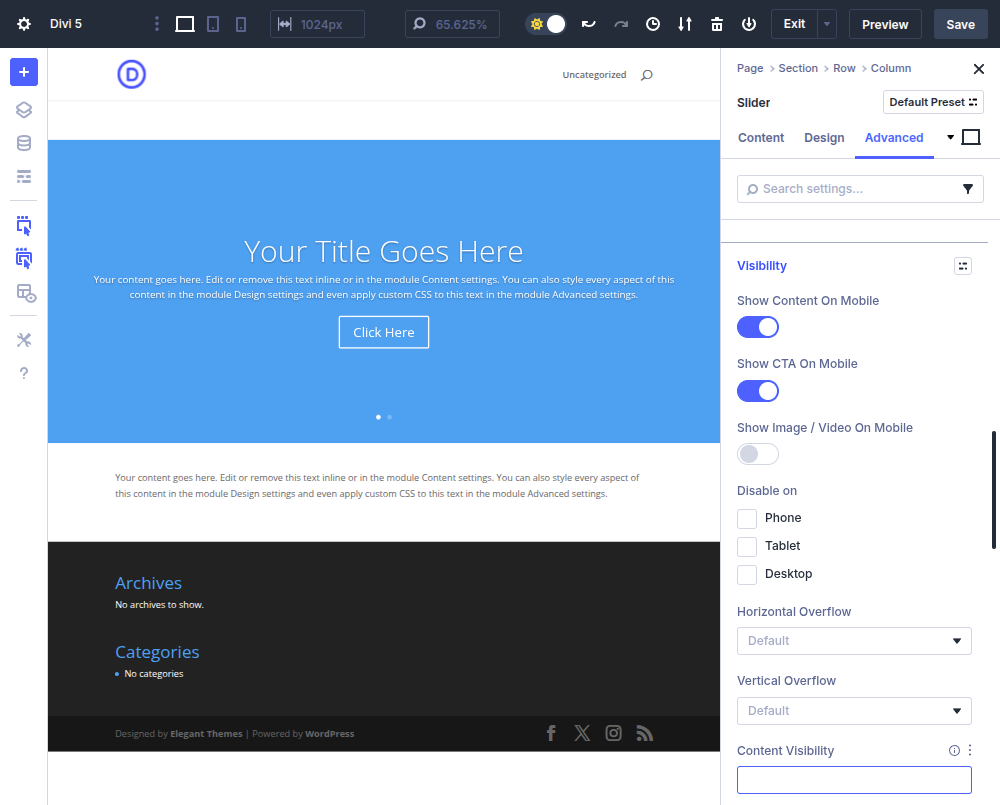
The Content Visibility option in the Divi 5.x interface.
-
The Content Visibility option in the Divi 4.x interface.
-
The Content Visibility option in the Divi 3.x Visual Builder interface.
-
The Content Visibility option in the Divi 3.x backend interface.
About this plugin
Content Visibility for Divi Builder allows Sections and Modules to be displayed/hidden based on the outcome of a PHP boolean expression.
This plugin is for both the standalone Divi theme (or child themes thereof) and the Divi Builder plugin, version 3 or higher!
Developer Filters
Expression Validation Filters
The following filters allow developers to customize expression validation behavior. Add these filters in your theme’s functions.php or in a custom plugin.
content_visibility_for_divi_builder_blocked_functions
Filter the array of blocked function names. Functions in this list will cause an expression to fail validation. All comparisons are case-insensitive.
Example – allow file_get_contents (blocked by default):
add_filter( 'content_visibility_for_divi_builder_blocked_functions', function( $functions ) {
    return array_diff( $functions, array( 'file_get_contents' ) );
} );
Example – block an additional function:
add_filter( 'content_visibility_for_divi_builder_blocked_functions', function( $functions ) {
    $functions[] = 'my_dangerous_function';
    return $functions;
} );
content_visibility_for_divi_builder_allowed_tokens
Filter the array of allowed PHP token types (T_* constants). Tokens not in this list will cause an expression to fail validation. This is an advanced filter – consult the PHP tokenizer documentation before modifying.
Example – allow the T_VARIABLE token type (blocked by default, use with caution):
add_filter( 'content_visibility_for_divi_builder_allowed_tokens', function( $tokens ) {
    $tokens[] = T_VARIABLE;
    return $tokens;
} );
content_visibility_for_divi_builder_allowed_chars
Filter the array of allowed single-character tokens. Characters not in this list (such as =, ;, {, }, `, @, &, |, ~, ^) will cause an expression to fail validation.
Example – allow the & character for bitwise operations:
add_filter( 'content_visibility_for_divi_builder_allowed_chars', function( $chars ) {
    $chars[] = '&';
    return $chars;
} );
content_visibility_for_divi_builder_allowed_callables
Filter the array of callables (function names and Class::method static-method entries) the validator considers known-safe. Anything not on the allowlist (and not on the blocked_functions denylist) is treated as an “Unknown callable” error. Names are normalized (leading \ stripped, namespace\ keyword prefix stripped, lowercased) before comparison, so \My\Namespace\Class::method, My\Namespace\Class::method, and namespace\My\Namespace\Class::method all match the same allowlist entry. The default list ships with WordPress conditional tags (is_user_logged_in, current_user_can, is_admin, etc.). The Expression Validation tab’s content scanner generates a ready-to-paste snippet for this filter pre-populated with every custom callable currently in your content.
Example – allowlist a theme helper and a static service method:
add_filter( 'content_visibility_for_divi_builder_allowed_callables', function( $callables ) {
    $callables[] = 'mytheme_should_be_visible';
    $callables[] = 'MyTheme\Visibility\Service::checkUser';
    return $callables;
} );
Questions
- Will this work for any module, even custom ones?
Yes!
In Divi 4 and below:
This plugin detects and modifies Modules and Sections by class inheritance.
As long as Elegant Themes continues to have a single root class for everything, this plugin should detect all of them, including third party ones!In Divi 5:
This plugin detects and modifies Modules and Sections by instrumenting all Gutenberg block render callbacks.
As long as Elegant Themes continues to utilize Gutenberg blocks with render callbacks for everything, this plugin should detect all of them, including third party ones!- What if I deactivate this plugin? Will all of my content reappear automatically?
Yes. If you decide to deactivate or uninstall this plugin, the “Content Visibility” configuration option will disappear from the Divi Builder, and will not have any effect on the frontend output.
Of course, the “Content Visibility” settings that were defined for a particular Section or Module will continue to persist in the database, until that post/page is updated.
This can be a good thing, however, as you may want to reinstall/reactivate in the future and not have to re-enter all of your “Content Visibility” expressions!- How do I use it!?
Once the plugin is installed and activated, a “Content Visibility” option will appear in each Section or Module’s settings on either the Advanced tab under Visibility (for Divi 4.x or higher) or the General Settings / Content tab (for Divi 3.x or lower.)
You may enter any PHP boolean expression you would like, (e.g. is_user_logged_in()), and the Section or Module will only display if the expression evaluates to true.
NOTE: Complex expressions are usually best entered as a custom function call defined in a child theme or plugin!
So, for example, you could enter my_custom_function() in the Content Visibility option, and then define that function (returning true or false) in your child theme’s functions.php.
If there are several common boolean expressions you use, this also has the added benefit of allowing you to change the behavior of your content by simply modifying the function body once instead of re-entering Content Visibility options all over the place.- What is Expression Validation?
Starting in version 5.00, the plugin includes expression validation that checks visibility expressions before they are evaluated. This prevents potentially dangerous PHP code (such as system commands, file operations, or network calls) from being executed via visibility expressions.
Expression validation works by:
- Tokenizing the expression using PHP’s built-in tokenizer.
- Checking each token against allowlists of safe token types and operators (function calls, literals, comparison and logical operators, etc.).
- Checking each callable against a denylist of dangerous functions (e.g.
exec,system,file_put_contents,eval, etc.) first, so an accidental allowlist entry never lets a destructive function through. - Checking each callable (function or static-method name) against an allowlist of known-safe names. The default list ships WordPress conditional tags (
is_user_logged_in,current_user_can, etc.); admins add custom helpers via thecontent_visibility_for_divi_builder_allowed_callablesfilter. - Detecting attempts to use strings as callable functions (e.g.
'system'('ls')).
New installs have validation enabled automatically.
Existing installs upgrading to 5.00 will see a non-dismissible admin notice directing them to the Expression Validation tab under Tools > Content Visibility for Divi Builder API Reference. That tab provides a content scanner that checks all existing posts for expressions that would be blocked, plus a copy-paste filter snippet that pre-allowlists every custom callable found in current content. Paste the snippet into a site-specific plugin or your theme’s
functions.php, re-scan to verify zero remaining errors, then click “Enable Validation”.Validation can be disabled later (a “Disable Validation” form appears once it is enabled, requiring you to type
DISABLEto confirm). Use this if validation causes unexpected behavior on your site while you investigate.When validation is enabled and an expression is blocked, the content will be shown (not hidden) and an email notification is sent to the site admin with details about the blocked expression. Publishing posts whose content contains expressions that fail validation is blocked at the editor – Gutenberg / the Divi 5 Visual Builder surface a clear error, and the classic editor and the Divi 3 & 4 builders abort the save before any database write so the existing post is left exactly as it was (a published page stays published with its previous content; in-progress edits remain in the editor for you to fix and re-save).
- What expressions are allowed with validation enabled?
Validation uses a curated allowlist of safe callables (WordPress conditional tags) plus an extension filter for adding your own. Out of the box the following work:
is_user_logged_in()current_user_can('editor')is_admin() && is_singular()is_page() || is_archive()- Comparison and logical operators:
==,!=,===,!==,<,>,&&,||,!,?:,?? - Numeric / string literals,
true/false/null
Custom callables (e.g.
my_custom_helper()orMyTheme::shouldBeVisible()) are NOT allowlisted by default – admins explicitly add them via thecontent_visibility_for_divi_builder_allowed_callablesfilter (a ready-to-paste snippet is generated by the content scanner on the Expression Validation tab).The following types of expressions are blocked:
- Unknown callables: function or static-method calls not on the allowlist – fix by adding to the allowlist filter or removing from content
- Bare identifiers:
wtf(without parens) – must be a function call, static method, class constant access, or atrue/false/nullliteral - Dangerous functions:
system('ls'),update_option(...),wp_mail(...), etc. – built-in denylist (filterable) - Variable access:
$_GET['cmd']–$andT_VARIABLEare not allowed - String-as-callable:
'system'('ls')– string literal followed by( - Object instantiation:
new ReflectionFunction(...)–newkeyword blocked (write a static helper that does thenewinternally instead) - Instance method chains:
Foo::bar()->baz()– cannot be reliably analyzed; rewrite as a static helper - Code execution keywords:
eval(...),include(...)– blocked token types - Backtick execution:
`ls`– backtick character blocked - Assignment:
$x = 1– both$and=are blocked characters
- Can I customize the validation rules?
Yes! Three filters are available for developers to customize validation behavior. See the “Developer Filters” section below for details.
sandywp / also on the shelf
Try another plugin

Dynamic Visibility for Elementor
4.6 · 50K+ installs
Show or hide Elementor widgets, containers, columns, and pages based on user role, date, device, and many other powerful…
4.2 · 3K+ installs
Add interactive triggers and conditional display logic to any Elementor element — show, hide, toggle on click, scroll, exit…
Conditional Logic Emails, Fields, Redirect for Elementor Forms
4.3 · 2K+ installs
Show and hide fields. Send certain email, don't send others. Redirect to one of many pages. The possibilities are endless!
Spin up a real WordPress site in seconds.
Test plugins, build a demo, hand a client a link — then squash it and start again. No local setup, no Docker.