sandywp / plugins / contact-form-by-supsystic

Contact Form by Supsystic
Contact Form Builder with drag-and-drop editor to create responsive, mobile ready contact forms in a second. Custom fields and contact form templates
Ready in seconds.
v1.10.2 6,000+ installs PHP 7.4+
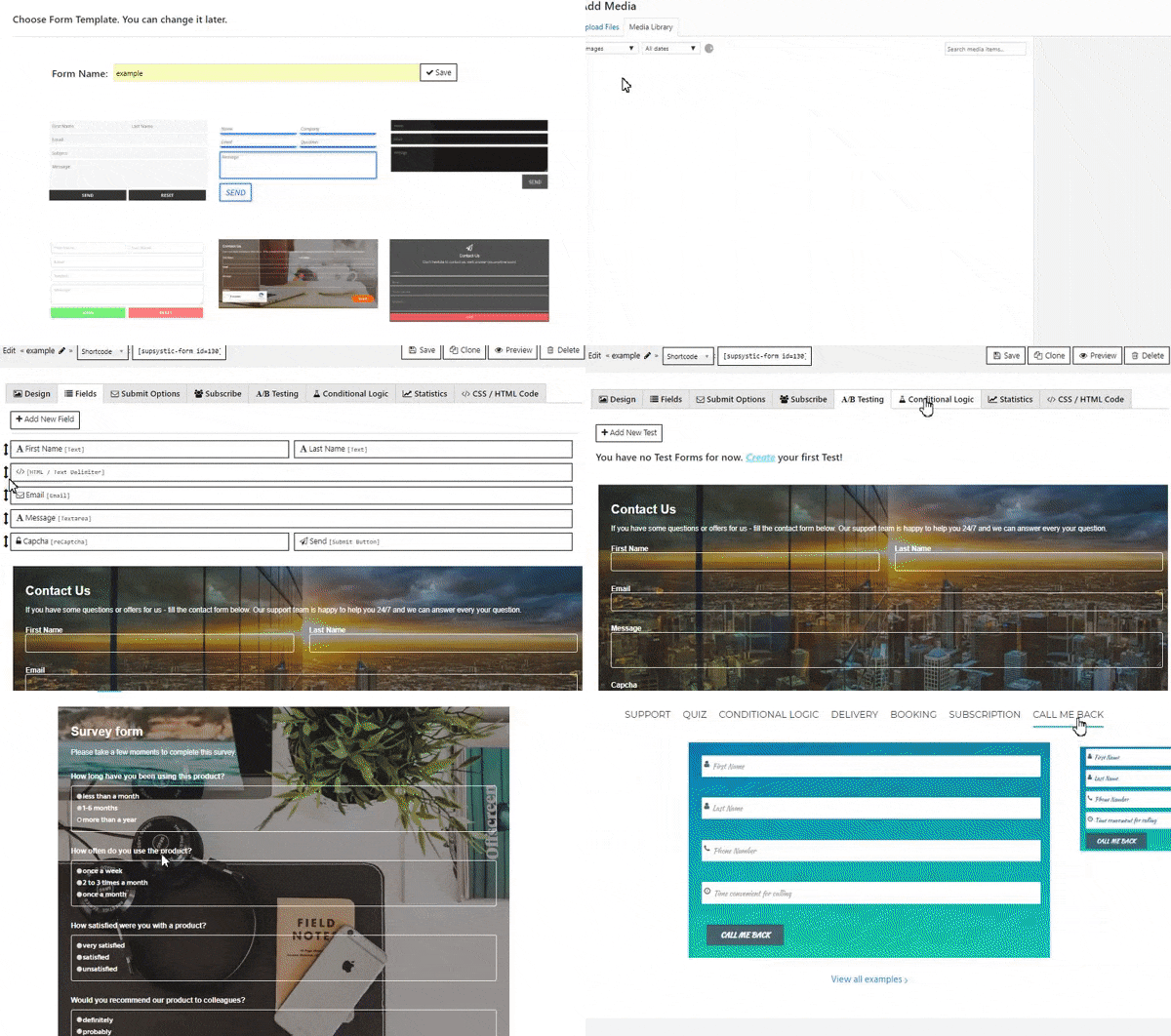
What you get inside
8 screens-
Contact Form demo
-
Conditional logic, Delivery form, Booking and Subscription
-
Quiz Form, Order form
-
Survey & Registration form
-
More examples of the Contact Form plugin
-
Contact Form templates in admin panel
-
Admin panel, Design settings
-
Admin panel, Fields
About this plugin
Simple and powerful Contact Form Builder by Supsystic with drag-and-drop editor. No coding knowledge is required.
Main Contact Form plugin features are:
- Drag-and-Drop Contact Form Builder
- Professional, responsive built-in Form templates design
- Google reCaptcha
- Unlimited Fields and Forms
- Publish Content
- Embed Popup Forms
- Quiz, Registration, Subscription form
- File Upload Form
- Conditional Logic
- Contact Form A/B Testing
- Statistics
- Contact Form widget
- Multi language support
- Fully responsive and mobile-friendly
- Integration with Popup, Membership and Google Maps by Supsystic
Contact Form by Supsystic is an ultimate form builder WordPress plugin that lets you create contact forms in seconds with ease. Build beautiful custom forms and manage submissions the WordPress way. View live previews of your forms while you build them. Capture more business opportunities on your website and get real time mobile notifications for new leads. Drag and Drop Contact Form Builder was made to create responsive, mobile ready contact forms in a second. Simple and powerful Contact Form Builder by Supsystic with Drag-and-Drop editor does not require coding knowledge.
Google reCaptcha
Every site admin and owner want to become better and be sure in quality of site life, statistics and income. Thus to avoid mistakes in Contact Form filling reCaptcha field was installed in the latest version of Contact Form. Use reCaptcha feature in the Contact Form to grow the percentage of real users of your site contacts.
Conditional Logic
A really useful new feature for those who get accustomed to gain more.
Condition Logic brings new variants of Contact form applications. Just imagine, how it will be easy to order a cup of coffee with your favorite pie online in 30 seconds! Or Book Hotel correctly with Contact Form even if you hurry. Or Redirect user to his/her country site of your Huge International Corporation with Condition Logic of Contact Form. Uncountable abilities appears in front of your eyes with new Conditional Logic modification in the Contact Form.
Embed Popup Forms
Don’t want your Contact Form takes place on your site? Use Supsystic team implementationof Contact Form into Popup by Supsystic! Thus, you can attract fresh site visits to your Subscribers’ lists or just collecting emails more actively by the Popup addition of Contact Form.
Contact Form Plugin Support
If you have any problem or feature request for the Contact Form by Supsystic, please let us know!
Translations in Your Language Contact Form Plugin
You have an incredible opportunity to get PRO version of the plugin for free. Just Make Translation of the Contact Form by Supsystic plugin! It will be amazing if you take advantage of this offer!
Available Translations:
- English
- French
Contact Form WordPress plugin helps you easily to create contact forms with your customers, gather your own client data and make it maximum elegant, beautiful and quickly. Simple and flexible plugin with user-friendly interface and light theme. Eye-catching contact form design and minimalistic functional variety – everything for your comfort!
The Contact Form has its merits, as in
- Immediate operation after activation, no need for adding boxes, fields, and lists configurations or short coding
- Wide range of settings to configure the option plugin and make it work for an eternal number of clients.
What are the benefits of Contact Form plugin by Supsystic?
Mostly the plugin is very light, easy and simple, which is appropriate almost for every site/online store/ WordPress gallery etc. Including these features at the same time, Contact form plugin produces maximum responsive products and looks cool on every device you need.
But the main benefit in comparing with other plugins is that you have full statistics about all the period using the plugin. Check how many forms were submitted, which were successful or failed on different very easy graphics. Bright colors and minimalist design allow you to check it as quickly as possible and understand the picture of your growth in two seconds. In addition, you can export your graphics in CSV file and check it on your device without internet access. Clear all the data by one click if you want to start everything from the very beginning or change your form!
Don’t forget that contact form plugin also offers options like: Load Assets in the footer or change the User role and a lot of others. The contact form plugin was created by the Supsystic team for the maximum comfort and ease of our clients, for everybody who wants to keep in touch with their guests, be modern and have all the info in one place.
Using Contact Form plugin on your WordPress site, you start a really responsive business with great analyzer. Contact form by Supsystic plugin is one of the best ways to understand your growth, to analyze the target audience of your business, its location, average age, gender etc. The responsive business is better!
Check other WordPress plugins:
Questions
- How to create a Contact form?
- Install the plugin by downloading the archive from supsystic.com, uploading it into your site and activating it.
- Navigate to the insert “Add New form” and choose the Design option (e.g. Background color, width etc), Fields – all the fields you need for a full info from your client (including different kinds of lists, emails, text fields, etc.), Submit options – customize the messages your clients get, after submitting forms, links etc.
- After all copy and paste the shortcode into your post or page and Contact Form will automatically create on your page using the settings you chose above. Read more info in full tutorial Getting Started
- What is A/B testing?
You can test different versions of a contact form to find out which form gives the best results and improve website’s conversion. By split testing your contact forms, it’s easy to understand what works best with your audience, and optimize them any time.
A/B testing feature:
* Helps improve marketing campaigns
* Improves website design and function
* Increases conversions and revenue- How to set different conditions for contact form fields?
With Conditional Logic option you have an ability to show certain fields, depending on the value of some other fields. It’s a great way to make complex forms more compact, and present the user with only the information he is interested in. You can set different conditions for several or even all your fields. Look at more details and Logic feature example.
- How to check information about submitting contacts?
Contact Form by Supsystic allows you to check and monitor information about your submitted contacts.
This data is stored on the Contacts tab (on the left navigation menu of the Contact Form Plugin). Here you will find a list of your contacts. Contacts tab will display several fields with some information from your contact form (if you have more than one form – it will show common fields information from all your contact forms).
Read more about Contact Details here.- How to set the design of Contact Form?
The plugin comes with a big variety options to customize your design.
While you start to create your Contact Form you can see a choice of Template. You have 8 different templates, different in their styles, sizes, properties – like Simple White theme, Neon template and etc. You should understand, if you choose one or another template – you chose the general style. Of course, you change any detail you do not like in it.
Also, you can make additional settings as:
* Width – set the width of the Contact Form in percents or pixels
* Form background – pleasant thing – you can change it to any image from your WP Media Library or device, or set the full color
* Inputs background – the same thing – it can be set in two ways: color or image
* Submit/Reset buttons background – definitely, you will get these two buttons on your for. Set their proper design and change the appearance on some picture or color you like too
Do not forget that below all these options you have the preview of your Contact Form, so there is no need to set it each time to the page – to see how it looks like.- How to add additional fields to a Contact Form?
Contact Form in its standard view comes with 6 fields by default. You have two different ways to customize it.
1. You can add any other fields type – by pressing the button Add New Field.
There is a long list of options/types, you can add. Choose the one/or several you like.
2. You can edit the fields you already have.Follow a complete tutorial Fields Settings.
- How to set Subscription for Contact Form?
If you want not only gather the data, but have new subscribers to your site, you can easily use the Contact Form plugin by Supsystic for any WordPress site. These subscribers will automatically get your news, letters, updates for blogs and etc. To check, how your Contact Form does work with subscribers look at the tab Subscribe.
Start your acquaintance from clicking the box Enable Subscription and after this, you will get a full range of settings for your customizing.- Problems with sending messages via Contact Form
The Supsystic team has noticed there is sometimes a big trouble with our Contact Form plugin for WordPress sites. No matter that our plugin is effective in sending and receiving more than 1 million emails every day, when you personally didn’t get it or didn’t send it.
The main causes, which can make your problem with plugin Contact Form by Supsystic
sandywp / also on the shelf
Try another plugin

4.0 · 10M+ installs
Just another contact form plugin. Simple but flexible.

Akismet Anti-spam: Spam Protection
4.7 · 5M+ installs
The best anti-spam protection to block spam comments and spam in a contact form. The most trusted antispam solution for WordPress…
-
The best WordPress contact form plugin. Drag & Drop form builder to create beautiful contact forms, payment forms, &…

Spin up a real WordPress site in seconds.
Test plugins, build a demo, hand a client a link — then squash it and start again. No local setup, no Docker.