sandywp / plugins / contact-form-7-image-captcha

Image CAPTCHA for Contact Form 7 and WPForms by HookAndHook (DSGVO/GDPR)
Adds an Image CAPTCHA to Contact Form 7 and WPForms, GDPR ready, perfect WPForms or Contact Form 7 Spam Protection Image CAPTCHA, adds a honeypot
Ready in seconds.
v3.3.29 80,000+ installs WP 4.7+ PHP 7.0+
What you get inside
3 screens-
CAPTCHA for Contact Form 7
-
CAPTCHA for WPForms
-
PRO plugin
About this plugin
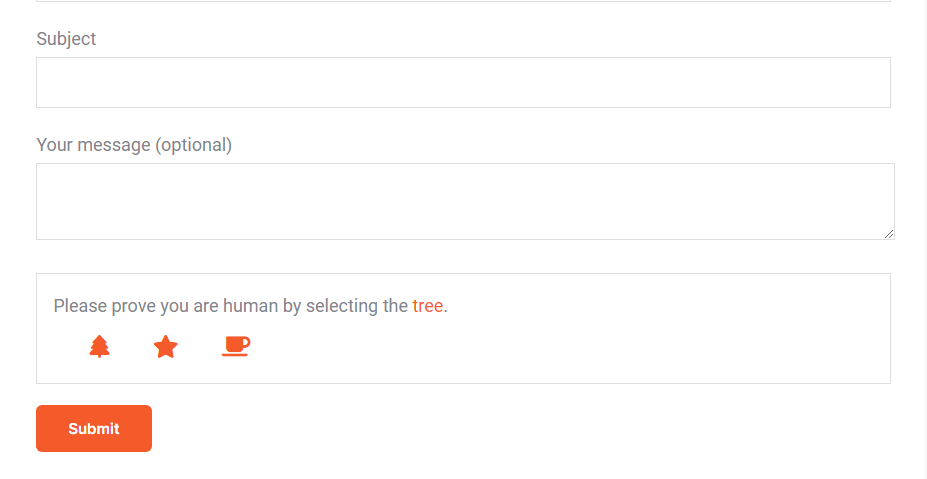
Add an SVG image captcha and honeypot to your Contact Form 7 or WPForms form. Based on our interpretation this CAPTCHA plugin is GDPR compliant because the images are inline SVGs and no download of external resources happens, in addition no cookies or other storing mechanisms are used on the user’s device, this plugin will not slow down your site with additional header requests like Google’s ReCAPTCHA and respects your users privacy.
Directions [PLEASE READ]
Contact Form 7:
Add the shortcode [cf7ic] to the form editor where you want the CAPTCHA to appear.
You can hide the CAPTCHA until a user interacts with the form, by adding “toggle” to the shortcode: [cf7ic “toggle”]
WPForms:
Just activate the CAPTCHA for WPForms on the plugin’s settings page.
Like the plugin?
Please consider leaving a review.
As of version 3.2.0, Contact Form 7 Conditional Fields is now fully supported! You no longer need to add [hidden kc_captcha "kc_human"] to forms that do not include the [cf7ic] shortcode.
Go Pro!
Get even better spam protection with the All-in-one Image CAPTCHA Pro version of this plugin which includes additional options to improve spam protection, options to control the look and style of the CAPTCHA and messages, additional forms support including login screens, gravity forms, WooCommerce and more.
PRO Demo
See the Pro version in action on my contact page.
Check out our pro version for more details.
PRO Features:
- GDPR compliant
- ADA/a11y/WCAG compliant
- Gravity Forms support
- WooCommerce support for login, registration and checkout forms (optional)
- WordPress login/registration form support (optional)
- Default WordPress comment support
- Customize the look of the WordPress login/registration screen and form
- CAPTCHA refreshes on submit to make it harder for automated spammers
- Reverse honeypot which checks if you are human through form engagement
- Stronger security with hashed answers to make it harder for automated spammers to read the answers
- Add additional icons to increase the chances of a random guess getting through. You can increase it from a 1 and 3 chance all the way up to a 1 in 10 chance!
- Select which icons you wish to use
- Add additional icons from Font Awesome 4.7
- Add your own custom SVG icons
- Customize the icon titles
- Change the captcha message
- Change the captcha errors
- Change the box color and border
- Change font and icon color and size independently
- Change the selected icon appearance
- Change where the icons appear
- Change the box from full width to content width
- jQuery free on the front end
Questions
- Language issues?
If either only parts of the CAPTCHA text is translated, or everything is displayed in English, please read through the following possible causes and how to fix them.
1 Translation missing
All plugins within the wordpress.org repository are translated by the translate.wordpress.org community.
Maybe your language set is not fully translated or not translated at all.In this case, you have the following options:
1. Contribute to the translate.wordpress.org community and translate your language
2. Use another plugin to create your own local translation
3. Purchase the Image CAPTCHA PRO plugin which offers the possibility to choose your own messages without relying on any external translation – Go Pro!2 Update WordPress translations
You might face the situation that your language pack is completely translated on translate.wordpress.org but the translation still might not work as expected.In this case, you have the following options:
1. Update your language packs via: WP Admin > Dashboard > Updates > Translations > Update Translations3 Contact Form 7 language settings
Contact Form 7 saves a meta variable for the language of each respective form and this is being done when you FIRST save the form.In this case, you have the following options:
1. Change the variable via the WordPress database directly (look for the post ID of the respective form in the postmeta table and there’ll be a “_locale” option).
2. Make sure to change the language in your WordPress backend to your desired target language and then simply re-create the CF7 form.- Does the plugin support WPML?
Yes, both the free and pro versions support WPML.
In fact, there is an active partnership between WPML and Image CAPTCHA for seamless integration.- Issues using WPML, CF7 and our plugin?
Please follow those steps:
1. Install CF7 and our plugin
2. Install WPML plugin and the CF7 Multilingual addon
3. WP admin backend: Choose your desired language, via flag at the top menu e.g. German (see screenshot)
4. WP admin backend: Choose Contact > Contact Forms > Add New
5. CF7: Translate the labels
6. CF7: In the right white sidebar, choose Translations to e.g. English (see screenshot)
7. WPML: Translate the strings into e.g. English
8. WPML: When finished click the green button: “Complete Translation”
9. WP admin backend: Choose Pages > Add New Page
10. WP page: Set the e.g. German title “Kontaktformular” and insert the Contact Form 7 shortcode
11. WP page: Save as draft or publish page
12. WP page: On the right, click: e.g. English + Translate (see screenshot)- How do you add the image CAPTCHA to the Contact Form 7 forms?
Simply add this shortcode [cf7ic] to your contact form.
- How do you use the toggle feature for Contact Form 7?
To make it so the CAPTCHA only shows when the form is being filled out, add “toggle” to the shortcode
[cf7ic "toggle"]in your contact form.- Toggle for Contact Form 7 is not working
The most likely reason the toggle is not working is because the double quotes around the word toggle has been changed to “smart quotes”, meaning that they are opening and closing quotation marks and not the verticle lines.
To fix, simply delete the quotes and re-add them with your keyboard – do not copy and paste.
- Why does the image CAPTCHA not appear?
If the Image CAPTCHA does not appear, please confirm that you are running PHP version 7 or higher.
- Why does the styling of the image CAPTCHA look wrong?
If the styling does not look right, you may need to clear your browser cache. If you have any caching plugins or speed optimization plugins installed, you may need to clear your site cache as well.
sandywp / also on the shelf
Try another plugin

4.3 · 600K+ installs
Adds WordPress login and admin protections, including CAPTCHA, login lock, login alerts, renamed login URLs, and SiteGuard WAF…

CF7 Apps – Honeypot, Database, Redirection, Webhook, and Addons for Contact…
3.8 · 300K+ installs
Add hCaptcha, Honeypot, and Redirection to Contact Form 7 with CF7 Apps, and generate forms effortlessly with AI. Improve form…

4.2 · 300K+ installs
Really Simple CAPTCHA is a CAPTCHA module intended to be called from other plugins. It is originally created for my Contact Form…
Spin up a real WordPress site in seconds.
Test plugins, build a demo, hand a client a link — then squash it and start again. No local setup, no Docker.