sandywp / plugins / conditionally-display-featured-image-on-singular-pages

Conditionally display featured image on singular posts and pages
Easily control whether the featured image appears in the single post or page view (doesn't hide it in archive/list view).
Ready in seconds.
v3.4.0 30,000+ installs WP 6.7+ PHP 5.6+
What you get inside
5 screens-
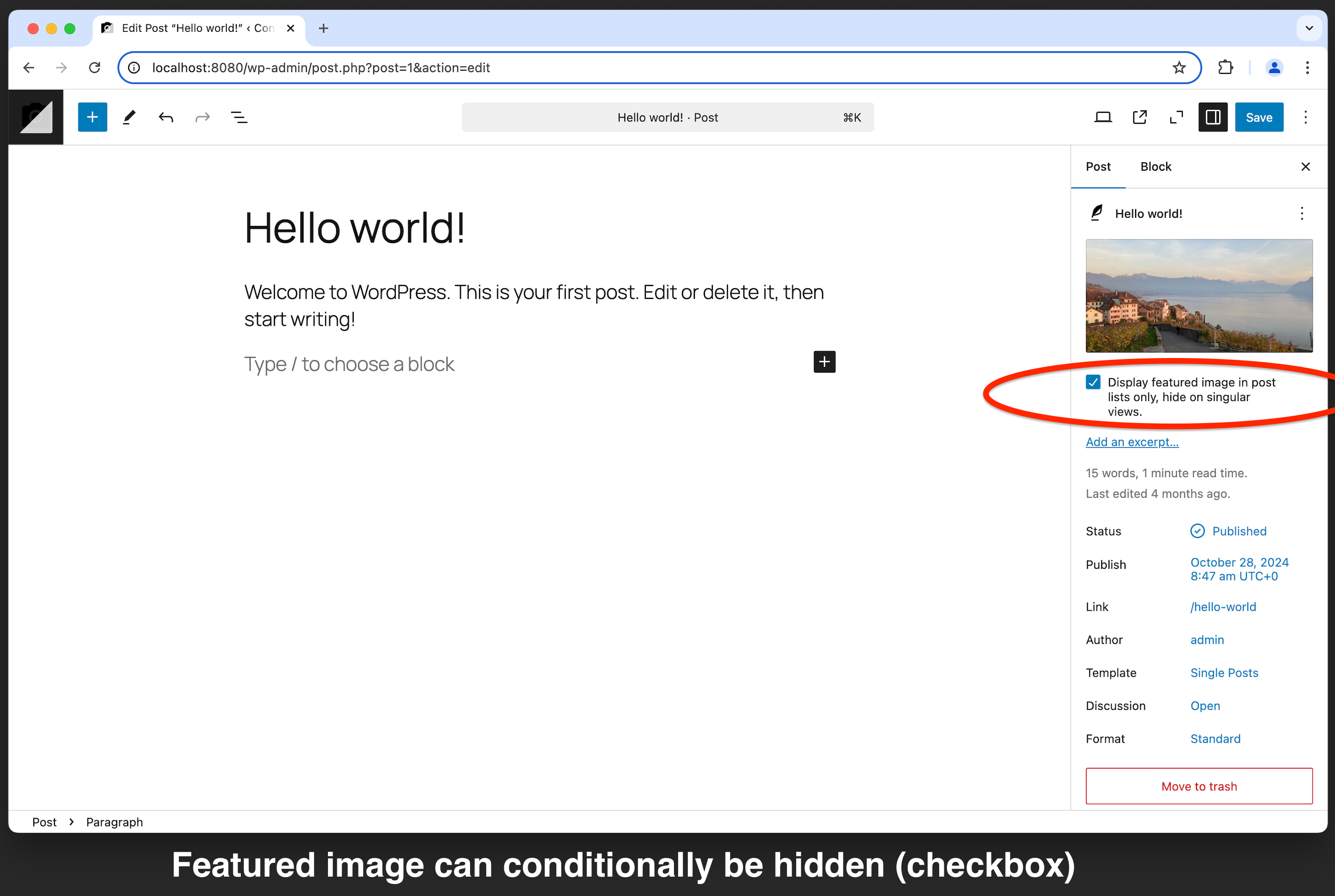
Backend (Block Editor)
-
Frontend (Front Page / Post List / Query Loop Block / Archive View)
-
Frontend (Post / Page / Singular View)
-
Backend (Classic Editor)
-
Backend (WooCommerce Product)
About this plugin
Easily control the visibility of the featured image on singular posts and pages–while keeping it visible in archive pages, query loops, and other list views. This plugin provides a simple checkbox option within the post editor, allowing you to enable or disable the display of the featured image on individual posts and pages.
Key Features
- Show or hide the featured image on singular pages and posts.
- Seamlessly integrates with the WordPress post editor.
- Simple checkbox toggle—no technical knowledge needed.
- AI ready.
- Compatible with most themes.
- Supports WooCommerce product pages.
- Lightweight and optimized for performance.
- 100% free—no ads, no upsells, no premium versions!
Perfect for bloggers, content creators, and developers who want precise control over the visibility of featured images on a per-post basis.
Important Notice
If your theme uses a custom method to load the featured image (such as the Twenty Seventeen theme), this plugin may not work. To ensure compatibility, use standard WordPress functions like get_the_post_thumbnail(), wp_get_attachment_image(), or the Post Featured Image block.
Additionally, by default, this plugin only hides the featured image when it is loaded inside the loop. If your theme loads it outside the loop check out the first FAQ entry for a solution.
Questions
- The plugin doesn’t work with my theme. What can I do?
Some themes load featured images in custom ways, which may cause compatibility issues. The two most common reasons are:
1) The theme loads the featured image before the loop (e.g., in the header).
2) The theme manually calls the featured image using custom functions.Solution for case 1
If your theme loads the featured image before the loop, you can modify the plugin’s behavior by adding the following snippet to your
functions.phpfile:function cybocfi_set_startup_hook() { return 'get_header'; } add_filter( 'cybocfi_startup_hook', 'cybocfi_set_startup_hook' ); add_filter( 'cybocfi_only_hide_in_the_loop', '__return_false' );Note: This may hide the featured image from other plugins that rely on it, such as SEO plugins or the ‘latest posts’ plugin.
Solution for case 2
If your theme uses custom functions to display featured images, try the following options:
- Ask the theme developer to use standard WordPress functions like
wp_get_attachment_image(),get_the_post_thumbnail()orthe_post_thumbnail(). - Create a child theme and load the featured image with one of the functions above.
- Ask the theme developer to use standard WordPress functions like
- Is this plugin GDPR compliant?
Yes! This plugin does not collect, process, or store any personal information, making it fully GDPR-compliant.
- Can I hide featured images by default?
Yes. Add the following code to your
functions.phpfile to hide featured images by default:add_filter('cybocfi_hide_by_default', '__return_true');This will automatically check the “Hide Featured Image” option for all new posts and pages. Existing content remains unchanged.
For different default behaviors based on the post type, use:
function cybocfi_set_default_hiding_state( $default, $post_type ) { if ( 'post' === $post_type ) { $default = true; // Hide featured images on posts by default } else if ( 'page' === $post_type ) { $default = false; // Show featured images on pages by default } return $default; } add_filter( 'cybocfi_hide_by_default', 'cybocfi_set_default_hiding_state', 10, 2 );- Can I limit this plugin to posts (and exclude other post types)?
Yes. By default, the plugin works on all post types that support featured images. To restrict it to posts only, add the following snippet to your
functions.php:function cybocfi_limit_to_posts( $enabled, $post_type ) { if ( 'post' === $post_type ) { return $enabled; } return false; } add_filter( 'cybocfi_enabled_for_post_type', 'cybocfi_limit_to_posts', 10, 2 );If you want it to work for both posts and pages but disable it for other post types:
function cybocfi_limit_to_posts_and_pages( $enabled, $post_type ) { $allowed_post_types = array( 'post', 'page' ); // add any post type you want to use the plugin with return in_array( $post_type, $allowed_post_types ); } add_filter( 'cybocfi_enabled_for_post_type', 'cybocfi_limit_to_posts_and_pages', 10, 2 );- WooCommerce: How does the plugin handle product images?
If the featured image is hidden for a WooCommerce product, it will still appear as a thumbnail in the cart, checkout, and product lists. However, it will not be displayed in the single product view. If a product gallery is available, all gallery images will be shown as usual, except for the hidden featured image.
- WooCommerce: Can I remove empty space left by the hidden image?
Yes. The plugin applies CSS adjustments automatically for standard themes. If needed, customize it with this snippet:
function cybocfi_woocommerce_styles( $css ) {
    return '.wp-block-woocommerce-product-image-gallery {display: none;}';
}
add_filter( 'cybocfi_woocommerce_style_overrides', 'cybocfi_woocommerce_styles' );
These styles apply only when the featured image is hidden in WooCommerce product pages.
- Can I translate this plugin into my language?
Absolutely! You can contribute a translation here. Keep in mind that translations need community approval before they go live.
- How can I change the text of the checkbox?
You can customize the checkbox label using this filter in your
functions.phpfile:function cybocfi_set_featured_image_label( $label ) { return 'Hide featured image in post'; // change this text } add_filter( 'cibocfi_checkbox_label', 'cybocfi_set_featured_image_label' );
sandywp / also on the shelf
Try another plugin

Featured Image from URL (FIFU)
4.6 · 60K+ installs
Use remote media as the featured image and beyond.

3.6 · 10K+ installs
To Hide Featured Image on single post/page.

8K+ installs
Daddy Plus is a useful plugin for WordPress theme by Themes Daddy.
Spin up a real WordPress site in seconds.
Test plugins, build a demo, hand a client a link — then squash it and start again. No local setup, no Docker.