sandywp / plugins / collapsing-archives

Collapsing Archives
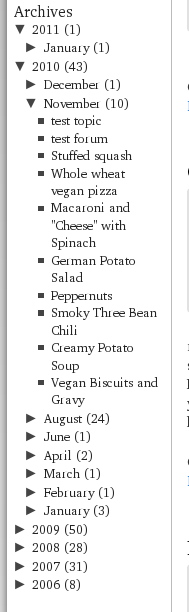
This plugin uses Javascript to dynamically expand or collapse the set of months for each year and posts for each month in the archive listing of your …
Ready in seconds.
v3.0.8 3,000+ installs WP 2.8+
What you get inside
2 screens-
Collapsing archives with default theme
-
widget options
About this plugin
Create collapsible archives by year or month. Features include: link to archive pages, display of individual posts and support for custom post-types.
Demo
I use this plugin in my blog at http://blog.robfelty.com
Questions
- How do I change the style of the collapsing archives lists?
The collapsing archives plugin uses several ids and classes which can be
styled with CSS. These can be changed from the settings page. You may have to
rename some of the id statements. For example, if your sidebar is called
“myawesomesidebar”, you would rewrite the line- sidebar li.collapsArch {list-style-type:none}
to
- myawesomesidebar li.collapsArch {list-style-type:none}
If you are using the plugin manually (i.e. inserting code into your theme),
you may want to replace #sidebar with #collapsArchList- There seems to be a newline between the collapsing/expanding symbol and the
category name. How do I fix this? =
If your theme has some css that says something like
- sidebar li a {display:block}
that is the problem.
You probably want to add a float:left to the .sym class
sandywp / also on the shelf
Try another plugin

Accordion FAQ – Compatible With All Page Builder (Elementor, Gutenberg)
4.6 · 30K+ installs
Accordion And Collapse is the most easiest drag & drop accordion builder for WordPress. You can add multiple accordion and…

4.6 · 30K+ installs
Full-featured FAQ and accordion plugin with advanced search, simple UI and easy-to-use FAQ blocks and shortcodes.

4.2 · 20K+ installs
Expand hidden content without a page refresh. 100% SEO-friendly and crawlable, now with accordion/FAQ schema, content locker,…
Spin up a real WordPress site in seconds.
Test plugins, build a demo, hand a client a link — then squash it and start again. No local setup, no Docker.