sandywp / plugins / cimo-image-optimizer

Cimo – Free Instant Image Optimizer & WebP Converter
Unlimited free image compression and WebP conversion, done instantly as you upload them. No quotas, no external servers, no limits.
Ready in seconds.
v1.4.2 10,000+ installs WP 7.0.3+ PHP 8.0+
What you get inside
1 screen-
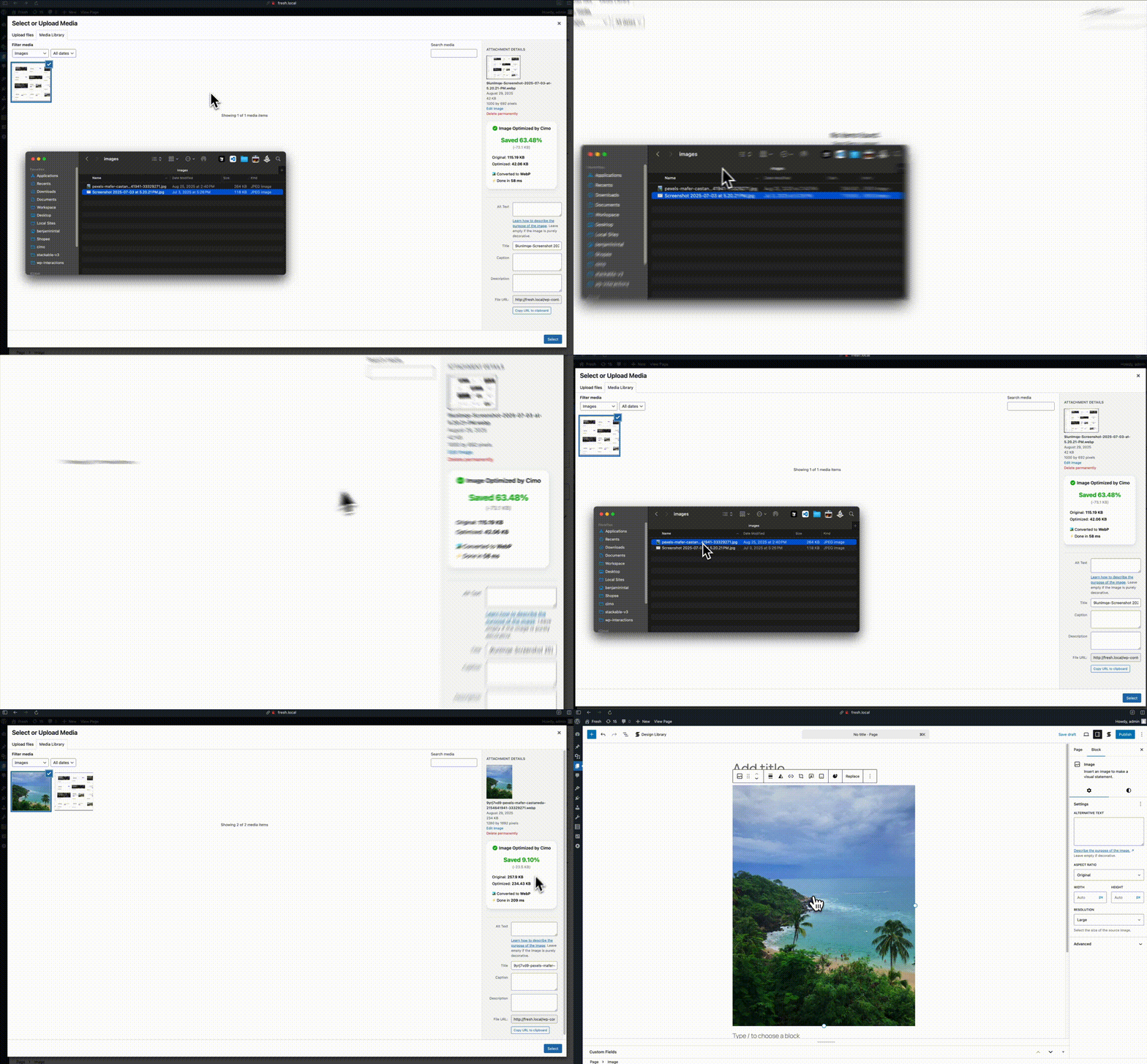
Automatic WebP conversion on image upload
About this plugin
Optimize all your images instantly and for free.
Cimo optimizes, resizes, and converts your images to WebP instantly as you upload them — right in your browser, before the files are ever added to your Media Library. From WordPress’ point of view, it’s as if the image was already optimized before you uploaded it, keeping your site’s load speed fast without compromising quality.
Visit Cimo’s website to learn more about how Cimo does things.
- Unlimited usage – upload as many images as you want
- Instant optimization – virtually no waiting time
- No extra server load, bandwidth, or external image-processing services
Note: Cimo works in all modern browsers (Chrome, Firefox, Edge, Opera). In Safari, images will be optimized but will keep their original file format. WebP conversion is not supported in Safari.
Image Optimization options:
- WebP quality – set the quality level for WebP conversion (1-100), defaults at 80%
- Max image dimension – automatically resize images to a maximum dimension while preserving aspect ratio
- WordPress automatic scaling – disable WordPress’s built-in 2560px image scaling
- Thumbnail generation – disable all WordPress thumbnail generation to save disk space
- Individual thumbnail sizes – selectively enable/disable specific thumbnail sizes
- Preset configurations – one-click “Recommended” settings for optimal performance
- Statistics dashboard – view total storage saved, compression ratio, and optimization metrics
How to use
Just upload images to your Media Manager as you normally would, then Cimo instantly optimizes the images to the next-gen format WebP on your browser during the upload process, the resulting optimized file is the one saved to your WordPress site. It’s amazing!
Why use Cimo?
- Completely Free & Unlimited – no quotas, no limits, no paywalls. Optimize as many images as you want, forever.
- Instant, Browser-Based Processing – images are optimized as you upload, with zero server load and no external services.
- Privacy-First – your images never leave your device until they’re uploaded to WordPress.
- Future-Proof Format – automatic WebP conversion reduces file sizes by up to 80%, with full control over quality, dimensions, and thumbnail generation.
- Universal Compatibility – works seamlessly with the WordPress Block Editor, Elementor, Beaver Builder, and all major page builders.
Works with
- The native WordPress Block Editor / Gutenberg
- Should work with any plugin, but we made sure it works with these:
- Popular Page Builders
- Elementor
- Divi (partial: dropping files is not yet supported)
- Breakdance
- Bricks Builder
- Oxygen
- Beaver Builder
- WP Bakery
- Popular Block Editor Builders
- Stackable
- Spectra
- Kadence
- Greenshift
- GenerateBlocks
- Popular plugins
- WooCommerce
- Popular Page Builders
Since Cimo’s optimization works during the upload process, Cimo should be compatible with any plugin that uses images
What’s in Cimo Premium?
Free already optimizes images as you upload. Cimo Premium finishes the job on what’s already on your site:
- Bulk Optimization – optimize your existing images, videos and audio in your Media Library in one click, no server processing as well
- Optimize All Media Uploaded via Form Plugins – automatically optimize images, videos, and audio uploaded through popular form plugins (Gravity Forms, WPForms, Ninja Forms, Formidable, Fluent Forms, etc.)
- Smart Optimization – uses advanced algorithms to automatically select the optimal compression settings for each image, for the best results without manual tweaking.
- Video & Audio Optimization – automatically optimize and optionally downscale the resolution of videos and audio quality as you upload them
- Low Quality Image Placeholders (LQIP) – for native image blocks, display a subtle image placeholder while waiting for images to load, then fade the loaded image in.
- Stealth Mode – completely hides all Cimo branding and interface elements, while all optimization features continue to work seamlessly in the background.
Visit our website to learn more
Video & Audio optimization are also performed as you upload your files, even before the files are added to your Media Library.
Perfect For
- Website owners and content creators who upload large images without optimizing them first
- Developers and agencies building or managing sites that need fast, optimized images
- Anyone wanting automatic WebP conversion without a manual workflow
- Sites where server-side image processing isn’t available or desired
- Privacy-conscious users who don’t want images sent to third-party servers
Questions
- What makes Cimo different from other image optimizers?
Unlike server-side plugins, Cimo processes everything in your browser. No external APIs, no server processing, no waiting – just instant optimization as you upload.
- How will I know if it worked?
When you upload an image into your Media Manager (let’s say a .jpg), you’ll notice that after uploading, it will be a .webp image! You will also find some additional information in the Media Manager about your uploaded image.
- Does Cimo work in all browsers?
Cimo works in all modern browsers including Chrome, Firefox, Edge, and Opera. In Safari, images will be optimized but will keep their original file format. WebP conversion is not supported in Safari.“`
- Does Cimo really have no limits?
Yes! Unlike other plugins that charge per image or have monthly quotas, Cimo’s image optimization and compression is completely unlimited and free forever.
- Is my data sent to external servers?
No! Cimo processes everything locally in your browser. Your media assets never leave your device until they’re uploaded to your WordPress site, nor do they go to another server for processing.
- How does Cimo’s client-side processing work?
Our browsers right now are quite powerful and already have the capabilities for converting images to different formats.
At the very core, the conversion is done via a clever use of JavaScript’s Canvas API to process your images in the browser right before they’re uploaded to WordPress.
This means faster uploads, no server load, and complete privacy.
- What image formats does Cimo support?
Currently WebP conversion is fully supported.
- Does Cimo work with existing images?
Cimo optimizes images during the upload process. For existing images, we have bulk optimization available in Cimo Premium. Learn more on our pricing page.
sandywp / also on the shelf
Try another plugin

4.8 · 1M+ installs
Comprehensive image optimization with WebP, AVIF, Lazy Load, and more. Optimize images automatically for Faster Sites and Happy…

4.7 · 10K+ installs
Minify HTML output for clean looking markup and faster downloading.
WP Super Minify • Minify, Compress and Cache HTML, CSS & JavaScript
4.1 · 9K+ installs
A lightweight plugin that automatically minifies, compresses, and caches HTML, CSS, and JavaScript on demand to improve your…
Spin up a real WordPress site in seconds.
Test plugins, build a demo, hand a client a link — then squash it and start again. No local setup, no Docker.