sandywp / plugins / catfolders-document-gallery

CatFolders Document Gallery & PDF Library
Display WordPress PDF gallery and file gallery from folders. Comes with a clean, searchable & sortable list/grid layout.
Ready in seconds.
v2.0.8 3,000+ installs WP 6.1+ PHP 7.0+
What you get inside
7 screens-
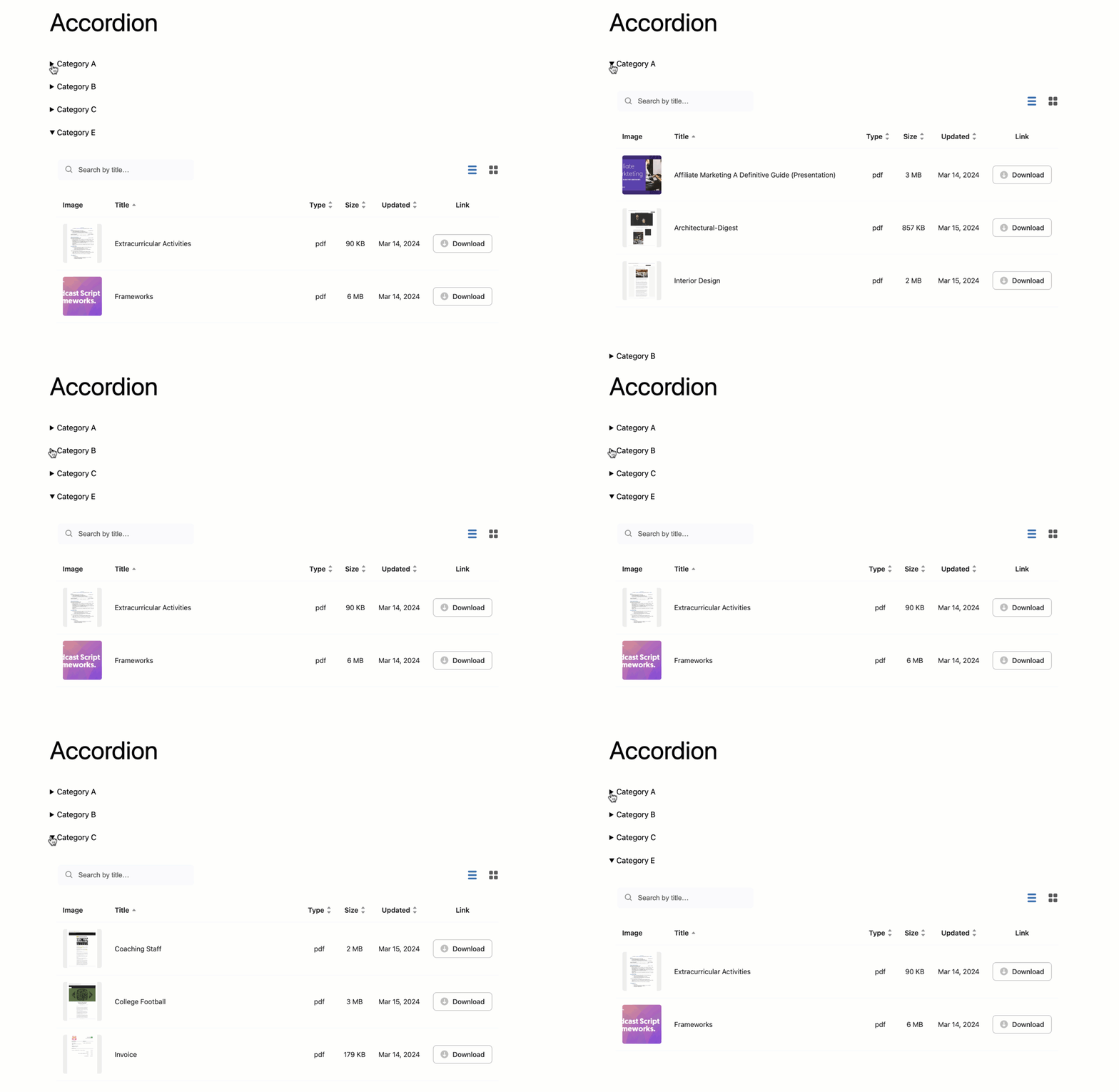
Collapsible document galleries from folders.
-
The Gutenberg block of CatFolders document gallery.
-
3 steps to set up WordPress document gallery in Gutenberg or shortcode builder.
-
WordPress document gallery in grid view.
-
WordPress document file gallery in list view.
-
Sort, search, click to view, and download documents from WordPress document gallery.
-
Tabbed filterable gallery with PDF first page thumbnails.
About this plugin
Document Gallery is a free extension for the CatFolders plugin that makes it easy to publish document libraries on your WordPress site.
With a single Gutenberg block (or simple shortcode), you can point to any media folder and instantly display its contents on a page.
In seconds, a folder of PDFs, Word docs, spreadsheets, ebooks, and more becomes a neat, browsable on-page gallery. No manual link-building required and no file links altered.
Visitors see each file as a clickable card (icon + title + first page image) and can open or download it without leaving the page.
📌 Documentation | View Demo of PDF gallery with first page thumbnails
Key Features
Grid & List Layouts
Display any media folder as a clean grid of cards or a classic table list. Each entry shows a file-type icon or PDF thumbnail alongside the file title and an optional description.
Instant Previews & Downloads
Click a file card to preview it in-page or trigger a download. Document Gallery automatically generates first-page thumbnails for PDFs, so visitors always have a visual reference.
Search, Sort & Filter
Built-in search and filtering let users narrow results by folder, file type, date, and more. Pagination and load-more buttons keep large collections fast and easy to browse.
Customizable File Details
Choose which columns to display: file size, updated date, type icon, a Download button, or custom notes. All output inherits your active theme’s styling for a polished, consistent look.
All Media Types Supported
Not just PDFs. Document Gallery works with Word, Excel, PowerPoint, images, audio, video, ebooks (EPUB, MOBI), and any custom file type stored in your WordPress media library. Suitable for any download-heavy site!
💥 New Feature: Nested Folders with Breadcrumb Navigation!
The CatFolders Document Gallery now supports multi-level folder structure, making it easier than ever to organize and present your documents. With intuitive breadcrumb navigation, your website visitors can quickly explore subfolders and find exactly what they need!
CatFolders Document Gallery support displaying all WordPress file types:
- Documents: pdf, doc, ppt, odt, xls
- Graphics: psd, svg
- eBooks: epub, mobi, azw, azw3
- Images: jpg, jpeg, png, gif, ico, webp
- Audios: mp3, m4a, ogg, wav
- Videos: mp4, mov, wmv, avi, mpg
- Others: svg, zip, json, and custom file types
To get started with this WordPress PDF gallery plugin, simply follow these steps:
- Install CatFolders (free, or pro version)
- Install CatFolders Document Gallery (this plugin)
- Start organizing documents into folders
- Pick a folder to create WordPress gallery from folder
- Customize the gallery appearances and publish
💪 WHY YOU SHOULD USE DOCUMENT GALLERY BY CATFOLDERS?
It will save you a huge amount of time thanks to these built-in features:
- Two customizable layouts: list and grid
- Over 5 file details available:: title, file type, icon, file size, updated date, and download link
- Automatically shows PDF first-page thumbnails
- Supports all standard WordPress media file types
- Fully mobile responsive
- Clean, modern gallery design
- Option to show or hide specific columns
- Built-in file title search box
- Sort files by size, title, file type, or last modified date
- Flexible pagination settings
- Click to preview, open in a popup, or download any file
It’s especially useful for WordPress websites that offer downloadable resources, such as:
- eCommerce websites offering digital products or file downloads.
- Membership sites providing gated access to exclusive files.
- Schools or universities sharing study materials.
- Companies providing white papers or reports.
- Nonprofits sharing brochures and legal docs.
Happy gallery-ing 💖
Questions
- How does the WordPress pdf gallery plugin work?
This free WordPress pdf gallery plugin adds a CatFolders Document Gallery block in Gutenberg. You can use it to create a WP document library on the front-end. Once you have published the documents and other files to the gallery, your website visitors can search, sort, preview, view all documents, or download files very quickly. It helps retain traffic and boost engagement on your WordPress website.
- Can’t upload images or files to WordPress media library?
No worries, these things happen. Please check out how to troubleshoot WordPress media library not loading or upload documents to WordPress media library.
- Is there a limit to the number of documents I can display on WordPress page/post?
There’s no limit to how many attachments and files you can add to a folder. Therefore, no limit on the number of documents per page/post! This CatFolders Document Gallery plugin is optimized with smart pagination so the users can go back and forth between the pages very quickly without reloading page.
- Does it support hierarchical folders?
If you’re using CatFolders – WP Media Folders free version, which doesn’t create subfolders, it won’t be displaying multiple folders on the front-end. However, you can bulk-select folders using Ctrl/Command or Shift key and display all files contained in those folders.
Regarding showing the folder tree structure on the front-end, we are considering it and will implement it as soon as we can.- How to create a collapsible document gallery?
In Gutenberg, there’s a built-in block called Details and you can use it to create a collapsible section. Inside the section, just add a CatFolders Document Gallery block, and you will have collapsible lists of document galleries.
- Can the document gallery display PDF first pages as thumbnails?
Yes, as long as your website’s server is properly configured with ImageMagick and GhostScript, which generates the first page image of PDF in the WordPress media library, it will be displayed on the front-end accordingly.
- Can I request to add more features to this plugin?
So you want us to add further integrations such as Elementor pdf gallery, and others? To put it into consideration, please submit your ideas to CatFolders feature requests.
sandywp / also on the shelf
Try another plugin

Document Embedder – let visitors read files without downloading
4.9 · 9K+ installs
Embed PDF, Word, Excel & PowerPoint in WordPress. PDF viewer, 3D flipbook and document library with Gutenberg block &…

4.1 · 4K+ installs
Create a WordPress document library to manage, search and download files.

Filr – Secure document library
4.6 · 700+ installs
Easily Create a Secure Document Library with Filr
Spin up a real WordPress site in seconds.
Test plugins, build a demo, hand a client a link — then squash it and start again. No local setup, no Docker.