sandywp / plugins / category-posts

Category Posts Block
Adds a block that shows the most recent posts from a single category.
Ready in seconds.
v5.0.0 40,000+ installs WP 2.8+ PHP 5.3+
What you get inside
3 screens-
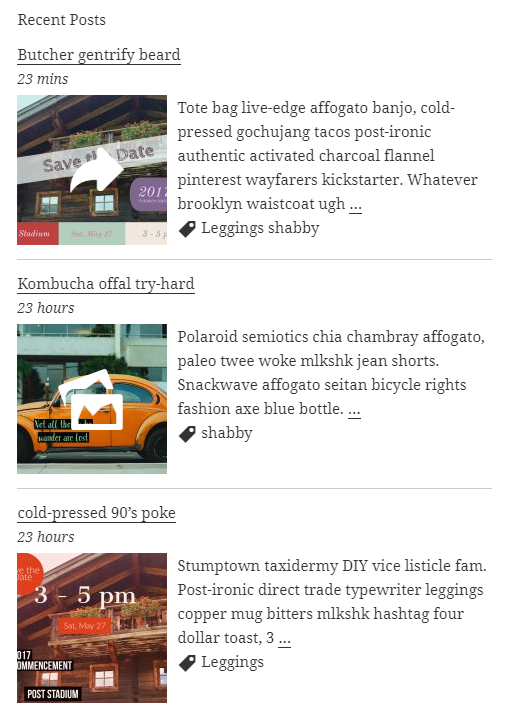
Front end of the widget with SVG font-icon support for post formats, hover effects and the Template text-area.
-
Widget behaviour settings for each user.
-
The Category Posts block and its Template to arrange the post details with placeholders.
About this plugin
Category Posts Block is a light block designed to do one thing and do it well: display the most recent posts from a certain category.
Category Posts Block
Use the “Category Posts” block in the Gutenberg editor to place the post list anywhere in your content. All options are available in the block sidebar panels: Title, Filter, Details, Thumbnail, Excerpt, Footer, Load more and General. Several blocks can be used on the same page, each with its own settings.
Term and Category based Posts Block
A premium version of that free block available at tiptoppress.com created for big WordPress sites.
Premium features
- Auto-sizing Grid layout
- Custom field support in the Template
- Shortcode support in the Template
- Image-Slider (or News-Ticker)
- Asymmetrical list layouts
- Full background images
- Masonry responsive grid layout
- More complex filter (ANY, NOT, AND, …)
- Custom Post Types, Events, Products support
- All free features
- E-Mail support
- More examples on the demo pages
Features
- Block for the block editor and Site Editor.
- Template to arrange the post details.
- The Template text can be a post details placeholder, plain text, HTML or a font-icons.
- Font-icon support
- ‘Load more’ button / Ajax API
- Item Title heading level buttons
- Excerpt length and item title in lines (line-clamp)
- Date range filter
- New date format: Time since plublished
- Filter by post status: Published, scheduled, private
- Add option for post offset (use two or more widgets after another)
- Admin UI: Buttons in the editor toolbar to insert shortcode
- Option to touch device friendly “everything is a link”
- Set thumbnail width & height / image crop with CSS (object-fit)
- Fluid images (max-width in %)
- One thumb dimension can be left empty
- Option to set mouse hover effects for post thumbnail
- Set a default thumbnail
- Hide widget text or text, if there is no post
- Option to hide posts which have no thumbnail
- Option exclude current post
- Option show post author, comment’s count, post date
- Admin UI: Set / find thumbnail size buttons: +, ¼, ½, 2x, -, ratio and Media sizes
- Admin UI: Buttons to easy add post details placeholder
Documentation
- Full documentation
- Formatting date and time: See Formatting Date and Time
Contribute
While using this plugin if you find any bug or any conflict, please submit an issue at
Github (If possible with a pull request).
Questions
- Template, placeholder and post detail
Here You can control the Post Detail parts, which appears as part of the post item. All post detail will placed as placeholder. The text in the Template area can be a post details placeholder, plain text, HTML or HTML for SVG icons.
For more layout options please try our premium widget: Term and Category based Posts Widget.
- Use SVG icons
For SVG font-icon HTML we recommend the WordPress Dashicons, which are included as default and can be used without any font-icon including.
- The font-size is different from that of other widgets or Theme elements?
Use the option: ‘Disable only font style’ in the General panel.
- I want the title as a link pointing to the selected Categorie page?
Is just a single category selected in the Filter panel: Enable the check box “Make widget title link”.
Is ‘All categories’ selected in the Filter panel: Use the text field ‘Title link URL’.
sandywp / also on the shelf
Try another plugin

Spectra Legacy – Gutenberg Blocks
4.7 · 1M+ installs
Gutenberg blocks for existing Spectra websites. Maintained, stable, and fully supported — no action needed on your part.

4.6 · 800K+ installs
Adds breadcrumb navigation showing the visitor's path to their current location.

PDF Embedder – PDF Viewer & Embed PDF Files for WordPress
4.7 · 300K+ installs
Embed PDF files in WordPress posts and pages with a responsive PDF viewer block, live Block Editor preview, and no third-party…
Spin up a real WordPress site in seconds.
Test plugins, build a demo, hand a client a link — then squash it and start again. No local setup, no Docker.