sandywp / plugins / cart-rest-api-for-woocommerce

CoCart – Headless REST API for WooCommerce
Ship your headless WooCommerce storefront faster. CoCart is the REST API built for Next.js, React, Vue, and any modern frontend — developer-first.
Ready in seconds.
v4.9.5 900+ installs WP 6.7+ PHP 7.4+
What you get inside
3 screens-
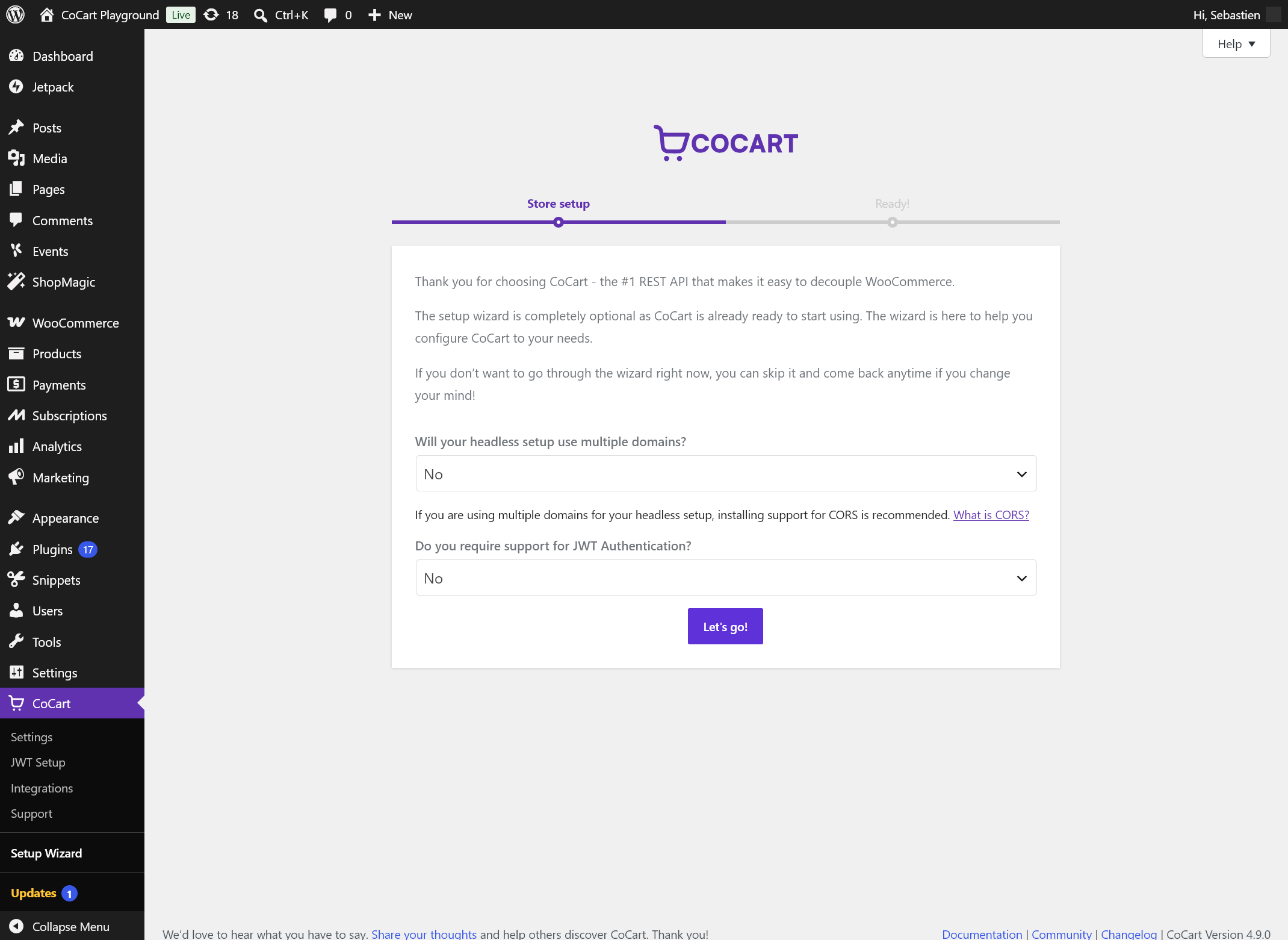
The optional setup wizard gets your headless store configured in minutes.
-
Settings page — configure CORS, authentication, sessions, and features without touching code.
-
Integrations page — control which supported third-party plugins load during CoCart requests.
About this plugin
You’ve chosen WooCommerce for your store. Now you want a modern frontend — React, Next.js, Astro, Vue — without being locked into WordPress themes. That’s exactly what CoCart is built for.
CoCart gives WooCommerce a proper frontend REST API: cookie-less session management built for stateless frontends, authentication that makes sense, and CORS support built-in. Cart sessions, authentication, and product data. Scale up when you’re ready.
In active development since 2018, with a ★4.9/5 rating from the developers who build headless stores with it every day.
🚀 Make your first API call in 2 minutes
Install CoCart and you’re immediately ready to call the API — no setup required:
curl -X POST https://your-store.com/wp-json/cocart/v2/cart/add-item \
  -H "Content-Type: application/json" \
  -d '{"id": "123", "quantity": 1}'
Want to explore before installing? Try a free sandbox →
💬 Loved by 1,000+ developers worldwide
Rated ★★★★★ 4.9/5 on WordPress.org.
★★★★★
“An excellent plugin, which makes building a headless WooCommerce experience a breeze. Easy to use, nearly zero setup time.” — Harald Schneider
★★★★★
“This plugin works great out of the box for adding products to the cart via API. The code is solid and functionality is as expected, thanks Sebastien!” — Scott Bolinger, Creator of Holler Box
★★★★★
“Thanks for doing such great work with this! Works exactly as expected and CoCart seems to have a nice community around it. The founder seems really devoted and that’s one of the key things for a plugin like this to live on and get the right updates in the future. We just got ourselves the lifetime subscription.” — Mighty Group Agency
See our full wall of love for more developer testimonials.
Why CoCart?
WooCommerce’s Store API can be used headless, but it was designed for the Gutenberg block editor ecosystem. Its session model relies on nonces passed via response headers — suited for anonymous single-session shoppers, but the nonce is tied to WordPress’s nonce lifecycle and less straightforward to persist across sessions or devices.
CoCart is purpose-built for headless from day one: cart sessions identified by a persistent key — no nonces, no cookies — a single unified endpoint set for both product and cart data, and authentication for customers that supports any shop requirement.
Features
🚀 Session management that works
- 🔐 Cookie-less sessions — database-stored, built for concurrent requests and stateless frontends
- 👤 Guest customer support — full cart session support for unauthenticated shoppers, no login required
- 🔄 Load any session into checkout — hand off to WooCommerce’s native checkout with any payment gateway
🛒 Essential cart operations
- ✅ Add, update, and remove items via simple POST/PUT/DELETE requests
- 🔎 Product search — query by name, SKU, or ID, authenticated or not, with flexible filtering
- 💸 Name Your Price support — donation-based and flexible pricing built in
- 📦 Bulk cart requests — combine multiple operations into a single API call
💻 Developer experience, done right
- 🔑 Flexible authentication — email, username, or phone login; no admin API keys to manage
- 🌍 CORS support built in — first-party CORS handling; your frontend connects without configuration hell
- 🧩 180+ filters — customize every response, add logic without writing new routes
- 📊 Cart insights — monitor active, expiring, and expired sessions from the dashboard
- 🛠 Works with your existing stack — built on WooCommerce Data Stores with familiar hooks for broad plugin compatibility
🎯 Battle-tested
- Tested with every major WooCommerce release
- Multisite compatible
Who builds with CoCart?
Frontend developers shipping storefronts in Next.js, React, Vue, Nuxt, Astro, Svelte, or Remix — keep WooCommerce as the commerce engine and own the entire frontend experience, from server components to fully static builds.
Mobile app developers building shopping apps in React Native, Flutter, Swift, or Kotlin — the same cart key works across devices, so a customer can start a cart on their phone and finish on the web.
Agencies delivering high-performance client storefronts — reuse one proven commerce backend across projects while every client gets a custom frontend, free of WordPress theme constraints.
Product teams going beyond the browser — progressive web apps with persistent carts, in-store kiosks, point-of-sale screens, even chat and voice commerce. Anywhere a customer can shop, CoCart can serve the cart.
Free vs. CoCart Plus
The free community version handles everything a headless cart needs: sessions, auth, CORS, cart operations, and product queries. It is actively maintained with security updates.
New features ship in CoCart Plus. When you’re ready to build a complete headless storefront — with coupons, shipping, fees, rate limiting, and checkout — Plus has you covered:
- 🎫 Coupon Management — apply discounts and promo codes, boost conversions
- 🚢 Shipping Calculations — real-time rates and method selection
- 💰 Cart Fees — handling fees, rush charges, and custom pricing logic
- 🥪 Advanced Batch API — multiple cart operations in a single request
- 🕒 Rate Limiting — protect your API from abuse under load
- 🧾 Checkout — complete orders with any WooCommerce-supported gateway (coming soon)
- 💲 Subscription Support — new subscriptions and renewals (coming soon)
View CoCart Plus features and pricing →
👍 Add-ons
Free add-ons that extend the core:
- CoCart – Rate Limiting — add rate limiting to CoCart Plus
- CoCart – JWT Authentication — authenticate via JWT token
SDKs & Tools
Official SDKs — authentication, session management, and cart operations out of the box:
- cocart-js (TypeScript/JavaScript) — GitHub
- cocart-php (PHP) — GitHub
- cocart-python (Python) — GitHub
- cocart-go (Go) — GitHub
More are also in development and look forward to your feedback.
Developer tools:
- CoCart OpenAPI Specs — generate client libraries or test with Postman/Insomnia/Yaak
- CoCart for VS Code — snippets and autocompletion for functions, classes, and hooks
- Raycast Extension — access CoCart docs without leaving your keyboard
- Cart Callback Example — register custom callbacks triggered on cart updates
Need Support?
Free users: Post in the WordPress support forum or join the CoCart Discord community — a growing group of developers, agencies, and shop owners building headless stores together.
CoCart Plus customers receive priority support with faster response times.
Join the community on Discord →
More Information
💯 Credits
Developed and maintained by Sébastien Dumont
Founder of CoCart Headless, LLC.
Contributors & Developers
You can help translate “CoCart” into your language.
INTERESTED IN DEVELOPMENT?
Browse the code on GitHub, or follow the CoCart development blog for the latest development updates. You can also follow @cocartapi on Twitter to stay up to date about everything happening with CoCart.
Please share your experience
We’d love to hear what you have to say. Share your experience and help others discover CoCart. It helps to keep the plugin going strong, and is greatly appreciated.
Questions
- Who is CoCart for?
Developers building headless or decoupled WooCommerce storefronts. If you can make HTTP requests and read JSON, you’re ready. No WordPress development experience required — CoCart abstracts the complexity and gives you clean, predictable API responses. Perfect for:
- Frontend developers building with React, Next.js, Astro, Vue, or any modern framework
- Agencies creating high-performance client storefronts
- Mobile app developers who need a reliable eCommerce API
- How do I get started?
Install WooCommerce and configure your store, then install and activate CoCart. You’re immediately ready to call the API — no additional setup required. Check the installation section for requirements, then follow the API reference to start building.
- What happens to the free community version if I don’t upgrade?
Nothing. The free community stays fully functional. It covers sessions, authentication, CORS, cart operations, and product queries — everything you need to build a working headless cart. CoCart Plus adds advanced features like coupons, shipping, fees, and rate limiting for when you need them.
- Is my store or customer data sent to CoCart’s servers?
No. CoCart runs entirely on your WordPress server. No customer data, cart contents, or store information is ever sent to CoCart’s servers. The plugin collects no analytics without your consent. Full privacy policy →
- Will my existing WooCommerce plugins still work?
Plugins that modify backend functionality — payment gateways, shipping, tax, inventory — continue to work. Plugins that only modify the PHP frontend (themes, shortcodes, widgets) won’t apply to the REST API layer, which is expected in a headless setup.
- Why use CoCart instead of WooCommerce’s Store API?
WooCommerce’s Store API can be used headless, but it was designed for the Gutenberg block editor ecosystem. Its session model relies on nonces passed via response headers — suited for anonymous single-session shoppers, but tied to WordPress’s nonce lifecycle and less straightforward to persist across sessions or devices. CoCart is purpose-built for headless: cart sessions identified by a persistent key and authentication that supports any shop requirement.
- Why does CoCart use a custom session handler?
Headless storefronts are stateless by nature — there’s no browser session to rely on, and concurrent requests are common. CoCart’s session handler is cookie-less, database-stored, and safe for concurrent requests, with full support for both guest and authenticated customers from day one.
- Can I run WordPress on one domain and my storefront on another?
Yes — that’s the primary use case CoCart is built for. Enable CORS via the free CORS add-on or manually via the filter documented here.
sandywp / also on the shelf
Try another plugin

4.6 · 80K+ installs
Automatically displays a shopping cart in your menu bar. Works with WooCommerce and Easy Digital Downloads (EDD)

4.5 · 10K+ installs
Welcart is a free WordPress e-commerce plugin with the top market share in Japan.

4.6 · 10K+ installs
Lightweight, user-friendly plugin to sell products/services on WordPress. Easily add a shopping cart and start accepting orders…
Spin up a real WordPress site in seconds.
Test plugins, build a demo, hand a client a link — then squash it and start again. No local setup, no Docker.