sandywp / plugins / brazilian-checkout-toolkit-for-woocommerce

Brazilian Checkout Toolkit for WooCommerce
Brazil-ready checkout for WooCommerce: CPF/CNPJ fields, validation, masks, and full Checkout Block compatibility.
Ready in seconds.
v1.2.0 100+ installs WP 6.0+ PHP 7.4+
What you get inside
7 screens-
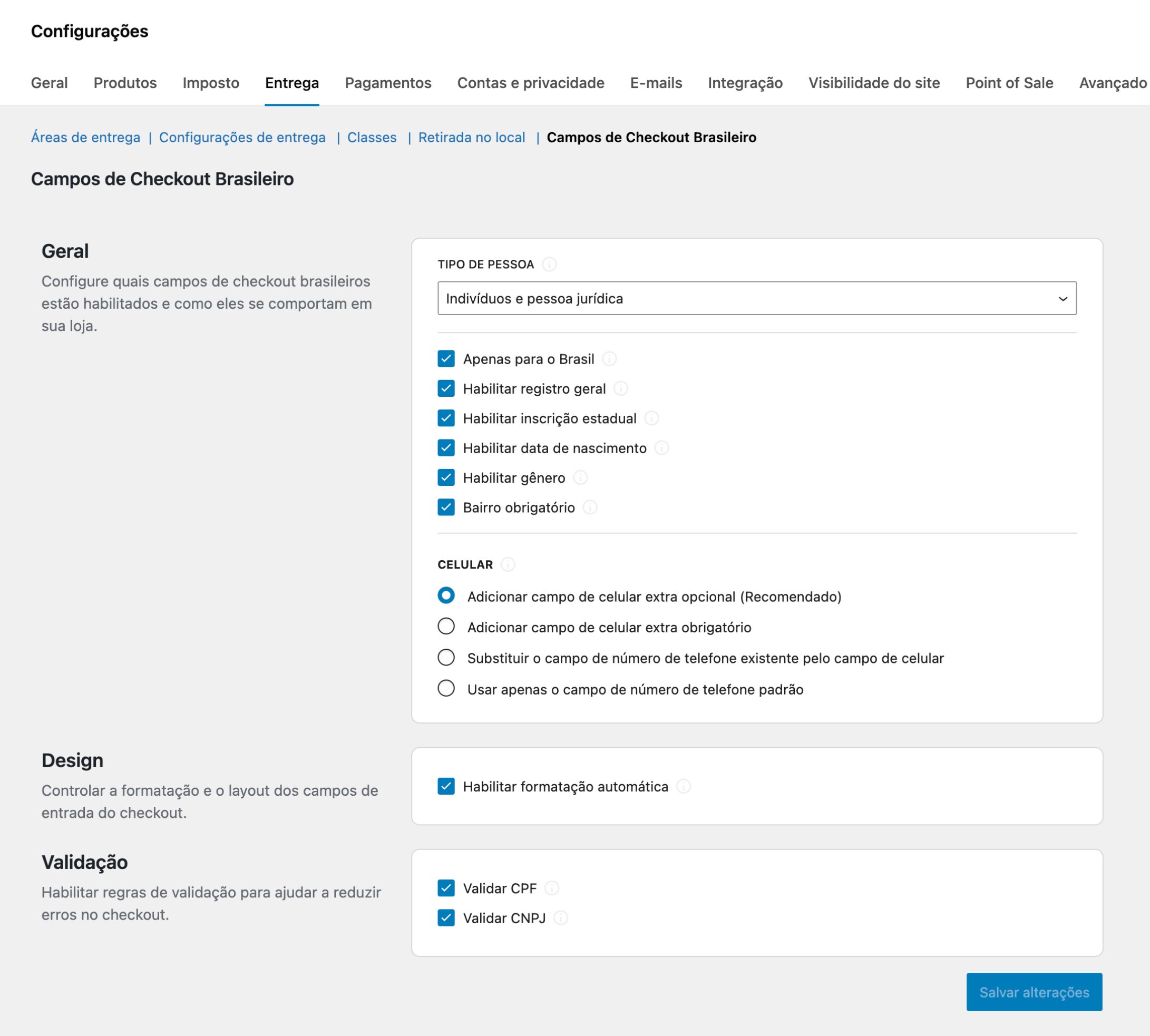
Settings screen (WooCommerce > Settings > Shipping > Brazilian Checkout Fields)
-
Checkout Block with Brazilian fields (CPF/CNPJ, person type, number, neighborhood)
-
Classic checkout with Brazilian fields and input masks
-
Order admin screen showing saved Brazilian customer data
-
My Account > Addresses showing the Brazilian address format
About this plugin
Brazilian stores need a few extra checkout fields to be compliant, avoid delivery issues, and reduce payment gateway errors.
Brazilian Checkout Toolkit for WooCommerce adds Brazilian-specific checkout fields (CPF/CNPJ, person type, neighborhood, street number, etc.), improves the customer experience with input masks, and works with both:
- Classic (shortcode) WooCommerce checkout
- WooCommerce Checkout Block (Cart & Checkout Blocks)
It also mirrors field values into the legacy _billing_* meta keys used by many themes, integrations and gateways.
Mission
Make the WooCommerce checkout truly Brazil-friendly — with the right fields, the right validation, and a smooth UX.
Why this plugin
Unlike older solutions that only work on the classic checkout, this plugin is built for modern WooCommerce stores:
- Checkout Block compatible (WooCommerce 9.0+ Additional Checkout Fields API)
- Backwards compatible with classic checkout and existing integrations
- Lightweight, settings-driven (enable only what your store needs)
Key features
- Person type (Individual / Company)
- CPF / CNPJ fields with optional validation (settings)
- Optional fields (settings): RG, State Registration (IE), Birthdate, Gender
- Street number and Neighborhood fields (Neighborhood can be optional/required)
- Cell phone options (optional field, required field, or replace WooCommerce phone)
- Input masks / formatting for CPF, CNPJ, phone and more (settings)
- Email typo suggestion (Mailcheck) to help reduce checkout failures
- Brazilian address formatting in orders and “My account” addresses
- REST API enhancements: exposes the extra fields on WooCommerce REST responses
- HPOS compatible (WooCommerce High-Performance Order Storage)
Where to find the settings
WooCommerce > Settings > Shipping > Brazilian Checkout Fields
Compatibility & requirements
- Requires WooCommerce
- WordPress 6.0+ (tested up to 7.0)
- PHP 7.4+
- WooCommerce 9.0+ recommended for Checkout Block support (the plugin auto-detects the Blocks API)
Integrations
This plugin includes compatibility layers / data mapping for:
- Flux Checkout for WooCommerce
- Bcash (adds number and CPF/CNPJ data)
- Moip / Moip Transparent Checkout (adds number, neighborhood, CPF and birthdate when available)
Credits
This plugin is based on the original Brazilian checkout fields work by Claudio Sanches and contributors, and has been significantly refactored/modernized.
Third-party libraries included:
* Mailcheck jQuery (https://github.com/Kicksend/mailcheck)
* jQuery Mask Plugin (https://github.com/igorescobar/jQuery-Mask-Plugin)
Questions
- Does it work with the WooCommerce Checkout Block?
Yes. If your WooCommerce version provides the Additional Checkout Fields API (WooCommerce 9.0+), the plugin registers the Brazilian fields for the Checkout Block automatically.
- Does it still work with the classic checkout?
Yes. The plugin keeps the classic checkout field injection and validation, and also avoids rendering duplicate fields when the Checkout Block is used.
- Can I make CPF/CNPJ validation optional?
Yes. Validation can be enabled/disabled in the plugin settings.
- Can I show only Individuals or only Companies?
Yes. You can configure “Person type” mode in the settings.
- Where is the settings page?
WooCommerce > Settings > Shipping > Brazilian Checkout Fields.
sandywp / also on the shelf
Try another plugin

Brazilian Market on WooCommerce
4.8 · 60K+ installs
Adds Brazilian checkout fields in WooCommerce

Brazilian Fields in WordPress Registry
80+ installs
Adicona campos brasileiros no Registro do Woocommerce

30+ installs
Inspired by "Hello, Dolly", this plugin shows a line from "Gaudério", a beautiful poem by the gaúcho poet João da Cunha Vargas,…
Spin up a real WordPress site in seconds.
Test plugins, build a demo, hand a client a link — then squash it and start again. No local setup, no Docker.