sandywp / plugins / better-font-awesome

Better Font Awesome
Font Awesome 5 Free icons for WordPress with shortcodes, HTML, TinyMCE, automatic metadata updates, backwards compatibility, and CDN delivery.
Ready in seconds.
v2.1.0 60,000+ installs WP 6.5+ PHP 7.4+
What you get inside
2 screens-
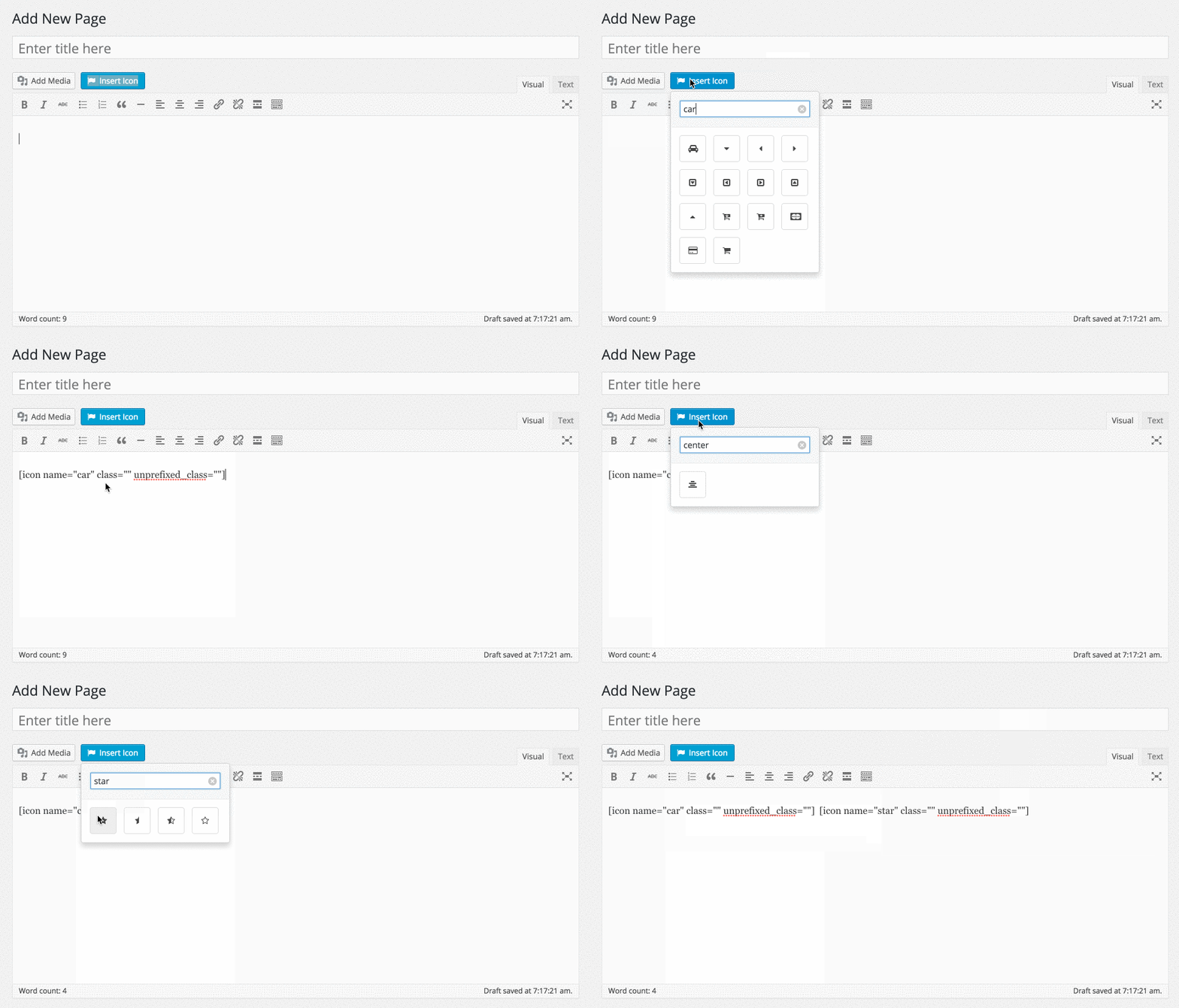
The icon shortcode dropdown selector
-
Better Font Awesome settings, accessed via Settings → Better Font Awesome
About this plugin
Do you find this plugin helpful? Please consider leaving a 5-star review.
Better Font Awesome integrates the latest available release in the supported Font Awesome 5 Free channel into your WordPress project, along with accompanying CSS, shortcodes, and a TinyMCE icon shortcode generator.
Features
-
Automatically updated – refreshes validated metadata in the background for the most recent available Font Awesome 5 Free release, so normal requests never wait for the metadata service.
-
Backwards compatible – established Font Awesome 4 and 5 shortcode prefixes remain compatible, including the optional Font Awesome 4 shim for upgraded sites.
-
Compatible with other plugins – designed to work with shortcodes generated with plugins like Font Awesome Icons, Font Awesome More Icons, and Font Awesome Shortcodes, so you can switch to Better Font Awesome and your existing shortcodes will still work.
-
CDN speeds – Font Awesome CSS is loaded from a versioned public CDN URL.
-
Shortcode generator – includes an easy-to-use TinyMCE dropdown shortcode generator.
Settings
All settings can be adjusted via Settings → Better Font Awesome.
Usage
Better Font Awesome can be used in 3 different ways: shortcode, HTML, and TinyMCE
1. Shortcode
[icon name="flag" class="2x spin border" unprefixed_class="my-custom-class"]
Note that prefixes (fa- and icon-) are not required, but if you do include them things will still work just fine. Better Font Awesome normalizes established shortcode prefixes for the supported Font Awesome 5 Free channel.
That means that all of the following established shortcode forms continue to work with the supported Font Awesome 5 Free channel:
[icon name=”flag” class=”2x spin border”]
[icon name=”icon-flag” class=”icon-2x icon-spin icon-border”]
[icon name=”fa-flag” class=”fa-2x fa-spin fa-border”]
[icon name=”icon-flag” class=”fa-2x spin icon-border”]
You can read more about shortcode usage on Github
2. TinyMCE
Better Font Awesome also provides you with an easy-to-use drop down menu when editing in TinyMCE’s visual mode. Check out our Screenshots to see what it looks like.
3. HTML
Note that prefixes are required for HTML usage, and are version-specific. For this reason, shortcode usage is encouraged over HTML. If you do want to use HTML, however, you can read more on the Font Awesome site.
Advanced / Integration
Better Font Awesome is built around the Better Font Awesome Library. This library allows you to integrate Better Font Awesome into any custom project you want to create (perhaps a theme or plugin with a constantly up-to-date icon list), and includes all the filters you might need.
External services
Better Font Awesome uses two Font Awesome services to provide current Free icon metadata and browser assets. No Font Awesome account or API token is required.
- Font Awesome GraphQL API (
https://api.fontawesome.com) – the site server requests public Font Awesome 5 Free release and icon metadata in an asynchronous WP-Cron worker, normally about once per day. Browser, frontend, REST, editor, settings, and shortcode requests only read validated local data and never wait for this API. The plugin does not intentionally send site, user, or content data in the request. Failed requests retain the last validated metadata and use capped retry backoff. - Font Awesome Free CDN (
https://use.fontawesome.com) – visitors’ browsers request the versioned CSS and font files needed to display icons. Font Awesome receives normal web request data such as the visitor’s IP address and user agent.
These services are provided by Fonticons, Inc. Review the Font Awesome terms of service and privacy policy for details.
Languages / Translations
- English
- French (thanks to David Tisserand)
Credits
Many thanks to the following plugins and their authors:
- Font Awesome Icons by Rachel Baker
- Font Awesome More Icons by Web Guys
- Font Awesome Shortcodes by FoolsRun
- Dmitriy Akulov and the awesome folks at jsDelivr
And many thanks to the following folks who helped with testing and QA:
Questions
- How is this plugin different from other Font Awesome plugins?
This plugin automatically refreshes validated metadata for the latest release in its supported Font Awesome 5 Free channel. Better Font Awesome is also designed to work with a wide variety of established shortcode formats used by other Font Awesome plugins, so existing compatible shortcodes can continue to work. Font Awesome 6 and 7 are not currently supported.
- How does automatic metadata refresh work?
Automatic metadata refresh depends on functioning WordPress cron. Default WP-Cron is request-driven, so refresh can be delayed on low-traffic sites. Sites using
DISABLE_WP_CRONshould invokewp-cron.phpthrough a real scheduler or an equivalent hosting mechanism.wp cron testis available as a WP-CLI diagnostic.If scheduled refresh does not run, Better Font Awesome continues serving validated last-known-good metadata or its bundled fallback. Normal page requests do not wait on the Font Awesome metadata service.
- Do I have to install any font files?
Nope. Better Font Awesome automatically loads the required CSS and font files from the Font Awesome Free CDN.
- What happens if I have another plugin/theme that uses Font Awesome?
Better Font Awesome does it’s best to load after any existing Font Awesome CSS, which can minimize conflicts. If you are experiencing any unexpected behavior resulting from plugin/theme conflicts, you can try checking the box to “Remove existing Font Awesome styles” in under Settings → Better Font Awesome.
sandywp / also on the shelf
Try another plugin

4.9 · 8M+ installs
Enables the previous "classic" editor and the old-style Edit Post screen with TinyMCE, Meta Boxes, etc. Supports all plugins that…

4.5 · 1M+ installs
Extends and enhances the block editor (Gutenberg) and the classic editor (TinyMCE).

5.0 · 500K+ installs
Disable Gutenberg Block Editor and restore the Classic Editor and original Edit Post screen (TinyMCE, meta boxes, etc.).
Spin up a real WordPress site in seconds.
Test plugins, build a demo, hand a client a link — then squash it and start again. No local setup, no Docker.