sandywp / plugins / best-woocommerce-feed

RexFeed – Product Feed Manager for WooCommerce – Google Shopping, Facebook, Amazon, ChatGPT & 200+ Channel Feeds
Generate WooCommerce product feeds for 200+ marketplaces. Sell on Google Shopping, Facebook, Instagram, Amazon, eBay, TikTok and more.
Ready in seconds.
v7.11.0 10,000+ installs WP 6.7+ PHP 7.4+
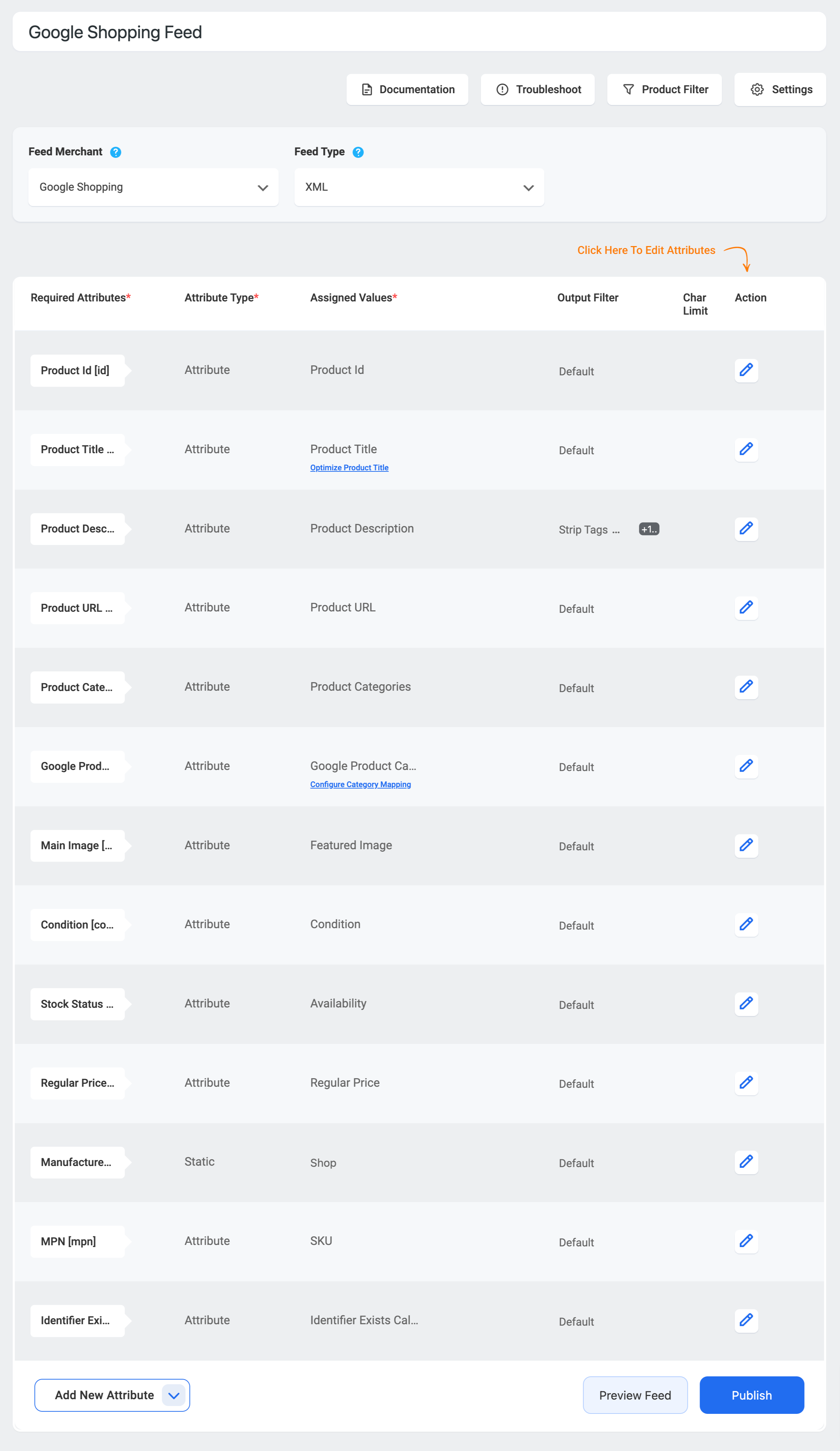
What you get inside
8 screens-
Generate WooCommerce product feed in 3 simple steps
-
Map your WooCommerce product categories according to your preferred merchant (Example: Google Merchant Category)
-
Exclude or include products in your feed using filters and conditions
-
Change Your WPML Currency easily
-
Authorize your Google Merchant Center account to send your Google Shopping Feed via the Content API method
-
Create ChatGPT product feed with OpenAI Commerce to show your products on ChatGPT
-
Create Facebook Catalog Feed easily
-
Create your first feed with automated tooltip guide
About this plugin
RexFeed – Product Feed Manager for WooCommerce generates and automatically updates product feeds for Google Shopping, Facebook, Instagram, Amazon, eBay, TikTok, ChatGPT (OpenAI Commerce), and 200+ other channels. 2026 Google Merchant Center compliant. Rated 4.8/5 by 10,000+ stores.
📘 Documentation | 🎥 Video Tutorials | 🌟 All Features | 🚀 Live Demo | 💎 Upgrade to Pro – 20% OFF
Why WooCommerce Stores Choose RexFeed – Product Feed Manager
WooCommerce Product feeds can become difficult to manage when marketplaces require different attributes, categories, and file formats.
RexFeed Product Feed Manager gives you the tools to:
- Create feeds using preconfigured templates for 200+ channels.
- Map WooCommerce attributes to each marketplace’s requirements.
- Validate feed data before submitting it.
- Keep prices, availability, and product information updated automatically.
- Include or exclude products using flexible filters.
- Manage simple, variable, grouped and other WooCommerce product types.
- Generate large feeds using batch and background processing.
- Control multiple product feeds from one WordPress dashboard.
Generate a Feed in 3 simple steps
You don’t need to learn every feed specification. Choose where you want to sell, map your WooCommerce data, and let RexFeed generate the feed.
- Choose where to sell
Select Google Shopping, Meta, TikTok, Pinterest, Bing, or another supported destination. RexFeed starts you with the right merchant template. -
Prepare the product data
Map WooCommerce titles, prices, categories, brands, GTINs, stock, images, variations and custom attributes to what the channel expects. -
Generate, publish, keep current
Create the product feed, review possible issues, publish it, then schedule updates so the channel keeps receiving current product data.
Start with the channels that matter now. Add more as your business grows.
Generate WooCommerce product feeds for:
- Google Shopping and Google Merchant Center
- Facebook Catalog and Instagram Shopping
- TikTok Ads
- Pinterest Catalog
- Bing Shopping
- YouTube Shopping
- Reddit Ads
- eBay
- Walmart
- Target+
- Idealo
- Marktplaats
- Heureka
- Fruugo
- Rakuten
- Yandex
- And 200+ additional marketplaces and comparison-shopping channels
Each merchant template includes the feed structure and relevant attributes required by that destination.
WooCommerce Google Shopping Feed (Google Merchant Center)
Create a Google Shopping feed from WooCommerce in minutes.
Product Feed Manager generates the exact attributes Google Merchant Center requires – ID, title, description, GTIN, MPN, brand, price, availability, and product categories mapped to Google’s own taxonomy – and keeps them updated automatically.
Authorize your Merchant Center account via the Content API and sync without manual uploads.
Create an accurate Google Shopping feed directly from your WooCommerce product data.
Product Feed Manager (RexFeed) helps you configure important Google Merchant Center attributes, including:
- Product title and description
- Product URL and image URL
- Regular price and sale price
- Availability and condition
- Brand
- GTIN, MPN, UPC, EAN and other product identifiers
- Google Product Category
- Color, size, material, pattern, age group and gender
- Shipping and tax information
- Custom labels
- Product details
- Local inventory information
Use category mapping to connect your WooCommerce categories with Google Product Categories without changing the category structure of your store.
You can also connect Product Feed Manager with Google Merchant Center and automatically send updated product information using the supported Google integration.
Facebook Catalog and Instagram Product Feeds
Generate a Facebook Catalog feed (also used for Instagram Shopping) with correctly formatted product data, variants, and image links.
Connect your catalog once, and your WooCommerce inventory stays in sync for Facebook and Instagram Shops and dynamic ads.
Create a WooCommerce product feed for Facebook Catalog and Instagram Shopping.
Use your feed to support:
- Facebook and Instagram product catalogs
- Dynamic product advertising
- Catalog-based campaigns
- Product retargeting
- Facebook Pixel tracking
- Scheduled catalog updates
Your prices, stock levels, and product information can be regenerated automatically according to your selected schedule.
TikTok Catalog Feed
List your WooCommerce products on TikTok Shop and TikTok catalog ads with a ready-made TikTok feed template – correct attribute names, image specs, and availability values out of the box.
ChatGPT Organic Shopping & ChatGPT Ads Product Feed (OpenAI Commerce)
Get your WooCommerce products recommended inside ChatGPT organic shopping and sponsored ads. Product Feed Manager (RexFeed) includes an OpenAI Commerce feed template – in JSONL, XML, CSV, or TSV – with all required attributes pre-mapped, plus a built-in Feed Validator that catches spec issues before you submit to OpenAI.
AI assistants are becoming a real product discovery channel; PFM makes your catalog visible there in a few clicks.
Google Merchant Center 2026 compliance
Google’s 2026 product data rules (multi-channel product ID requirements, stricter image standards, subscription product attributes) reject feeds that older tooling generates happily.
Product Feed Manager’s templates and feed validation are maintained against the current specification – see the changelog for compliance updates such as native_commerce attribute support.
Amazon, eBay, Pinterest, Bing & 200+ more channels
One plugin for every channel: Amazon, eBay, Pinterest, Snapchat, Bing Shopping, Walmart, Target+, Rakuten, Yandex Market, idealo, and 200+ more – each with a maintained template so you never hand-build attribute mappings.
Keep one catalog. Optimize every feed
RexFeed gives you the controls to adapt your WooCommerce data to each destination without rewriting your store.
Attribute mapping
Connect WooCommerce fields, product attributes, custom fields or static values to the attributes required by each marketplace.
Category mapping
Map your existing store categories to Google Product Categories or other marketplace taxonomies.
Product filters
Include or exclude products according to:
- Product category
- Product tag
- Brand
- Price
- Stock status
- Creation date
- Modification date
- Individual products
- Custom product conditions
- Feed rules
Replace, modify or conditionally assign attribute values without changing the original product information in WooCommerce.
Combined attributes
Combine product information such as brand, product title, color, size or model to create more descriptive feed titles.
Dynamic pricing
Adjust prices inside a feed by adding, subtracting, multiplying or dividing the original WooCommerce price.
Custom product fields
Add product identifiers and marketplace-specific information that may not be available in WooCommerce by default, including GTIN, MPN, UPC, EAN, JAN, ISBN and ITF-14.
Keep Product Information Updated Automatically
Choose hourly, daily, weekly or custom feed-generation schedules.
When your WooCommerce products change, Product Feed Manager can regenerate your feed so marketplaces receive updated:
- Prices
- Sale prices
- Availability
- Stock levels
- Product descriptions
- Images
- Product URLs
- Newly added products
You can also configure the plugin to avoid unnecessary regeneration when no relevant product information has changed.
Control Variable Products and Variations
Choose how variable products appear in your feeds.
Depending on your configuration, you can:
- Include all variations.
- Include only the default variation.
- Include the lowest-priced variation.
- Include the highest-priced variation.
- Include the first or last variation.
- Exclude parent products.
- Add variation attributes to product titles.
- Include both parent and variation data when supported.
- Supported Feed Formats
Generate product feeds in:
- XML
- CSV
- TSV
- TXT
- RSS
The available format may vary according to the requirements of the selected marketplace.
Built for Small and Large WooCommerce Catalogs
Product Feed Manager uses batch processing, scheduled actions and background feed generation to reduce timeouts and resource problems when processing larger product catalogs.
Custom batch settings give you additional control over how feeds are generated on your hosting environment.
Integrations and Compatibility
RexFeed – Product Feed Manager works with popular WooCommerce and WordPress tools, including:
- WooCommerce Brands
- Perfect Brands for WooCommerce
- YITH WooCommerce Brands
- Advanced Custom Fields
- Yoast SEO
- Rank Math
- All in One SEO
- WPML
- Polylang
- TranslatePress
- Aelia Currency Switcher
- FOX Currency Switcher
- CURCY
- WooCommerce Subscriptions
- WooCommerce Product Bundles
- Composite Products
- Dokan
- WC Vendors
- Table Rate Shipping
- Discount and dynamic-pricing plugins
Free and Pro Versions
Start with the free version to create and manage product feeds using the core merchant templates and feed-management features.
Upgrade to Product Feed Manager Pro for:
- Feeds containing unlimited products
- Advanced feed rules
- Combined attributes
- Dynamic feed pricing
- Additional custom product fields
- Advanced identifier support
- Feed-generation error notifications
- Feed import and export
- Advanced structured-data controls
- Premium merchant templates
- Priority support
Driving Traffic Is Step 1. Converting It Is Step 2.
Product Feed Manager gets your products in front of buyers across 200+ marketplaces. But more traffic doesn’t automatically mean more profit — your checkout experience is what turns clicks into revenue. Complete your WooCommerce profit stack:
- WPFunnels — Replace the default WooCommerce checkout with custom pages, order bumps, and one-click upsells. Make every visitor from Google Shopping worth more. Learn more
- Cart Lift — Recover abandoned carts automatically with email and SMS. Learn more
- Mail Mint — Email marketing automation for WordPress. Trigger sequences from purchases, signups, and funnel actions. Learn more
Start Creating Better WooCommerce Product Feeds
Install Product Feed Manager and create your first marketplace-ready product feed directly from WordPress.
Download the free plugin · Live Demo · Upgrade to Pro
Privacy and policy
If you explicitly opt in to usage tracking, we collect specific telemetry data via PostHog to improve plugin performance and troubleshoot issues.
What Data is Collected?
No data is collected by default. If you provide consent, the following information is gathered:
- System Environment: WordPress version, PHP version, and active theme/plugin names.
- Plugin Details: Product Feed Manager version and non-sensitive configuration settings.
- Usage Patterns: Feature usage and in-plugin page views.
- Contact Info: Site administrator email address.
How to Request Data Removal
You can revoke your consent at any time. If you would like your previously collected data to be deleted from our systems, please contact us at:
Email: [email protected]
Questions
- What is a WooCommerce product feed?
A WooCommerce product feed is a structured file containing product information such as titles, descriptions, prices, images, availability and identifiers. Shopping channels use this file to list and advertise your products.
- Can I create a Google Shopping feed for WooCommerce?
Yes. Select the Google Shopping template, map your WooCommerce product information, generate the feed, and connect it with Google Merchant Center.
- Can I create a ChatGPT Shopping and ads feed from WooCommerce?
Yes. Product Feed Manager includes an OpenAI Commerce feed template with all required attributes pre-mapped, plus a built-in Feed Validator that checks your feed against OpenAI’s specification before you submit it.
- Is Product Feed Manager compliant with Google’s 2026 product ID requirements?
Yes. Google’s March 2026 update requires multi-channel retailers to use correctly split product identifiers; Product Feed Manager generates compliant id, GTIN, MPN, and brand attributes, and its templates are maintained against Google’s current product data specification.
- Can I create Facebook and Instagram product feeds?
Yes. Product Feed Manager includes a template for creating product feeds compatible with Facebook Catalog and Instagram Shopping.
- Why does Google Merchant Center keep rejecting my feed, and how does this plugin fix it?
Most rejections come from missing identifiers, wrong category mapping, or malformed attributes. Product Feed Manager maps your categories to Google’s own taxonomy, fills required attributes from your product data, and validates the feed before you submit it.
- Does the plugin meet Google’s product image requirements?
Yes. Templates follow Google’s current image specification, including the minimum size requirements introduced in Google’s 2026 product data updates.
- Does the plugin update feeds automatically?
Yes. You can schedule feeds to regenerate hourly, daily, weekly or according to a custom schedule.
sandywp / also on the shelf
Try another plugin

Product Feed Manager for WooCommerce – CTX Feed – Support 220+ Shopping, AI…
4.6 · 80K+ installs
Create WooCommerce product feeds for Google Shopping, Facebook, TikTok & 220+ channels. 2026 compliant. 6 formats.
-
Create unlimited WooCommerce product feeds for Google Shopping, Facebook, Instagram & 25+ top channels. Easy feed mapping,…

Product Feed Manager by Conversios: Google Shopping, TikTok, Meta & 100+…
5.0 · 100+ installs
Create and manage WooCommerce product feeds with accurate data syncing for Google Shopping, Meta, TikTok, and 100+ channels to…
Spin up a real WordPress site in seconds.
Test plugins, build a demo, hand a client a link — then squash it and start again. No local setup, no Docker.