sandywp / plugins / autodescription

The SEO Framework
Fast, Automated, Effortless.
The fastest feature-complete SEO plugin for professional WordPress websites. Secure, fast, unbranded, and automated SEO. Do less; get better results.
Ready in seconds.
v5.1.4 200,000+ installs WP 6.0+ PHP 7.4.0+
What you get inside
5 screens-
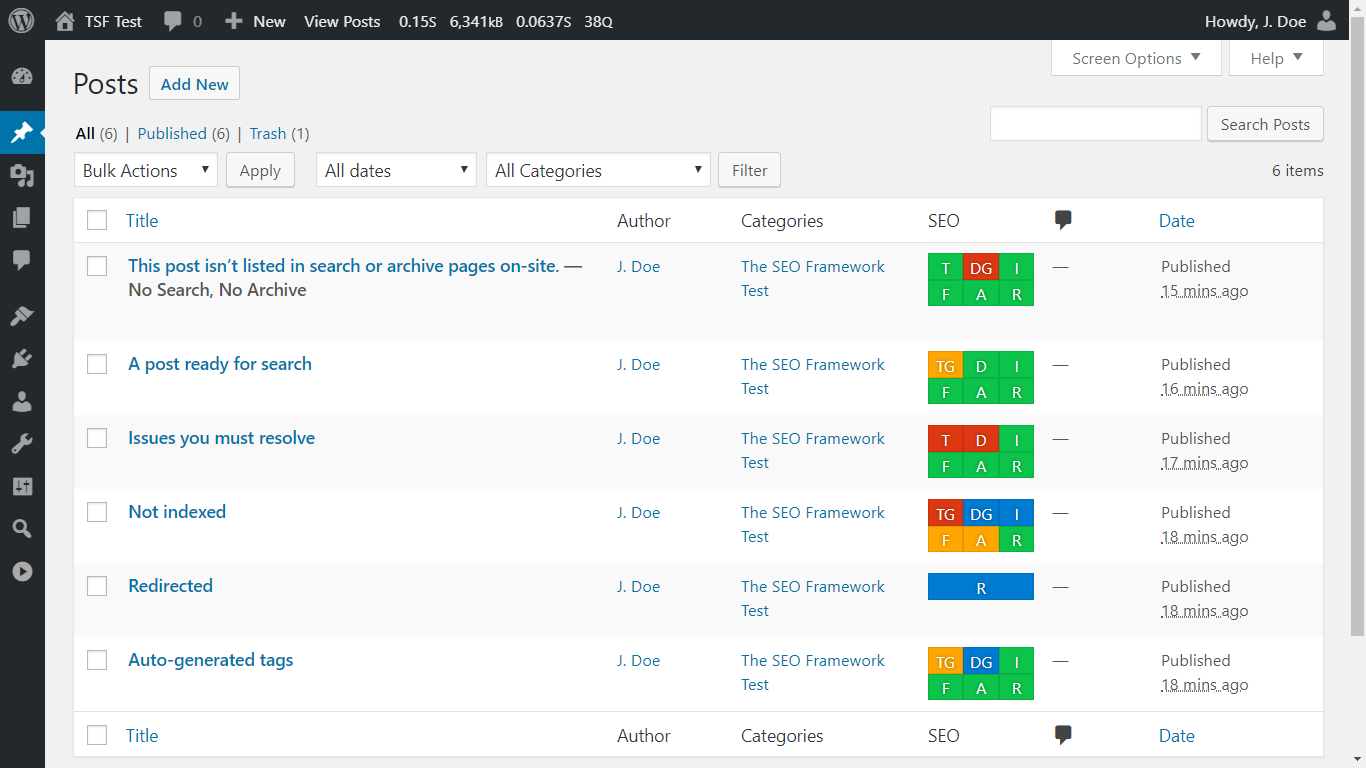
The SEO Framework shows you how your site is performing, at a glance. This is what we call the SEO Bar.
-
Hover over, tap on, or focus any SEO Bar item and it will tell you what's asserted from your environment.
-
The SEO meta box is displayed on all pages. It's everything you need. Here you can see the pixel counters.
-
These SEO settings are shown on the term edit screen. It seamlessly blends into your WordPress interface.
-
The SEO settings page of The SEO Framework. Every setting is explained thoroughly. You're in full control.
About this plugin
The fastest and only feature-complete SEO plugin that follows the guidelines and rules imposed by WordPress and search engines.
Preview The SEO Framework in WordPress Playground.
Start using proven SEO tactics to improve your website’s ranking. Clean, dedicated, extensible, unrestricted, ad-free, and no strings attached.
To top it off, this is the fastest full-featured SEO plugin, and it blends right into your WordPress website, without leaving you in the dark.
It’s easy to get started. Activate this plugin, and your site’s instantly protected against prominent SEO attacks. The SEO Framework will also prefill all critical meta tags for you. A real time-saver. Ingenious.
Migrate | Setup | Improve | Extensions | API | Support | Privacy
We poured over 27 000 hours of love into this plugin.
Here are the results:
-
It is brilliant.
The SEO Framework is an expert system for SEO. It is the only solution that can intelligently generate critical SEO meta tags in any language by reading your WordPress environment. This automation saves you a considerable amount of time that could be used to write more content or focus on other tasks. It also removes the need for advanced SEO knowledge. -
It comes preconfigured.
With The SEO Framework, we provide an excellent starting point for your website by rationally optimizing all your pages. Naturally, you can also tweak it however you like. If you’re not an SEO expert, learn what you may wish to optimize in our Setup guide. -
It helps you optimize your metadata.
We made the only SEO plugin that follows Google’s webmaster guidelines to the letter. It took years of research and tweaking to translate this well inside your WordPress interface. Finally, you can freely optimize your pages without having to worry about making critical mistakes. -
It creates a beautiful overview.
On your post overview pages, you’ll find color-coded guidelines. They suggest how to improve your pages as you hover over them with your mouse cursor. For example, when your titles are unbranded or when WordPress blocks indexing. Instinctively, touch-and keyboard navigation is also supported. -
It includes exceptional support.
We don’t outsource our support. We’re here for you. Feel free to drop by our support channels at any time to ask a question. More than 5000 inquiries have been answered personally in the past nine years, typically within 72 hours. -
It leaves no room for errors.
We focus on the quality of features you need over the quantity on features you don’t. This trait makes this plugin unique, faster, more accurate, nearly bug-free, and more sustainable. The added benefit is that your site is unlikely to get penalized by search engines. We won’t steer you into writing unnatural content or allow you to trick search engines. -
It remains genuine and pure.
We built The SEO Framework for small to large corporations and enterprises. The interface is entirely accessible and seamlessly integrates within your dashboard. Therefore, interacting with this plugin feels natural. It might feel dull, but your WordPress dashboard shouldn’t be a billboard for our branding. We won’t ever change this. -
It improves search presence.
The SEO Framework ranks your website distinctively by enabling breadcrumbs for Google Search via structured data. It also automatically generates titles and descriptions according to Google’s guidelines and quickly helps search engines find the website’s latest changes via the built-in optimized sitemap. -
It makes social sharing easy.
The SEO Framework automatically supports and allows you to further tailor the Open Graph, Facebook, and Twitter Cards protocols. It helps your posts stand out when they’re shared on various social networks, including Pinterest, Discord, and WhatsApp. -
It feels more than accessible.
We handpicked our color scheme so that people with any medically recognized color-vision deficiency can distinguish the guidelines set by search engines. We also implemented full keyboard-navigation and screen-reader support. -
It protects you from mistakes.
The SEO Framework steers you from making significant and common SEO mistakes. It leaves little room for you to mess up because the plugin already does everything SEO for you. For example, it automatically prevents duplicated content mistakes by enforcing strict canonical rules. -
It follows best-practices and beyond.
The biggest problems with WordPress plugins are security and compatibility. As part-time security researchers, we focus on making this plugin impenetrable. The SEO Framework also uses WordPress’s API whenever possible, making this plugin integrate neatly with every other plugin written with that in mind. -
It has developers at heart.
We encourage other developers to enhance and add functionality to this plugin. We’ve done so ourselves, already, with our extensions. Check out our API, and feel free to contribute! -
It respects your privacy.
The SEO Framework sends us no information and does not create cookies. Learn more from our strictly adhered-to privacy policy.
Getting started
- Used another SEO plugin? Easily migrate your metadata.
- Need a helping hand getting started? Read our quick setup guide.
- Want to improve your pages? Learn how to optimize your metadata.
Do more with extensions
For additional functionality, check out our free companion plugin Extension Manager. It provides numerous free and paid extensions, such as:
- Focus guides you through the process of writing targeted content that ranks with focus keywords and synonyms.
- Articles enhances your published posts by automatically adding important Structured Data.
- Transport migrates and transforms metadata from Rank Math, Yoast SEO, and SEOPress to this plugin.
- Honeypot catches comment spammers through five lightweight yet powerful ways.
- Cord helps you connect your website to Google Analytics and Meta Pixel.
- Local lets you set up important local business information for search engines to consume.
- AMP binds The SEO Framework to the AMP plugin for AMP supported articles and pages.
- Monitor keeps track of your website’s SEO optimizations and statistics.
- Incognito hides all development-comments from The SEO Framework.
- Origin redirects attachment-page visitors back to the parent post.
- Title Fix makes sure your title output is as configured. Even if your theme is doing it wrong.
Visit our extensions overview page for more information.
Unbranded, free and for the professionals
The SEO Framework is a uniquely white label plugin that blends seamlessly into your WordPress dashboard. This means that we don’t even put the name “The SEO Framework” anywhere within your WordPress interface. No ads, no nags. Nobody has to know about the tools you’ve used to create your website. Note that we output standardized development-comments distinguishing the plugin output in source code. You can remove these with our free Incognito extension.
Behind the screens
The SEO Framework works on many things without notifying you, because the best software is fast, nimble, responsive, and should save you precious time. Here are a few things it does behind the screens.
- It prevents canonical errors for categories, pages, subdomains, and WordPress Multisite domain mapping.
- It stops SEO attacks that are caused by pagination exploits in WordPress by telling the search engine to look at the existing last page instead.
- It discourages 404 pages and empty categories from being indexed, even when they don’t send a 404 response.
- It automatically notifies Google and the Bing network on website updates when sitemaps are enabled.
- It discourages search engines from indexing feeds and the sitemap. This doesn’t mean they won’t use them; only, they won’t show them in their search results.
- It directs search engines from the comment pages back to the post storing those comments.
Compatibility and accessibility
The SEO Framework supports:
- Internationalization through WordPress.org. You can contribute here.
- Unicode (UTF-8) character recognition and rendering, including Emoji and CJKV (Chinese, Japanese, Korean, Vietnamese).
- Right to Left (RTL) languages (Arabic, Hebrew, Farsi, etc.), through its interface and metatag generation.
- Complete color-vision deficiency accessibility thanks to a carefully picked color scheme.
- Full keyboard navigation, so that you can inspect tooltips quickly without ever having to reach for your mouse.
- Full screen-reader accessibility via field anchors, ARIA labels, and title attributes.
- WordPress Multisite setups, this plugin is in fact built upon one.
- Detection and output of robots.txt and sitemap.xml files.
- Full integration with WordPress Core sitemaps.
- Primary term (category) selection to influence breadcrumbs and links.
- Output of structured data via Schema.org JSON-LD scripts.
- Altering oEmbed for improved sharing on Discord.
- Detection of various other SEO plugins to help you switch graciously.
- Translation plugins like WPML, Polylang, WPGlobus, and MultilingualPress.
- E-commerce plugins like WooCommerce and Easy Digital Downloads.
- Blocking of SEO analysis and AI crawlers for Moz, OpenAI, Apple, and others, via robots.txt.
- Forum plugins like bbPress and wpForo.
- Editing posts and terms via WordPress’s native bulk-and-quick-edit interfaces.
- Headless mode via a single constant definition.
Questions
- Is The SEO Framework free?
Absolutely! It will stay free as well, without ads, tracking, bloat, or nags!
This plugin is slim yet all-inclusive. It’s 100% freeware, not crippleware.- Is there a premium version?
No. We treat this plugin as a premium plugin already.
However, we do offer many free and paid extensions that help support this free plugin. We provide these via our free Extension Manager plugin.
- Why is there no analytics, tracking, or 404 monitoring?
SEO experts that use advanced tools such as Ahrefs, SEMrush, Screaming Frog, and Google Analytics prefer using The SEO Framework because it doesn’t try to do their job haphazardly.
To correctly analyze your website, it must be done from the outside. If we load these features on your site, bad robots will cause thousands of false positives that fill your database with useless information that doesn’t apply to search engines. We refrain from this because it won’t ever help you anyway.
- I have a feature request, a question, or found a bug.
Please visit the support forums and kindly tell us about it.
We’ll try to get back to you within a week. Typically, we reply within three days.
- I am a developer; how can I help?
Any input is much appreciated, and everything will be considered.
Please visit the GitHub project page to submit issues or even pull requests.Learn more about contributing.
- What do the colors tell me?
We use different colors to convey messages. Red is an error that you must resolve. Yellow is a non-critical warning that you may want to address. Green is good. Blue is informational and situational. Gray is undefined or unprocessable.
- The sitemap doesn’t contain categories, images, etc.
Not having every single page listed is not an issue. Search engines love crawling WordPress because its structure is consistent and well known.
If a visitor can’t find a page, then why would a search engine? Don’t rely on your sitemap, but on your content and website’s usability.
Check out our Extension Manager. It brings extensions, like Articles, that fill in the gaps via modern and more robust means.
- The sitemap contains unwanted links.
The SEO Framework takes all publicly queryable posts, pages, and CPT and puts them in the sitemap.
If you don’t want a page in the sitemap, consider enabling the
noindexoption for it. This option will also remove the page from search engine result pages.If the link shouldn’t be in the sitemap because it’s meant for structural reasons, then inform the plugin or theme author that created them.
You should tell the author to check out the “publicandrewritepost type arguments.” The plugin or theme author should know what that means.In the meantime, you can disable SEO for the unwanted entries via the “General SEO Settings” under “Exclusions.”
sandywp / also on the shelf
Try another plugin

CrawlWP SEO – Instant Search Engine Indexing & SEO Performance Monitor
4.7 · 30K+ installs
Improve your WordPress SEO with instant search-engine indexing, SEO insights, and indexing status tracking.

Schema – All In One Schema Rich Snippets
4.0 · 30K+ installs
Improve SEO, elevate rankings and Boost CTR. Supports different types of content and works well with Google, Bing, Yahoo, and…
4.4 · 5K+ installs
This plugin gives a very simple way to integrate Google Search into your WordPress site.
Spin up a real WordPress site in seconds.
Test plugins, build a demo, hand a client a link — then squash it and start again. No local setup, no Docker.