sandywp / plugins / audio-album

Audio Album
Displays a collection of audio tracks as an audio album using the native WordPress audio features. Includes a customizer section.
Ready in seconds.
v1.5.1 4,000+ installs WP 4.9+
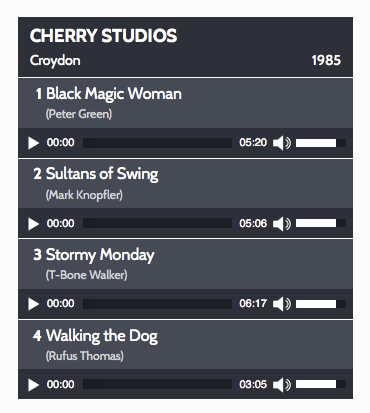
What you get inside
2 screens-
The default style should fit most site designs.
-
Change the colour scheme using the audio album section of the WordPress customiser.
About this plugin
The plugin was originally created for Dave Draper’s website where it is used on the music pages. For an example, please see the page for the Wild Bunch album featuring Dave on vocals and bass.
Audio Album uses the default audio capabilities of mediaelement.js included with core WordPress files and enables you to style a group of audio files (MP3 etc) as single block formatted as an album. The colours can be customized in the Audio Album section of the WordPress customizer.
You can display as many Audio Albums as you need on your site, with multiple albums on each page.
Usage:
There are two shortcodes that can be used [audioalbum] and [audiotrack]
[audioalbum]
This shortcode is required and can be used as a header before the [audiotrack] shortcodes.
- title
- detail
-
date
[audiotrack]
This acts as a wrapper to the WordPress [audio] shortcode so uses the same parameters as the [audio] shortcode, plus the following which are specific to this plugin: -
title
- width
- height
- songwriter
- buttontext
- buttonlink
The following attributes can also be used in the [audiotrack] shortcode in the same way in which they are used in the default WordPress [audio] shortcode:
- src
- mp3
- ogg
- wma
- m4a
- wav
- loop
- autoplay
- preload
Example
[audioalbum title="The Album Title" detail="Some other Details" date="2022"]

[audiotrack title="Song One" songwriter="credit" mp3="http://domain.com/wp-content/uploads/audiofile1.mp3"]

[audiotrack title="Song Two" songwriter="credit" mp3="http://domain.com/wp-content/uploads/audiofile2.mp3"]
Lyrics / other info in a popup window
There are some additional parameters which can be added to the [audioalbum] shortcode to optionally add a button to allow a visitor to open a link on each audio track to open a page in your site within a popup window.
You need to first create the page, post, or custom post type post and make a note of the post/page id.
There are four parameter/value pairs which can be added to the [audiotrack] shortcode to make a popup link
- buttonlink
- buttontext
- width
- height
Enter the page/post id of the target page as the value for the buttonlink parameter. A button will only be shown when a value is set for the buttonlink parameter.
The buttontext attribute is optional, if no value is specified, the default label of ‘lyrics’ will be shown on the button.
The dimensions of the popup window can also be specified using optional width and height attributes. If no values are given, default values of 520px (width) and 400px (height) will be used.
If your site is using a Genesis child theme, as a little bonus, a landing-page template without a masthead, menus, sidebars or other distractions will be applied to the popup page.
Example with default ‘lyrics’ button
[audiotrack title="Song One" songwriter="credit" mp3="http://domain.com/wp-content/uploads/audiofile1.mp3" buttonlink="808"]
Example with custom button and custom popup window dimensions
[audiotrack title="Song Two" songwriter="credit" mp3="http://domain.com/wp-content/uploads/audiofile2.mp3" buttonlink="909" buttontext="linklabel" width="300" height="500"]
The parameters used with the standard native WordPress audio shortcode outlined in the codex: Audio Shortcode page can also be used in the [audiotrack] shortcode.
Questions
- Where is the plugin’s admin page?
Go to Appearance -> Customize -> Audio Album
- Is it responsive?
Yes – it should work with any responsive theme. It defaults to 100% of the width of the enclosing element. If you are using a theme or plugin that provides column shortcodes, it should, it work well with these.
- Can I change the fonts?
The fonts used are inherited from your theme, so in most cases they should work well, but if you do need to change them, ensure that the font you want to use has already been made available in your theme, and add the following css rule (with the appropriate font name) to your child theme or a custom CSS plugin:
.audioheading, .audioalbum, .track { font-family: 'verdana', sans-serif; }- How can I make more substantial customizations to the styles?
Select the checkbox for manual CSS in the Audio Album customizer section. This will prevent the audio album styles from loading. Then copy the default audio album stylesheet from the plugin into your child theme or custom theme’s stylesheet or into a custom CSS plugin, and make your customisations to this copy. The manual CSS option is intended for experienced developers with CSS skills.
- Can I display multiple albums on a single page?
Yes you can. As many as you like.
- What about playlists?
Audio Album was created before playlist functionality was introduced to WordPress with version 3.9, so it does not use or provide any playlist features.
- Can you create for me a customized stylesheet to fit in with the colours of my website?
I would love to, but my time is limited and this is beyond of the scope of the free support that I can give on the forums, I can offer this as a paid service. Please send me details of your requirements via the cubecolour contact form.
- Are there any other free cubecolour plugins?
If you like this plugin, you may like some of my other plugins in the WordPress.org plugins directory. These are listed in the plugins page on my WordPress.org profile page.
sandywp / also on the shelf
Try another plugin

rtMedia for WordPress, BuddyPress and bbPress
3.7 · 7K+ installs
Add albums, photo, audio/video upload, privacy, sharing, front-end uploads & more. All this works on mobile/tablets devices.

3.7 · 1K+ installs
Fastest, easiest to use multifunctional image gallery plugin. Create Featured Posts Gallery, Dynamic Content Gallery, Albums!

Gallery for Google Photos – share your albums right on your site
2.7 · 1K+ installs
Import your Google Photos into WordPress and show them as responsive grid, masonry, carousel, or story galleries via block or…
Spin up a real WordPress site in seconds.
Test plugins, build a demo, hand a client a link — then squash it and start again. No local setup, no Docker.