sandywp / plugins / api-key-for-google-maps

API KEY for Google Maps
Add your Google Maps API key to any theme or plugin that loads Google Maps, and fix the missing callback error, without editing code.
Ready in seconds.
v1.2.16 30,000+ installs WP 6.0+ PHP 7.4+
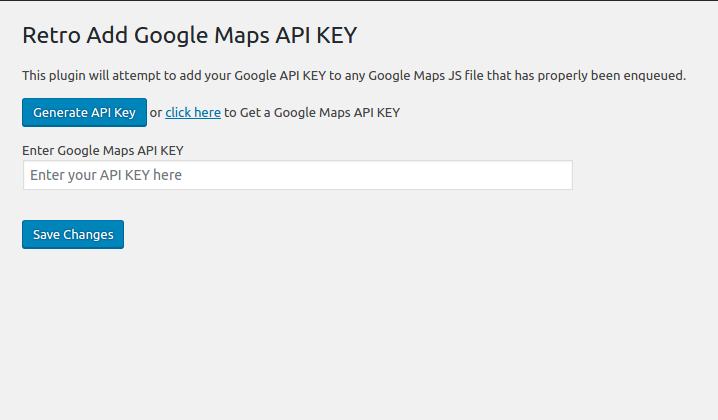
What you get inside
3 screens-
Settings page.
-
Generate API KEY.
-
Copy API KEY, paste in Settings and save.
About this plugin
Many themes and plugins load Google Maps without an API key, or without a setting to enter one. Google requires an API key for every Maps JavaScript API request, so these maps fail with “This page can’t load Google Maps correctly” or show a “For development purposes only” watermark.
API KEY for Google Maps fixes this without touching theme or plugin code. Enter your key once and the plugin adds it to every Google Maps JavaScript API script enqueued on the site.
Features
- Adds your API key to Google Maps JavaScript API scripts enqueued by any theme or plugin.
- Replaces an outdated or different key already present in the script URL with your own.
- Adds the callback parameter Google has required since January 2023, fixing the JavaScript error Loading the Google Maps JavaScript API without a callback is not supported.
- Works on the front end of your site and in the WordPress admin.
- One-click Generate API Key button that opens the Google Cloud Console with the Maps APIs selected.
- Quick link to a free tool that checks your site for Google Maps API key errors.
- Lightweight: a single settings field and a tiny inline script. The saved key is removed when you delete the plugin.
How to use
- Activate the plugin and go to Settings > Google API KEY.
- Click Generate API Key (you must be signed in to your Google account), or paste a key you already have.
- Click Save Changes. Your maps now load with your key.
Requirements and tips
- The theme or plugin must load Google Maps the standard WordPress way (with
wp_enqueue_script()). Scripts that are hard-coded into templates or injected by JavaScript can not be changed. - Browser API keys are visible in your page source. In the Google Cloud Console, restrict your key to your website’s domain (HTTP referrers) and to the Maps APIs you use.
For developers
When the Google Maps API has loaded, the plugin sets window.rgmkGoogleMapsCallback to true and triggers the jQuery event rgmkGoogleMapsLoad on document. Use the rgmk_google_map_callback_script filter to change the callback script.
The plugin was created by the GeoDirectory team.
Security
To report a security vulnerability, please review our vulnerability disclosure policy.
sandywp / also on the shelf
Try another plugin

WP Go Maps – Google Map, OpenStreetMap, Leaflet & Store Locator
4.8 · 300K+ installs
The easiest to use WordPress map plugin! Create a custom map, map block, store locator or map widget with high quality markers.

4.4 · 60K+ installs
[iframe src="http://www.youtube.com/embed/7_nAZQt9qu0" width="100%" height="500"] shortcode

WP Maps – Google Maps, OpenStreetMap, Mapbox, Store Locator with Search,…
4.3 · 60K+ installs
WordPress map plugin for Google Maps, OpenStreetMap & Mapbox with custom markers, filters, searchable listings and store…
Spin up a real WordPress site in seconds.
Test plugins, build a demo, hand a client a link — then squash it and start again. No local setup, no Docker.