sandywp / plugins / age-gate-plus

Age Gator
Age Gator is a Wordpress plugin specifically designed to guard sensitive content (alcohol, gambling, x-rated, etc) from underage users.
Ready in seconds.
v1.06 400+ installs WP 5.0+ PHP 5.6+
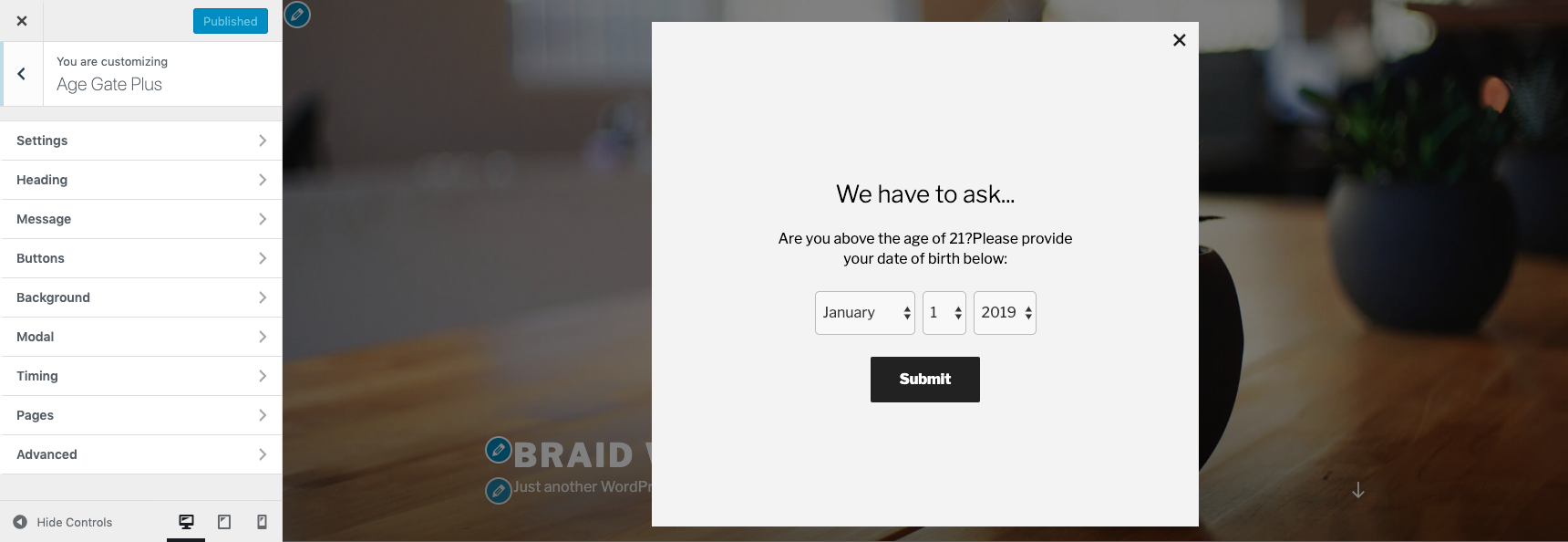
What you get inside
2 screens-
Admin Customizer Age Gate Example
-
User Facing Age Gate Example
About this plugin
Age Gator is a WordPress plugin specifically designed to guard sensitive content (alcohol, gambling, x-rated, etc) from underage users. Featuring an abundance of customizable settings, the display and behavior of the overlay can be easily configured to suit a variety of use cases.
Features
- Select from templates for Beer, Smoking, Vaping, Marijuana, or Adult or customize for your unique use case
- Checks age of user before showing content
- Edit appearance and text directly from the Customizer live preview screen
- User prompt may be set to a yes/no button, age entry, date of birthday entry, or confirmation checkbox
- Optional Retry button
- Remember previously passed users
- Set previously passed user bypass expiration time
- Limit number of attempts
- Ignore logged in users
- Customized failure and success messages
- Show age gate on all pages, all pages except those specified, or only on pages specified (Whitelist or Blacklist)
- Wilcard support for setting whitelisted and blacklisted pages
- Caching compatible
Questions
- How can I get started?
After you install and activate the plugin, a new tab called “Age Gator” should appear on the customizer screen (found in the appearance section). From here, you can select the starter template that best matches your use case, and edit the other options from there.
- I want to remember users that have already passed the age gate and allow them to skip the verification. How can I do that?
There is an option available under settings called “Remember User” that will do this. You can also enable the “Ignore Logged in Users” option.
- What happens when a user fails the age gate?
That depends on what settings are enabled. The default behavior is to simply show a failure message (eg “Sorry, but you must be 21 years of age to visit this webpage”), but the user can refresh the webpage and attempt the age gate again. If you’d like to provide users with an easy way to retry, you can enable the “Show Retry Button” setting. If you don’t want to allow users to retry the age gate at all, you can check the “Limit Attempts” option and set the “Max Attempts” value to 1.
- How can I set the age gate to display on only certain pages?
You can choose to have the age gate appear on all pages of your website or only on some pages. If you don’t want the age gate to appear on all pages, you can select to use either a whitelist or a blacklist. First, select the “Pages” tab from the Age Gator customizer area. A blacklist approach will show the age gate on all pages except those specified, and a whitelist approach will only show the age gate on the pages specified. From here, add a relative url for each page that you want to whitelist/blacklist. For example, if your website is “example.com”, and the page you wanted to whitelist/blacklist was located at “example.com/spirits/”, then you would enter “/spirits/”. Each item that appears on the whitelist/blacklist should be put on a new line. Preview
- I see a cancel button at the top of the age gate modal, but I don’t want my age gate to be dismissible to users. What gives?
The cancel button is only displayed to logged in admin users – it doesn’t appear to regular visitors.
- I’ve used the appearance Customizer to modify some of the details, but still can’t quite get it to look the way I want. Can you help?
Yes, although the plugin features an extensive list of editable properties, your age gate’s appearance will still depend on the base CSS of your WordPress theme. If you need a pro to make it pixel perfect, please make a support request
- Where can I preview Age Gator’s features?
The feature list can be explored at https://www.age-gator.com
sandywp / also on the shelf
Try another plugin

4.6 · 40K+ installs
A plugin to check the age of a visitor before view site or specified content

5.0 · 2K+ installs
A lightweight, customisable age gate to lock content from younger audience.

20+ installs
Do you have to filter out younger people? With this super simple age gate you'll fix those age restrictions quickly. Ment for…
Spin up a real WordPress site in seconds.
Test plugins, build a demo, hand a client a link — then squash it and start again. No local setup, no Docker.