sandywp / plugins / advanced-custom-fields-font-awesome

Advanced Custom Fields
Font Awesome Field
Adds a new 'Font Awesome Icon' field to the popular Advanced Custom Fields plugin.
Ready in seconds.
v6.2.0 90,000+ installs WP 6.5+ PHP 5.6+
What you get inside
3 screens-
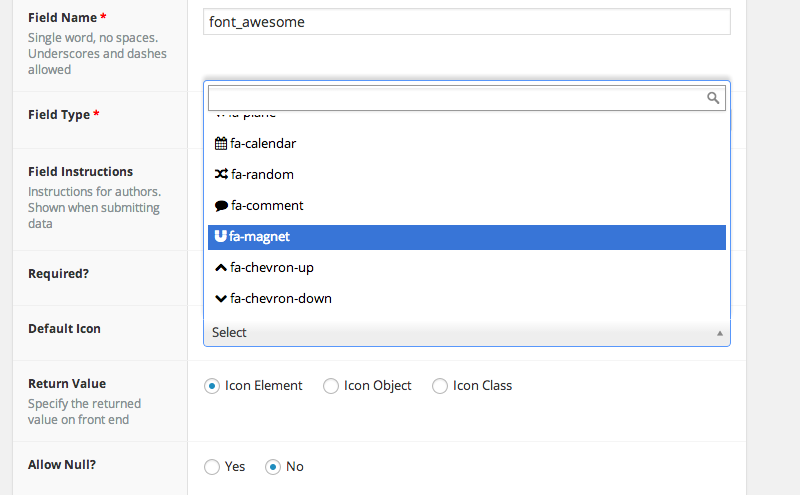
Set a default icon, and choose how you want icon data to be returned.
-
Searchable list of all icons, including large live preview
About this plugin
Add a Font Awesome icon field type to Advanced Custom Fields.
- Specify which FontAwesome icon sets to use (Solid, Regular, Light, Thin, Duotone, Duotone Sharp, Brands, and Custom Upload Icons) (Some features only available with FontAwesome 5.x or 6.x icons)
- Create your own custom filtered list of FontAwesome icons to use with your fields. Use different custom icon sets with different fields
- Returns Icon Element, Icon Class, Icon Unicode, or an Object including the element, class, unicode value, and SVG data (if applicable)
- Optionally enqueues Font Awesome in footer where needed (when a FontAwesome field is being used on the page))
- Integrates with the FontAwesome GraphQL for loading your FontAwesome Kits, searching for icons, and loading the latest version of FontAwesome
Note: It is recommended to let this plugin enqueue the latest version of Font Awesome on your front-end; or include the latest version yourself using your FontAwesome Kit; so that available icons in the admin area will be displayed properly on your sites front-end.
Compatibility
This ACF field type is compatible with:
* ACF 5.7+
* FontAwesome 4.x, 5.x, 6.x and 7.x fonts
Optional Configuration
Filters
- ACFFA_always_enqueue_fa: Return true to always enqueue FontAwesome on the frontend, even if no ACF FontAwesome fields are in use on the page. This will enqueue FontAwesome in the header instead of the footer.
- ACFFA_admin_enqueue_fa: Return false to stop enqueueing FontAwesome in the admin area. Useful if you already have FontAwesome enqueued by some other means.
- ACFFA_get_icons: (Applies to FontAwesome 4.x and 5.x icons only) Filter the array of icons and icon details loaded from the database
- ACFFA_get_fa_url: Filter the URL used for enqueuing FontAwesome in the frontend and admin areas of the site.
- ACFFA_override_major_version: Filter to manually set the ‘major’ version of FontAwesome to load (accepts either 4, 5, or 6). NOTE: This filter must be registered before any calls to ACF get_field() function are made.
- ACFFA_fa_api_key: Filter to programmatically set the FontAwesome API key.
- ACFFA_fa_kit_token: Filter to programmatically set the FontAwesome kit token.
Questions
- Where do I report security bugs found in this plugin?
Please report security bugs found in the source code of the Advanced Custom Fields: Font Awesome Field plugin through the Patchstack Vulnerability Disclosure Program. The Patchstack team will assist you with verification, CVE assignment, and notify the developers of this plugin.
sandywp / also on the shelf
Try another plugin

4.5 · 2M+ installs
ACF helps customize WordPress with powerful, professional and intuitive fields. Proudly powering over 2 million sites, WordPress…

ACF Content Analysis for Yoast SEO
4.1 · 100K+ installs
WordPress plugin that adds the content of all ACF fields to the Yoast SEO score analysis.

Advanced Custom Fields: Extended
4.8 · 100K+ installs
All-in-one enhancement suite that improves WordPress & Advanced Custom Fields.
Spin up a real WordPress site in seconds.
Test plugins, build a demo, hand a client a link — then squash it and start again. No local setup, no Docker.