sandywp / plugins / abc-pricing-table

Pricing Table
Responsive & Easy
Display pricing plans with responsive tables. Unlimited packages, 4 templates, shortcode support. Works with Elementor and Gutenberg.
Ready in seconds.
v1.5.4 3,000+ installs WP 4.0+ PHP 7.2+
What you get inside
5 screens-
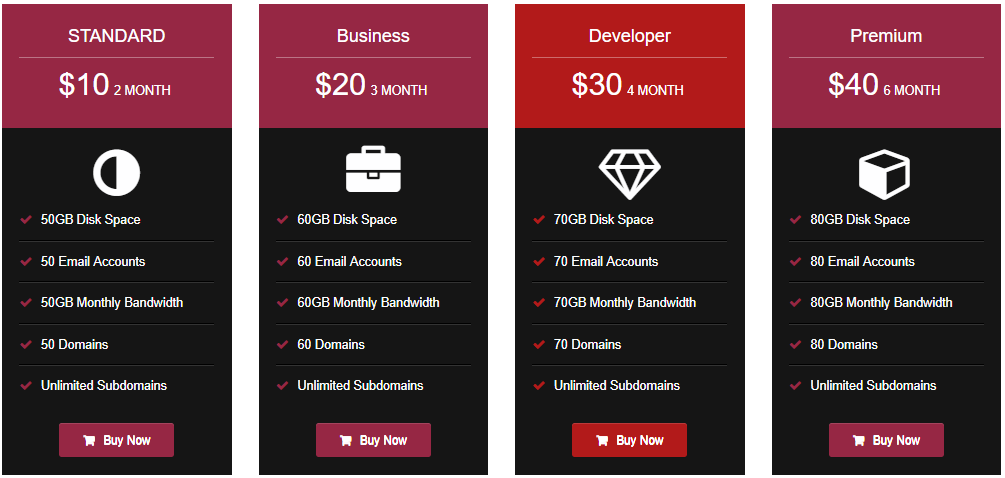
Sample pricing table layout with 4 columns
-
Backend settings for pricing plans
-
Add new pricing table screen
-
Widget shortcode in sidebar
-
Responsive design preview on mobile
About this plugin
Pricing Table lets you add professional pricing tables to your WordPress site. Show your products, services, or subscription plans in a clean, organized layout that visitors can compare at a glance.
View Pro Demo: Pricing Table Premium
More About Pro: Pricing Table Premium Features
Where To Buy: Buy Pricing Table Premium
This pricing table builder works with shortcodes, so you can place tables anywhere — pages, posts, sidebars, or widget areas. Each table supports unlimited pricing packages with custom features, icons, and call-to-action buttons.
Video Tutorial
What You Can Do
Create pricing comparison tables for:
- SaaS subscription plans
- Service packages (basic, standard, premium)
- Product feature comparisons
- Membership levels
- Hosting or software pricing
Free Version Features
- 4 ready-to-use pricing table templates
- Unlimited pricing packages per table
- Unlimited features per package
- Responsive layout for mobile, tablet, and desktop
- Header, button, and feature color customization
- Icon picker for feature icons
- Show/hide features with ✔️(right) or ❌(cross) marks
- Shortcode support for pages, posts, and widgets
- Sidebar widget integration
- Custom CSS option for advanced styling
- Works with Gutenberg and Elementor
- Multi-language support (English, Hindi, German, Spanish, Arabic, Indonesian, Portuguese, Chinese)
Pro Version Features
- 26 additional template designs
- Pricing switcher (monthly/yearly toggle)
- Tooltip feature for detailed descriptions
- YouTube and Vimeo video support
- Custom image support in pricing cards
- Advanced column layout settings
- Button icon customization
- Extended font size controls
- Open link in new tab option
- Priority support
More Pro Demos
Pricing Table With Sidebar
Multi Columns Tables
Tooltip On Features
Pricing Switcher
Features True & False
Icon Picker
Image Or Video Support
Languages
Available in: English, Hindi, German, Spanish, Arabic, Indonesian, Portuguese, and Chinese.
Questions
- How do I create a pricing table?
Go to “Pricing Table” in your WordPress dashboard, click “Add New,” and fill in your plan details including name, price, features, and button text. Save and copy the shortcode to use on any page.
- Can I use this plugin with Elementor or Gutenberg?
Yes, this pricing table works with both Elementor and Gutenberg editors. Just paste the shortcode in any widget or block.
- How do I display the pricing table on my website?
After creating a pricing table, copy its shortcode and paste it into any page, post, or sidebar widget.
- Is the plugin responsive?
Yes. All pricing tables adapt to screen sizes including desktop, tablet, and mobile devices.
- How many pricing tables can I create?
Unlimited. You can create as many pricing tables as needed with unlimited plans inside each table.
- Can I add a featured or highlighted plan?
Yes, you can highlight a specific plan using the featured option. This makes one plan stand out from the others to draw visitor attention.
- Does this work with WooCommerce?
The pricing table displays information and links. You can connect buttons to WooCommerce product pages or checkout URLs for a smooth buying experience.
- Can I customize the button text and link?
Yes, each pricing package has its own button with customizable text, link URL, and color settings.
sandywp / also on the shelf
Try another plugin

Ninja Tables – Responsive Table Builder for Data, Pricing & Product Tables
4.6 · 70K+ installs
Build responsive, sortable and searchable tables with drag & drop. Import CSV, Excel or JSON. Create data, pricing,…

Pricing Table by Supsystic – Responsive Pricing Plans & Comparison Tables
4.1 · 10K+ installs
Responsive pricing tables and comparison tables with a drag-and-drop builder. Templates, badges, icons and buttons included.

Pricing Table WordPress Plugin – Easy Pricing Tables
4.3 · 10K+ installs
Pricing Table Plugin - Easy Pricing Tables Lets You Create A Beautiful, Responsive Pricing Table In 2 Minutes. No Coding Required.
Spin up a real WordPress site in seconds.
Test plugins, build a demo, hand a client a link — then squash it and start again. No local setup, no Docker.